

Introducing the CVE Library

New public resource gives Liquibase Community users release-by-release security visibility into known vulnerabilities across releases, Docker images, binaries, and dependencies. Experts believe this to be the first such CVE library for open source database change governance.
Liquibase released the Liquibase CVE Library to foster security and transparency across the Liquibase Community. The free, publicly available library helps users of older versions of Liquibase OSS and the full Liquibase Community to identify existing vulnerabilities and get a clearer sense of their security posture. By tying vulnerability data directly to Liquibase releases, the CVE Library helps teams see their risk exposure, compare versions, and take informed action to secure the software they run.
Security is a shared responsibility, and visibility is its foundation. With the CVE Library, every Community user can now see, at a glance and in detail, exactly where vulnerabilities live across Liquibase components and dependencies, which ones have fixes, and how their exposure changes from one release to the next. It’s the latest and most significant step in a broader investment Liquibase is making to keep its open source community informed, secure, and confident in what they ship.
What is the CVE Library?
The CVE Library gives Liquibase users clearer visibility into vulnerability exposure across Liquibase components and dependencies. Community users gain transparency into known risks, while Liquibase Secure customers gain clarity into what is patched, supported, and remediated under Liquibase’s enterprise security SLA.
In short, it turns vulnerability data that is usually scattered, stale, or locked behind tooling into a single, current, browsable source of truth tied directly to real Liquibase releases.
How does it work?
Every time Liquibase ships a new release, automated security scanning tools analyze both the Docker image and the Liquibase binary for known vulnerabilities. Scanning also runs against previously published images, maintaining an up-to-date view of the evolving threat landscape and catching anything that surfaces post-release. Those results are published to a repository on GitHub, and the CVE Library reads from them automatically so the data you see is always tied to an actual release.
The site organizes everything by image and version. You can see a high-level security grade and CVE counts for the latest release, drill into any specific version for the full vulnerability list, or use the comparison tool to see exactly which CVEs were resolved, or introduced, between two releases.
Which environments are supported?
The CVE Library currently covers two areas:
- Docker images: The official Liquibase Community Docker image, with data for every tagged release. Each version shows a full CVE breakdown by severity, which vulnerabilities have available fixes, and how the security posture changed from the prior release.
- Liquibase binary: Vulnerabilities in the Liquibase JARs themselves, regardless of how you install it. If you run Liquibase via a tarball, installer, or Docker, this view applies to you.
What you’ll see
For each vulnerability, the CVE Library shows:
- CVE ID: The standard identifier (e.g., CVE-2024-1234), linked directly to the advisory source so you can read the full disclosure.
- Severity: Critical, High, Medium, or Low, color-coded for quick scanning.
- CVSS score: The numerical risk score (0–10).
- Affected package: The specific library or component that carries the vulnerability, along with the installed version.
- Fix available: The package version that resolves it, if one exists; and where applicable, the first Liquibase image version where the CVE no longer appears.
- Component type: Whether the vulnerability is in an OS package, the JRE, a bundled JAR, or a database driver.
- First-party vs. third-party (on the Binary page): Whether the vulnerability is in Liquibase’s own code or an upstream dependency.
The full list is filterable by severity, component type, and keyword search, and can be exported as CSV or PDF.
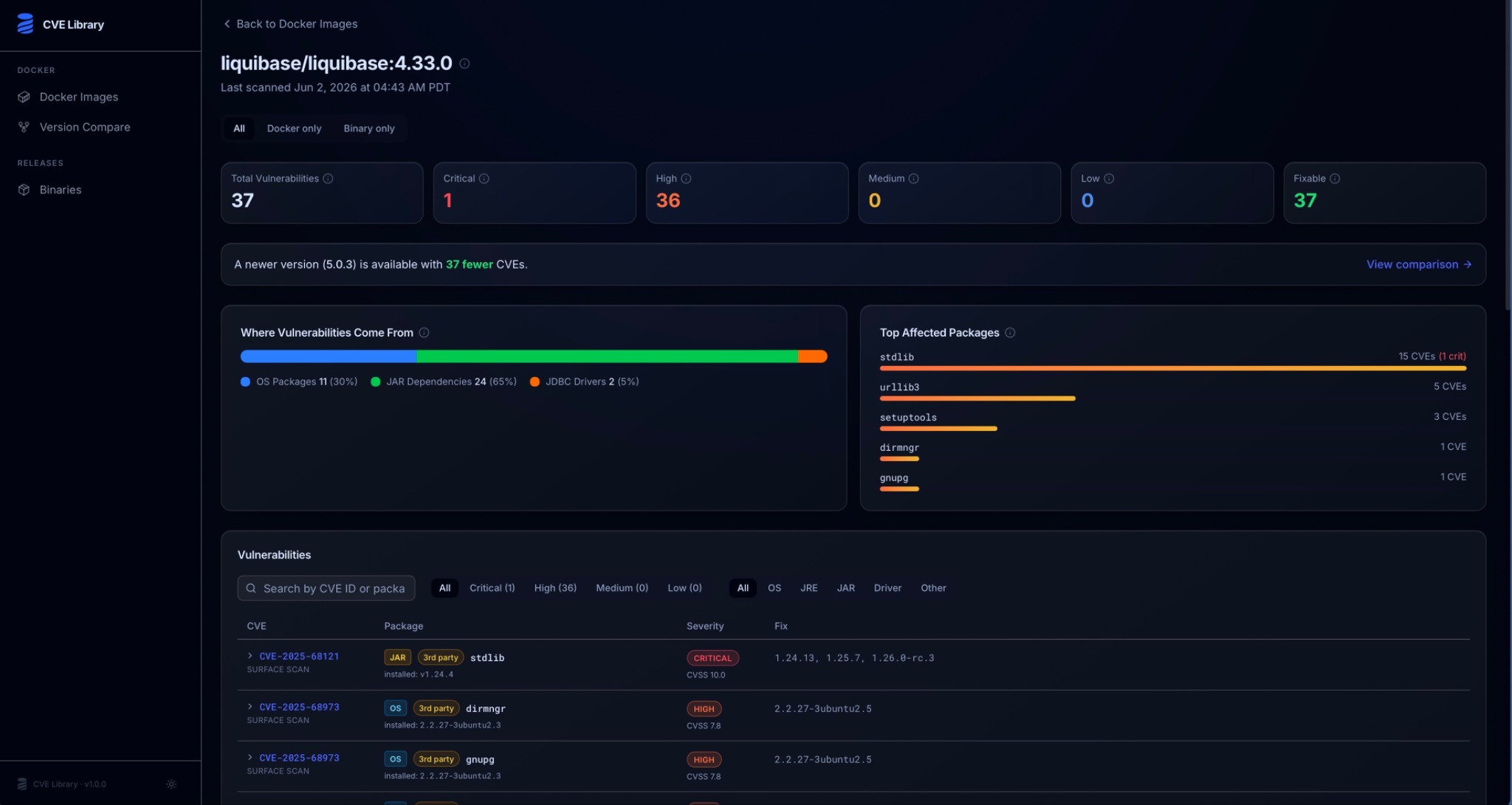
Figure 1: With a quick view of Liquibase Community vulnerabilities and affected packages, the CVE Library helps users understand their potential risk and exposure.
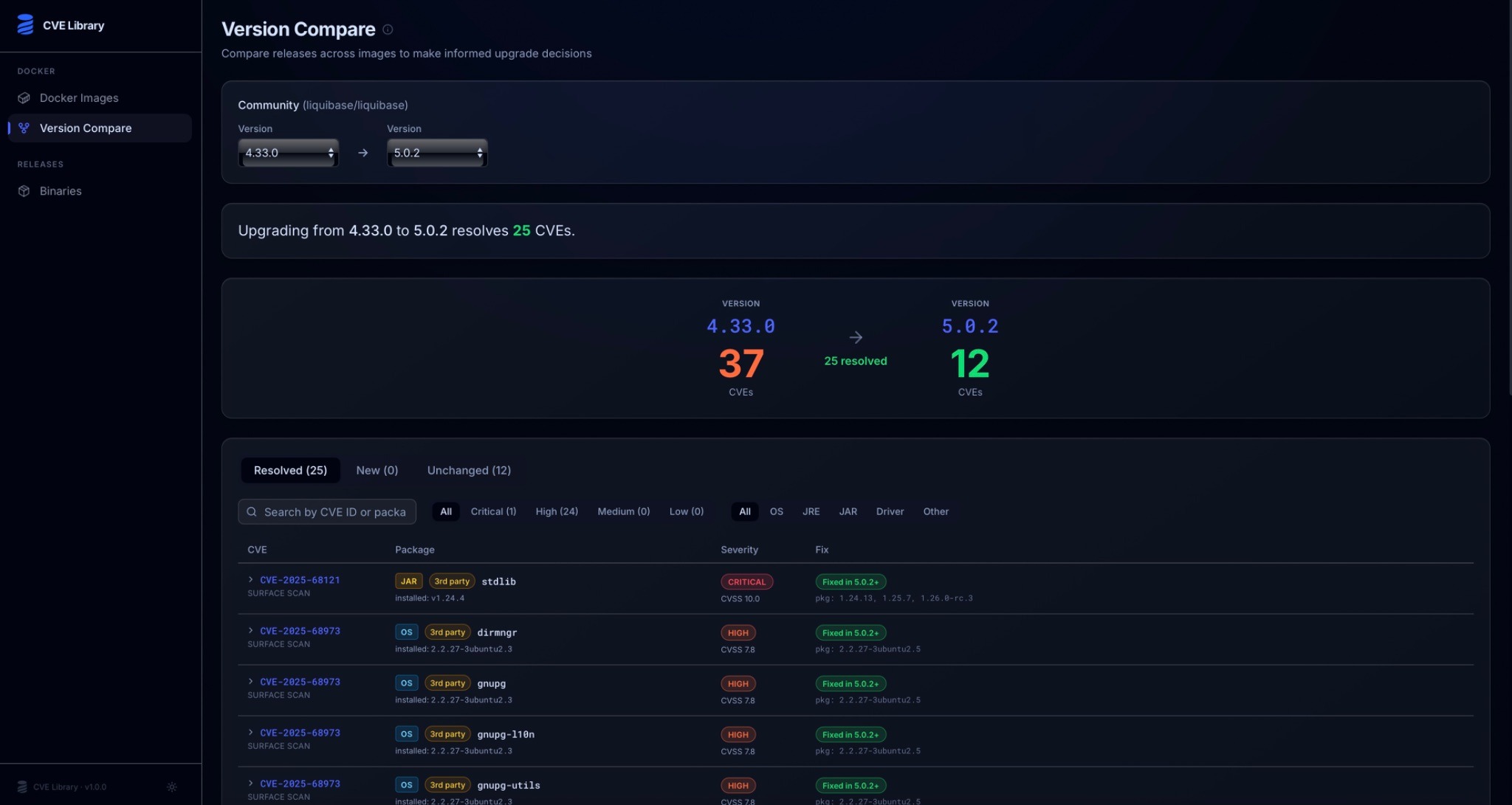
Figure 2: The version compare view makes it easy to see how your security posture changes when you upgrade.
Part of a broader commitment to the Community
The CVE Library doesn’t stand alone. It’s the security-transparency layer on top of a steady stream of recent investment in Liquibase Community.
That investment starts with a more predictable release process. Beginning with version 5.0.2, Liquibase offers two clear paths to updates: quarterly Community releases on a regular cadence for stable, production-ready versions teams can plan around, and continuous nightly “Main Branch” builds on GitHub for early access to the latest improvements and fixes as they land. The latest nightly is always available at github.com/liquibase/liquibase/releases/tag/nightly, giving the community an easy way to test upcoming capabilities and share feedback ahead of an official release.
Recent releases show that rhythm at work and underscore why a tool like the CVE Library matters. Community 5.0 reset the foundation with a clearer separation between the open source Community and commercial Secure distributions, integrated the Liquibase Package Manager (LPM), and moved to Java 17 so the project builds, tests, and ships on modern, more secure dependencies. Community 5.0.2 followed in March 2026 with cross-platform bug fixes and quality-of-life enhancements from 19 contributors across four continents, and the most recent Community 5.0.3 paired security fixes with database-specific fixes across Oracle, PostgreSQL, and SQL Server, plus a thread-safety improvement for multi-tenant environments. The CVE Library now makes that ongoing work visible so users don’t just trust that issues are being addressed, they can see it, release by release.
Take a look and get involved
You can explore the CVE Library today at https://cve-library.liquibase.com. Liquibase welcomes your feedback and contributions as the platform continues to improve and make vulnerability management easier for everyone.
The Liquibase Community thrives because people around the world step up to contribute. Here’s how to get in touch and take part:
- Ask questions or start a discussion on the Liquibase Forum, the community Discord, or Stack Overflow (under the liquibase tag).
- Report a bug or request a feature in the GitHub issue tracker at github.com/liquibase/liquibase.
- Contribute code by opening a pull request at liquibase/liquibase.
To stay informed about releases and community meetups, sign up for the newsletter on liquibase.org or join the Liquibase Legends community to earn recognition for your contributions.
The post Introducing the CVE Library appeared first on Liquibase: Database DevOps.
*** This is a Security Bloggers Network syndicated blog from Liquibase: Database DevOps authored by Liquibase: Database DevOps. Read the original post at: https://www.liquibase.com/blog/introducing-the-cve-library-for-liquibase-community-users
