
Home » Security Bloggers Network » Empowering data classification policy template guide

Empowering data classification policy template guide

The post Empowering data classification policy template guide appeared first on TrustCloud.
A data classification policy template gives you a repeatable way to define how your organization labels and protects data, so teams always know what’s sensitive, what’s not, and how to handle each type. Using a guided template (plus this article) removes the guesswork and lets you create a usable, audit‑ready policy much faster, similar to how your risk register guide simplifies risk management.
What is a data classification policy template?
A data classification policy template is a pre‑structured document that helps you define how data is categorized based on sensitivity, confidentiality, and regulatory requirements, and how each category must be protected. It usually includes default classification levels, criteria for each level, handling rules, and roles and responsibilities.
Instead of starting from a blank page, the template gives you ready‑made sections and language you can customize to your own data types, systems, and industry. In TrustCloud, the Data Classification Policy template also maps directly to the DATA‑1 control so you can tie classification activities into your wider TrustOps and CCF programs.
Why is a data classification policy important?
A data classification policy is important because not all data carry the same risk if exposed, altered, or lost, and treating everything the same is either unsafe, inefficient, or both. Clear classification makes it possible to apply stronger controls to sensitive information (like customer PII or financial records) and lighter controls to low‑risk data (like public marketing content).
From a compliance standpoint, many frameworks expect you to understand what data you hold, where it lives, and how it is protected, which is difficult without a formal classification scheme. Operationally, classification guides access decisions, encryption, retention, and incident response, helping teams make consistent choices instead of ad hoc judgments.
The purpose of a data classification policy
The core purpose of a data classification policy is to provide a consistent decision‑making framework for how data is labeled and handled throughout its lifecycle. It translates abstract ideas of “sensitive” and “confidential” into specific categories with clear rules attached.
A good policy also creates shared language between security, engineering, legal, and business stakeholders, so everyone talks about data risk in the same terms. Like a risk register centralizes risk information, a classification policy centralizes how the organization thinks about data, making governance more structured and auditable.

Looking for automated, always-on IT control assurance?
TrustCloud keeps your compliance audit-ready so you never miss a beat.
How to create a data classification policy template
Creating your data classification policy template is similar to designing a modern risk register: start with the right fields, then tailor them to your organization’s environment. The TrustCloud template already includes the essential structural pieces you need.
A practical approach:
- Confirm your classification levels and definitions
- Define criteria and examples for each level
- Specify handling rules per level
- Assign roles and responsibilities
- Link to inventories and systems
- Set review and update expectations
Once those elements are in place, you can roll the template out as your standard for any new system, dataset, or vendor that comes into scope.
Filling out a data classification policy template in 6 steps
Filling out the template becomes straightforward when you tackle it in a structured order, similar to the step‑by‑step approach in the risk register guide.
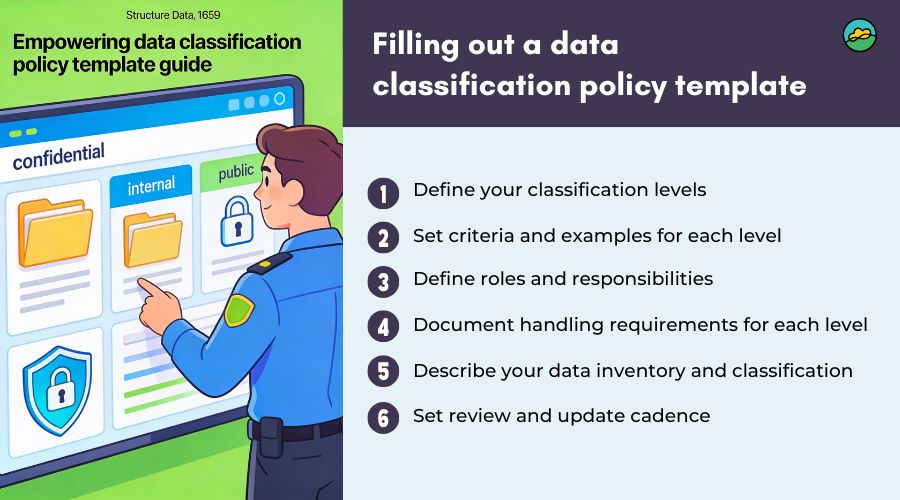
1. Define your classification levels
Start by selecting and naming the levels you will use, commonly something like Public, Internal, Confidential, and Restricted (or equivalent). For each level, add a short, plain‑language definition that captures how sensitive the data is and what would happen if it were exposed, changed, or lost.
Keep the number of levels manageable (usually three to four) so users can choose confidently without overthinking. Too many levels make classification hard to apply in practice.
2. Set criteria and examples for each level
Next, describe the criteria for assigning data to each level, for example, “contains customer PII,” “disclosure would cause financial loss,” or “approved for public distribution.” Add concrete examples: product marketing pages, internal roadmaps, CRM records, employee HR files, production database backups, etc.
These examples play the same role that risk categories and descriptions play in the risk register template: they help users apply the framework consistently across teams.
3. Define roles and responsibilities
In the template’s roles section, specify who:
- Owns the policy (often Security or GRC)
- Acts as data owners for key systems or datasets
- Maintains the data inventory and classification records
- Enforces handling rules and responds to violations
This is your equivalent of assigning risk owners and an overall register owner in the risk register guide. Clear ownership prevents classification from becoming “everyone’s job and no one’s job.”
4. Document handling requirements for each level
For each classification level, define the minimum required controls in the template. Typical dimensions include:
- Who may access the data (roles/groups)
- Where it may be stored (approved systems, regions)
- How it must be protected (encryption in transit/at rest, MFA, logging)
- How it can be shared (internal only, with NDAs, public)
- How long it must be retained and how it is disposed of
This section is where classification ties directly into other policies, such as access control, backup, incident response, and acceptable use.
5. Describe your data inventory and classification process
Use the template to outline how you will maintain an inventory of systems and datasets and record their classification. At a minimum, describe:
- How new systems or data sources are onboarded and classified
- How existing systems are reviewed and updated
- How changes (like new data fields or integrations) trigger re‑classification
This aligns directly with DATA‑1, which requires you to define and document a process to classify all data and systems and maintain an inventory.
6. Set review and update cadence
Finally, fill in the review and maintenance section of the template. Define:
- How often the policy itself is reviewed (for example, annually)
- When classification or inventory updates are required (e.g., new system launches, regulatory changes, M&A, large product changes)
- Who is responsible for carrying out and documenting those reviews
Just like a risk register, your classification policy should be a living document that evolves with your business, not a one‑time exercise.
Data classification policy template
It outlines the levels of classification, access controls, encryption standards, and guidelines for protecting data throughout its lifecycle.
Conducting data classification using the template
The template supports a repeatable classification process similar to how the risk register template supports structured risk assessment. A typical workflow:
- Identify data sources and systems
List applications, databases, repositories, and storage locations that hold business data, starting with customer‑facing and core internal systems. - Review data elements
For each system, identify key data elements (e.g., PII fields, financial records, logs, product telemetry) and determine the highest sensitivity level present. - Assign classification levels
Apply the criteria from your template to assign a level to each dataset or system, using examples as guidance. When in doubt, involve the data owner and security for a joint decision. - Record in the inventory
Capture system name, owner, location, and classification in your inventory, referenced directly by the policy. This is the operational evidence that DATA‑1 is being met. - Apply handling rules
Ensure access, encryption, sharing, and backup configurations match the handling rules defined in your template for that classification level. - Monitor and review
Revisit classifications during periodic reviews or when systems change, and update the inventory and policy as needed.
Over time, this process becomes routine, and new systems cannot go live without being classified and logged.
That’s it! Filling out a data classification policy template is that simple
By working through the sections one by one, levels, criteria, handling rules, inventory, ownership, and review cadence, you can turn a generic data classification template into a tailored, practical policy for your organization. Just as your risk register template transforms risk management from overwhelming to approachable, this template makes data classification concrete and repeatable.
Once completed, you can store the policy and its inventory in TrustCloud, map it to DATA‑1, and reuse the same artifact as evidence across multiple frameworks and audits.
Frequently asked questions
What control does the data classification policy satisfy?
The Data Classification Policy template directly satisfies DATA‑1, which requires you to define and document a process to classify all data and systems and maintain an inventory. This single policy can then be mapped across your CCF to support multiple standards that expect structured data classification.
Who should own the data classification policy?
Ownership typically sits with Security or GRC, with strong input from IT, data platform teams, and business data owners. The owner is responsible for maintaining the policy, overseeing the inventory, and coordinating reviews when new systems or regulations come into play.
How often should data classification be reviewed?
Most organizations review their data classification policy and inventory at least annually, and whenever major changes occur, like new products, significant architecture shifts, new regulations, or large vendor changes. Tying reviews to your risk assessment or internal audit cycle helps keep the process structured.
The post Empowering data classification policy template guide first appeared on TrustCloud.
*** This is a Security Bloggers Network syndicated blog from TrustCloud authored by Shweta Dhole. Read the original post at: https://www.trustcloud.ai/grc/empowering-data-classification-policy-template-guide/
