

The Backdoor in the Backplane: Why Your Server Management is a Silent Risk

In the race to secure data centers and applications, many organizations have left the front door wide open at the hardware level. I’m referring to the Intelligent Platform Management Interface (IPMI) that’s built into every server. Chances are, you’re more familiar with its OEM implementations, such as Dell iDRAC, HPE iLO, and Lenovo XClarity Controller.
While IPMI is indispensable for remote management, it represents a massive, often unmonitored attack surface. In a sense, IPMI is a secret door to your server hardware, which, if left unsecured, can take down your entire server.
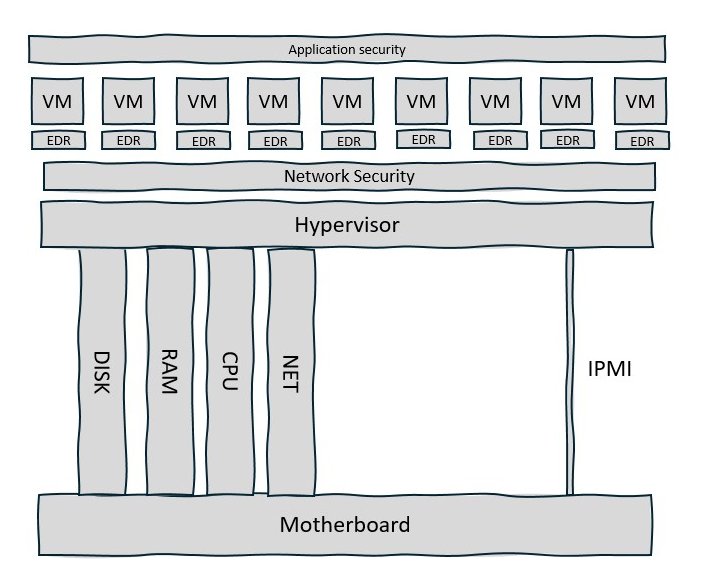
Figure 1: The IPMI is your server’s weakest link
Are You Breach Ready? Uncover hidden lateral attack risks in just 5 days. Get a free Breach Readiness and Impact Assessment with a visual roadmap of what to fix first.
What Is IPMI, and Why Do We Need It?
To manage a modern data center, you need access to servers even when they are powered off or the operating system has crashed. And you definitely do not want to lug a keyboard and monitor down aisles of server racks to accomplish this task. IPMI addresses this problem using Out-of-Band (OOB) management, powered by a hardware component called the Baseboard Management Controller (BMC).
The BMC is essentially a secondary, independent computer soldered onto your server’s motherboard. Its key features are:
- Independent Power: The BMC stays on and active as long as the server is plugged into a power source, even if the main unit is “off.”
- Independent OS: It runs its own firmware, usually a specialized Linux kernel, completely separate from the hypervisor OS, such as Windows Server, VMware, KVM, etc.
- Total Control: Because it sits “below” the main CPU, it can reboot the system, modify the BIOS, and even mount virtual drives to reinstall the operating system.
The diagram below shows a high-level block diagram of a typical server motherboard.
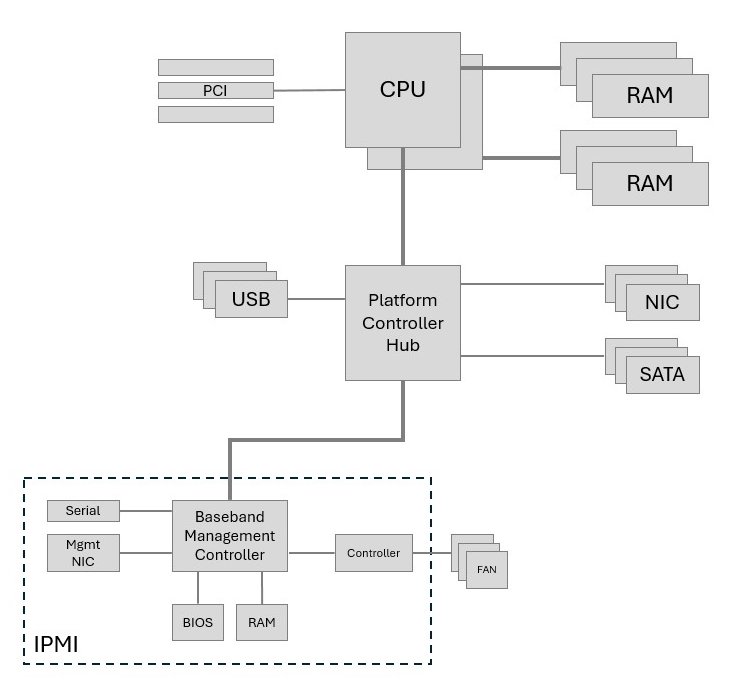
Figure 2: IPMI: A “Computer Within Your Computer”
The Silent Security Crisis: Real-World Exploits
IPMI was built for convenience in an era before modern cyberattacks. Because BMCs operate independently of your EDR, network security, and application security tools, they are often invisible to your security stack. There are two major attack vectors for IPMI.
The first is what I call the “Open Door” policy due to the use of default credentials from factory settings. For several years, servers shipped with universal defaults.
Administrators who have been managing servers for a while will recognize “root/calvin” as the password on Dell servers with iDRAC, or “admin/admin” on Supermicro servers. Fortunately, most manufacturers have moved away from this practice, but unique, pre-programmed passwords are still printed on pull-out tags or stickers affixed on the server. If the attacker gains even brief physical access to the server and the default password is in effect, they may be able to access the IPMI system remotely.
The second is inherent to software, i.e., there are vulnerabilities that attackers can exploit. There is a history of vulnerable IPMI implementations, and researchers have uncovered critical flaws across every major hardware vendor. These vulnerabilities prove that the “Management Plane” is just as targeted as the “Data Plane.”
| CVE | Vendor | Vulnerability | Real-World Impact |
|---|---|---|---|
| CVE-2018-7105 | HPE (iLO 5) | Remote Code Execution | Allowed attackers to bypass the login screen and take full control. |
| CVE-2018-15774 | Dell (iDRAC 7,8,9 | Privilege Escalation | Allowed low-level users to gain full administrative access. |
| CVE-2013-4782 | Supermicro | Authentication Bypass | Permitted unauthenticated users to reset the admin password. |
| CVE-2019-11181 | Intel (BMC) | Session Hijacking | Allowed attackers to take over an active admin session. |
| CVE-2013-4786 | Generic (IPMI 2.0) | Password Hash Disclosure | Allows anyone to request a password hash for offline cracking. |
Table 1: A small sample of known IPMI vulnerabilities
The “Multiplier Effect”: Why One Exploit Equals 100+ Outages
For a security manager, the primary concern is the Blast Radius. In a modern data center, we no longer run one application on a server. We run hypervisors such as VMware, Windows Server, and KVM, which in turn run tens or possibly hundreds of virtual machines or application containers.
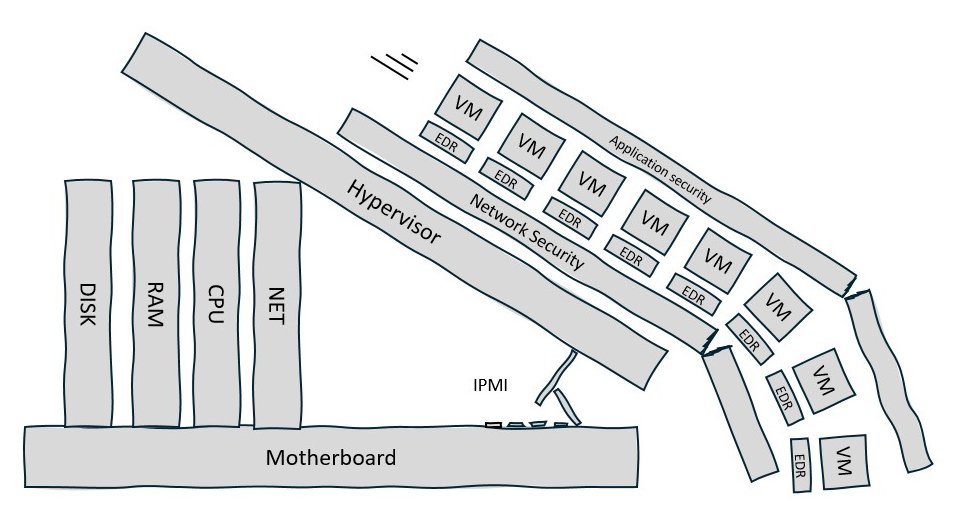
Figure 3: The blast radius of IPMI compromise encompasses all workloads
If an attacker gains access to a single iDRAC or iLO port, the repercussions can be catastrophic:
- Hypervisor Collapse: They can hard-power off a host, instantly crashing dozens of virtual machines.
- Permanent Denial-of-Service (PDoS): They can flash malicious firmware to the BMC, “bricking” the server.
- Crown Jewel Access: Physical servers often host Domain Controllers and Primary Databases. A power cycle can lead to significant database corruption.
- Lateral Movement to other Servers: Because most BMCs run a stripped-down but functional Linux-based OS with its own network stack, they can serve as beachheads for attacks on other parts of the infrastructure.
Real-world Examples and Guidance
In the “JungleSec” Ransomware attack of 2018, attackers specifically targeted IPMI interfaces exposed to the internet. After gaining access via default passwords, they used the KVM (Keyboard, Video, Mouse) feature to access the host OS, encrypt the data, and then pivot to other reachable systems on the internal network.
In the following months, research teams identified several vulnerabilities in IPMI firmware. The “Cloudborne” vulnerability, identified and named by Eclypsium in 2019, allows an attacker to first exploit a known Supermicro hardware vulnerability present in many cloud providers to overwrite the firmware of a BMC. This allowed them to maintain persistence even after the current user released the server and returned it to the pool for allocation to the next requester.
In 2023, Eclypsium’s researchers demonstrated a new attack they named “Lights Out Forever” that allows a single compromised BMC to be used to push a “continuous reboot” command or malicious firmware updates to every other vulnerable BMC on the same management segment, effectively taking down an entire data center.
The seriousness of IPMI attacks prompted CISA to release a Binding Operational Directive BOD 23-02 in June 2023 for mitigating the risk from Internet-exposed management interfaces.
Securing IPMI
Now let’s look at how we can secure the management plane. Given its criticality, we need to adopt a “Defense in Depth” strategy that incorporates Zero Trust principles. At the firmware layer, we must harden the controller with the following actions:
- Kill the Defaults: Change all factory passwords before racking the server.
- Disable Legacy Protocols: Disable IPMI-over-LAN (UDP 623) if you use the modern Web GUI (HTTPS).
- Add IPMI Patching to your Vulnerability Management Program: Treat BMC updates with the same urgency as OS security patches.
At the network layer, we must restrict access to the IPMI and ensure that management traffic does not share the same path as production data. This may prove challenging for large brownfield deployments, but we have some options.
- Physical Isolation: If possible, use a completely separate set of switches and cables for all IPMI interfaces. MSSPs managing multi-tenant data centers should adopt this approach.
- Logical Isolation: If physical separation isn’t feasible, management traffic must be strictly isolated into a non-routable, heavily firewalled VLAN. However, this does not prevent lateral movement within the VLAN and allows an attacker who has compromised a single server to attack other servers.
- Microsegmentation: Isolating the IPMI interfaces of individual hosts from each other provides the strongest defense and adds a second layer of defense to both the options above.
Access Report | ColorTokens Named a Leader in the Forrester Wave Microsegmentation Report
The Xshield Advantage
While a separate management network using physical or logical separation is a great start, it is often a “flat” network. If an attacker breaches one device on that network, they can see every other server in the rack. Xshield microsegmentation takes security a step further by creating a micro-perimeter around each host’s IPMI.
The results are:
- Invisible Ports: Xshield makes your IPMI ports “invisible” to unauthorized scanners. An attacker cannot attack what they cannot see.
- The “Verified Admin” Lock: Xshield ensures that only authorized administrators connecting from specific “Jump Hosts” can even attempt to log in.
- Lateral Movement Prevention: If one IPMI is compromised, Xshield prevents the attacker from “reaching sideways” to infect other servers.
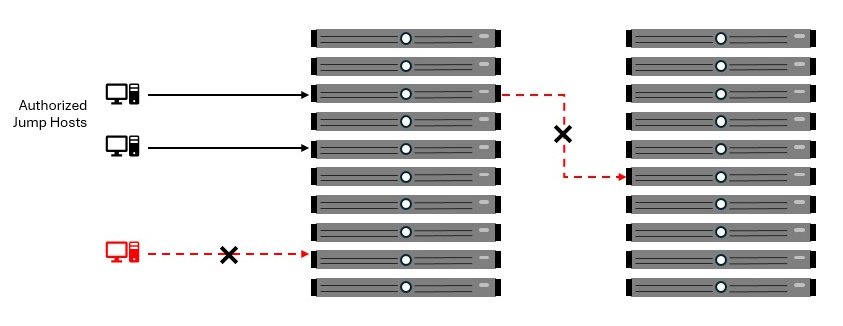
Figure 4: Xshield prevents unauthorized access to the IPMI and lateral movement
By wrapping your hardware in a Zero Trust layer, Xshield ensures that your most powerful management tools stay out of the wrong hands. The solution requires no changes to the existing switching network and, being agentless, works with any vendor’s IPMI implementation – Dell iDRAC, HPE iLO, Lenovo XCC, and more.
If your servers still expose management interfaces that sit outside your security stack, it may be time to take a closer look. Reach out to us or request a demo to see how microsegmentation can contain that risk.
The post The Backdoor in the Backplane: Why Your Server Management is a Silent Risk appeared first on ColorTokens.
*** This is a Security Bloggers Network syndicated blog from ColorTokens authored by Venky Raju. Read the original post at: https://colortokens.com/blogs/ipmi-security-risks-server-management-microsegmentation/
