

How DataDome Created a Custom Metrics Exporter for GitHub Actions

The post How DataDome Created a Custom Metrics Exporter for GitHub Actions appeared first on Blog – Datadome.
In recent years, GitHub Actions has become an industry standard for automation, continuous integration (CI), and continuous delivery (CD).
For more than 4 years, GitHub offered users the capability to manage CI/CD within their own cloud providers by using self-hosted runners. This allowed us to reduce the costs associated with running GitHub Action while retaining full control over the infrastructure, enabling us to harden the security of the solution.
This article will discuss how DataDome developed a custom Prometheus exporter to manage GitHub Actions self-hosted runners infrastructure at scale. After a brief introduction to our GitHub runners infrastructure, we will delve into the importance of monitoring the deployed infrastructure to provide visibility on runner health and performance.
At DataDome, we manage:
- Hundreds of GitHub repositories.
- Hundreds of GitHub Workflows executions per day.
- Various types of runners managing different types of workloads.
- A multitude of checks assessing the quality of deliveries, including automated performance tests, non regression tests, and compliance checks.
Undeniably, GitHub Action lays as a central solution to ensure a constant level of quality while shipping code delivery to production.
GitHub Self-Hosted Runners at DataDome
When searching for scalable runner infrastructure, there is a clear choice between two popular frameworks:
- Action-Runner-Controller (ARC): Deploys pods in a Kubernetes cluster.
- Philips self-hosted runners: Deploys Spot AWS instances.
We confidently selected the second solution for multiple reasons. Firstly, it enabled us to migrate our existing CIs with minimal engineering costs. Additionally, we were able to leverage Philips’ self-hosted runner open-source module for its customization capabilities.
This openness led us to keep the following objectives in mind:
- Minimize the infrastructure cost of self-hosted runners.
- Leverage ephemeral runners.
- Optimize the reactivity of the solution.
These requirements led us to assess the technical team’s GitHub Action usage—as a result, we pre-provision runners to reduce waiting times for GitHub Action execution. We also lower the number of pre-provisioned runners during periods of low demand, while still maintaining the capacity to trigger runners on demand. This allows us to easily deploy hundreds of runners per day.
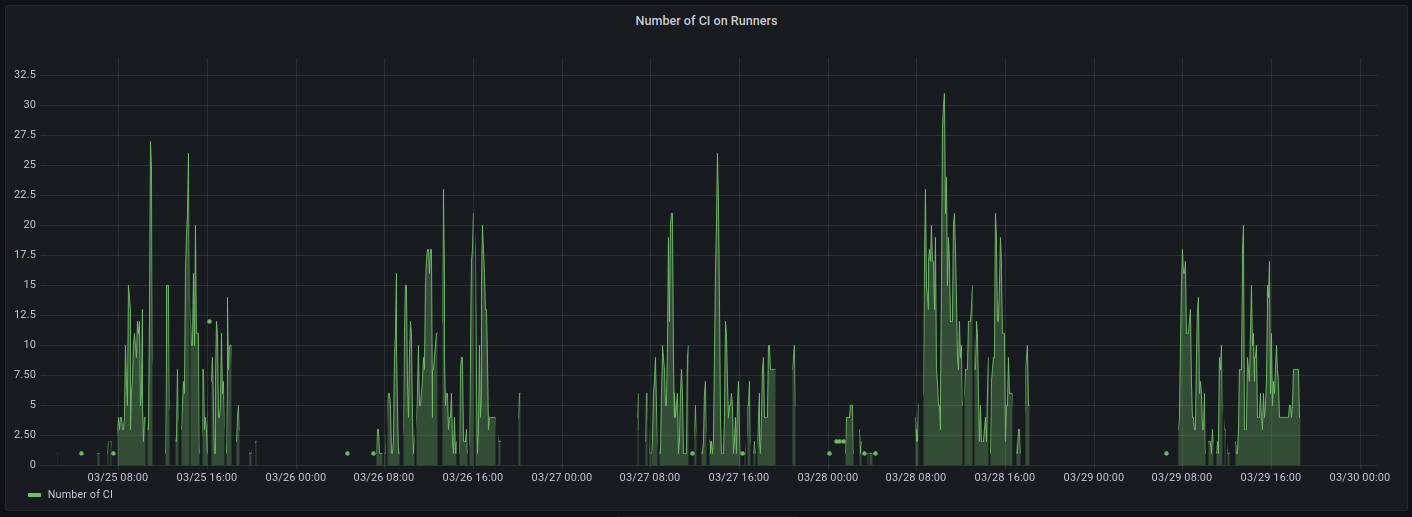
Self-Hosted Runners & GitHub Action Monitoring
We also need to closely monitor the infrastructure to ensure optimal usage and availability for technical teams.
Without proper metrics, managing a large volume of GitHub Actions can become challenging. There are a plethora of reasons to monitor GitHub Actions usage, such as to detect CI/CD failure, optimize job execution, or ensure deliveries’ reliability. This is achievable in the GitHub UI if you only have a few GitHub Actions, but it becomes challenging without the proper metrics and monitoring with a large volume of GitHub Actions.
Our team’s initial approach was to explore existing Prometheus exporters that specialize in GitHub Actions usage. We searched for an exporter capable of retrieving the necessary metrics for each runner category:
- The runner’s state (Idle, Active, or Offline): To obtain a comprehensive overview of the available workload.
- The workflows & job duration: To measure the duration of jobs and find room for GitHub Actions optimization.
- The warm-up duration: To evaluate the waiting time for GitHub jobs before being computed by GitHub self-hosted runners.
Limitations of Existing Prometheus Exporters
GitHub does not offer an official Prometheus exporter, but the community has developed a few, each with its strengths and weaknesses. However, none of them fully meet our requirements. Even the most advanced options have shortcomings in two critical areas:
- No warm-up duration metric, which may result in us being unaware of how the infrastructure responds to workload spikes.
- Our GitHub organization contains many repositories, sending an excessive number of requests to GitHub’s API—resulting in a rate-limited exporter, exposing almost no metrics at all.
We developed our own exporter to overcome these limitations.
Building a Custom Prometheus Exporter
Our exporter gathers information on runners and GitHub Actions execution by making requests to GitHub’s REST API. It is built on top of the widely recognized prometheus-client Python package.
Filtering Repositories to Optimize the Number of Requests
Due to the high number of GitHub repositories at DataDome, we rapidly faced the consequences of GitHub’s rate-limiting. As a matter of fact, GitHub has implemented two rate limits regarding REST API calls:
- Primary rate limit: Limits the number of requests per hour to a maximum of 12,500. This limit scales depending on the number of users and repositories within the GitHub organization.
- Secondary rate limit: Limits the number of concurrent requests sent to GitHub’s API. This reduces the opportunities for multithreaded exporters.
These limitations required us to adopt an approach that strongly optimizes requests sent to the GitHub API—while providing sufficient metrics for proper analysis of self-hosted runner usage at DataDome.
Each GitHub repository potentially generates a number of requests to retrieve information related to each workflow and job, which are a significant source of requests to GitHub’s API. Therefore, we have decided to only gather GitHub Actions metrics on:
- Private repositories: Self-hosted runners should not be used on public ones.
- Non-archived repositories: These repositories are irrelevant for such metrics.
- Repositories active within the last week: To focus on only active repositories.
This filter lowered the number of repositories we are gathering metrics on from over 400 to 70, reducing the number of requests to GitHub’s API by more than four times.
Retrieving Relevant Information on Runs & Jobs
After refining the list of relevant repositories, we need to gather metrics on the GitHub workflows associated with them.
Multiple pieces of information are available from GitHub’s API, but in our case, we are focusing on listing jobs execution as well as their associated runners.
To do so, we retrieve the list of workflows associated with each repository, then for every workflow, we search for associated runs (as workflows can be relaunched, fully or partially, from the GitHub UI) to finally obtain job information from each run execution:
{
"id": 399444496,
"run_id": 29679449,
[...]
"status": "completed",
"conclusion": "success",
"started_at": "2020-01-20T17:42:40Z",
"completed_at": "2020-01-20T17:44:39Z",
"name": "build",
"steps": [
{
"name": "Set up job",
"status": "completed",
"conclusion": "success",
"number": 1,
"started_at": "2020-01-20T09:42:40.000-08:00",
"completed_at": "2020-01-20T09:42:41.000-08:00"
}
[...]
],
"check_run_url": "https://api.github.com/repos/octo-org/octo-repo/check-runs/399444496",
"labels": [
"self-hosted",
],
"runner_id": 1,
"runner_name": "my runner",
"runner_group_id": 2,
"runner_group_name": "my runner group",
"workflow_name": "CI",
"head_branch": "main"
}
Additional Information on GitHub
In addition to the metrics already collected, we also obtain:
- The state (active, idle, offline) of each runner registered in our GitHub organization.
- The billing usage of our GitHub organization.
- The number of requests sent to the GitHub API.
These final metrics provide an overview of the deployed runners at any given time and allow us to track our quota usage for GitHub-hosted runners.
This information is particularly important to us, as GitHub provides 3,000 minutes of computing time thanks to our subscription plan. Even if we could migrate all of our GitHub workflows to self-hosted runners, for cost optimization purposes we choose to leverage GitHub-hosted runners for non-critical and short-lived GitHub Actions.
Available Metrics
Our Prometheus exporter exposes these metrics:
# HELP runner_nb_idle Number of idle runners
# TYPE runner_nb_idle gauge
runner_nb_idle{runner_label="self-hosted-runner"} 9.0
# HELP runner_nb_busy Number of busy runners
# TYPE runner_nb_busy gauge
runner_nb_busy{runner_label="self-hosted-runner"} 4.0
# HELP runner_nb_offline Number of offline runners
# TYPE runner_nb_offline gauge
runner_nb_offline{runner_label="self-hosted-runner"} 0.0
# HELP runner_workflow_queued Number of queued workflow
# TYPE runner_workflow_queued gauge
runner_workflow_queued{repository="DataDome/repository"} 3.0
# HELP runner_workflow_job_duration Number of queued workflow
# TYPE runner_workflow_job_duration gauge
runner_workflow_job_duration{id="12345678910",job_name="job1",repository="DataDome/repository",runner="self-hosted-runner"} 22.0
# HELP runner_warm_up_duration Number of queued workflow
# TYPE runner_warm_up_duration gauge
runner_warm_up_duration{job_id="123456789",label="self-hosted-runner"} 6.0
# HELP runner_collection_duration Cumulated collection duration
# TYPE runner_collection_duration gauge
runner_collection_duration{duration="runners"} 0.566448450088501
runner_collection_duration{duration="repositories"} 5.607841968536377
runner_collection_duration{duration="workflow_runs"} 22.287299394607544
runner_collection_duration{duration="workflow_jobs"} 0.7833900451660156
# HELP runner_app_api_rate_limit Number of call made to API for GH app. Reset every hour
# TYPE runner_app_api_rate_limit gauge
runner_app_api_rate_limit{app_id="123456"} 3537.0
# HELP github_hosted_runners_minutes_used Number of minutes used by GitHub-hosted runners across the organization
# TYPE github_hosted_runners_minutes_used gauge
github_hosted_runners_minutes_used{duration="github_hosted_runners_usage"} 35696.0
Using this information, we created informative Grafana panels that track the usage and infrastructure of our self-hosted runners.
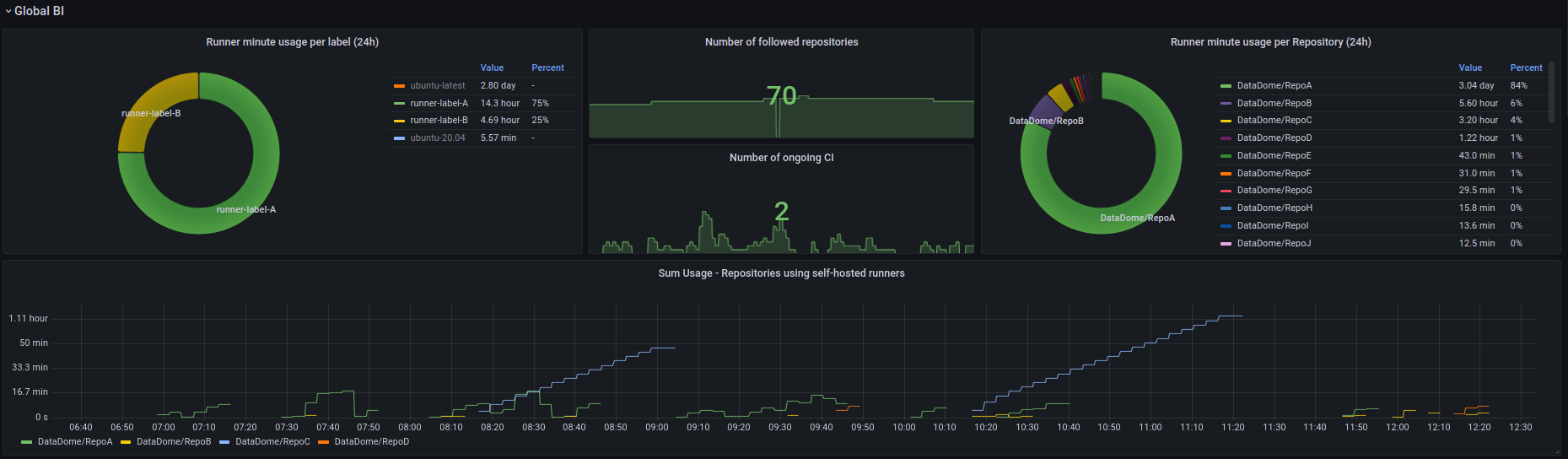
They have been divided into different categories. Initially, we have included panels that provide an overview of GitHub Actions usage at DataDome.
Next, the usage details for each runner category will be presented, including the number of running jobs and, most importantly, the warm-up duration for GitHub Actions computed on this specific runner category.
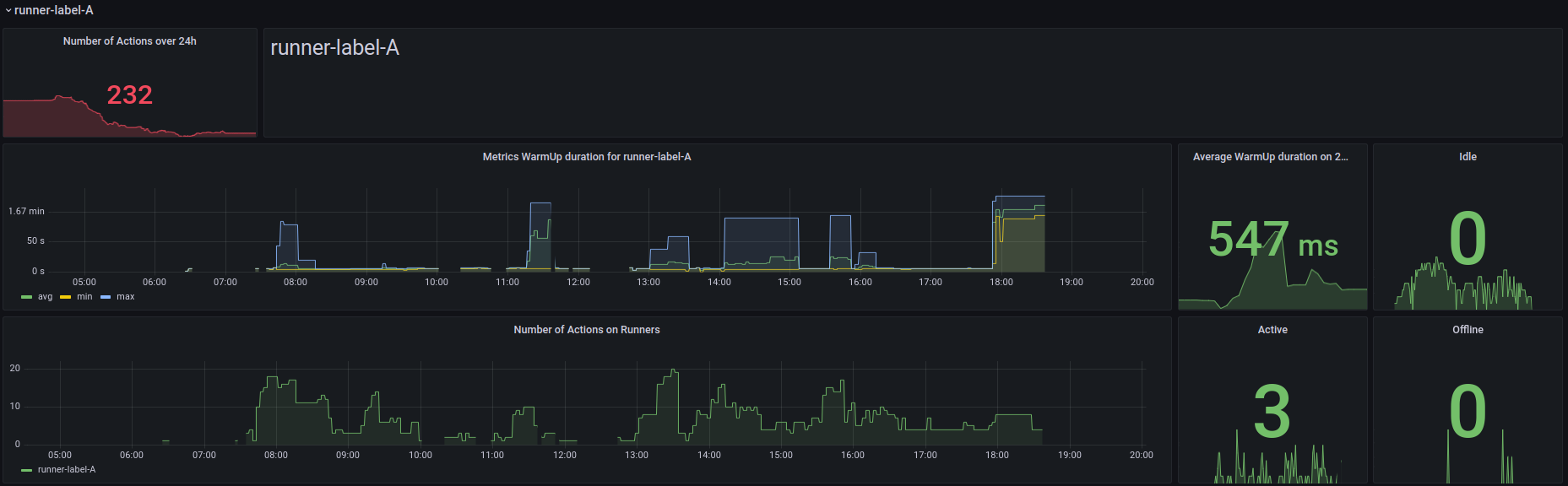
To gain a more detailed understanding of GitHub Action job repositories, some panels will display the complete duration of job execution.

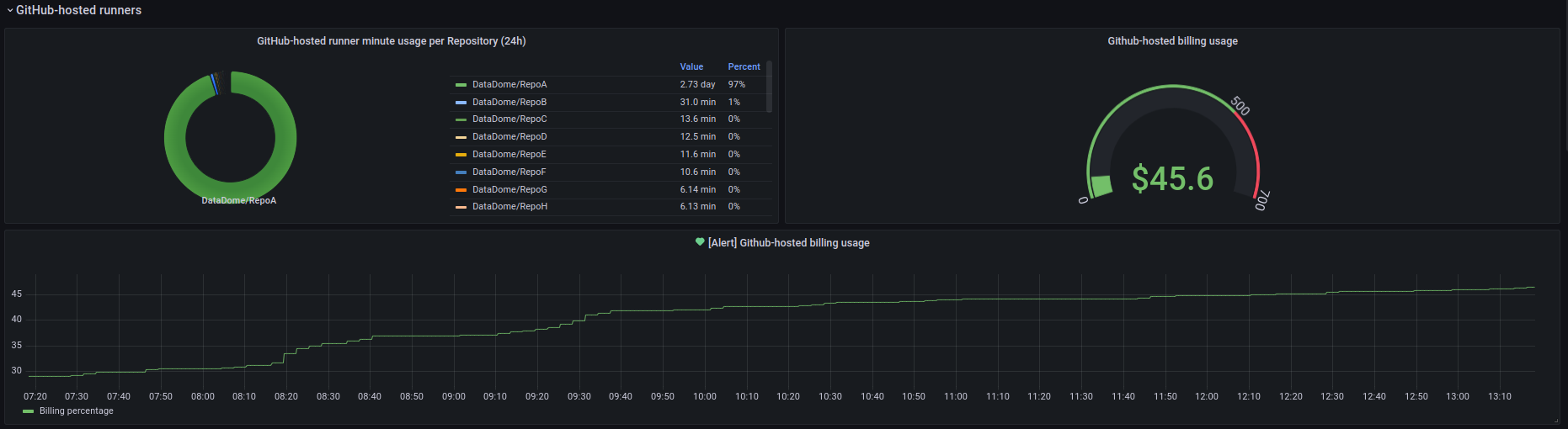
Finally, certain panels are designed to show details on current billing usage and ongoing GitHub Actions on GitHub-hosted runners, to keep track of the transition to self-hosted runners.
What We Learned & Next Steps
The deployment of GitHub Self-Hosted runners came with the need to monitor them. Because of the number of repositories in our GitHub organization, no existing Prometheus exporter fit our needs.
The main challenge in creating our custom Prometheus exporter was to be able to scrape metrics at a regular pace—without exceeding the rate limit imposed by GitHub REST API. This has been achieved by applying strict filtering on the monitored GitHub repositories, as well as limiting the number of requests sent to the GitHub REST API to avoid throttling.
Our next step will be improving the monitoring of GitHub Actions results to detect issues within the GitHub action execution, along with the remaining GitHub job to be migrated from GitHub hosted runners to self-hosted runners.
*** This is a Security Bloggers Network syndicated blog from DataDome authored by Nicolas Spenlihauer. Read the original post at: https://datadome.co/engineering/how-datadome-created-a-custom-metrics-exporter-for-github-actions/
