
Don’t Get Burned (Out) by Cloud Vulnerabilities

As a cybersecurity professional, vulnerabilities and exploits can be exhausting, never-ending and the bane of your existence. It is hard to prioritize what matters to you and your organization when you are staring at thousands of vulnerabilities, especially when you also consider those that might impact your supply chain and third-party vendors! Earlier this year, Sysdig put out a report based on data collected from billions of containers and thousands of cloud accounts and projects run over the course of the last year.
The team looked at how vulnerabilities are impacting the software supply chain and the impact of excessive permissions on zero-trust readiness (or the lack thereof)! I’m digging deeper into these security headlines to offer some relief to my fellow defenders.
A Whopping 87% of Images Have High or Critical Vulnerabilities
One of the worst-kept secrets in cybersecurity is the number of vulnerabilities in the cloud. But just how bad is it?
The Sysdig report found that 87% of images have high or critical vulnerabilities. That is a big scary number; quite frankly, it lends itself well to a fear-mongering headline. This doesn’t even include medium and low vulnerabilities. It is also only a single point in time, not factoring in the daily compounding vulnerabilities we read about in the news.
As part of the team that put together this report, I can tell you we were shocked. When we saw that number, we all kept saying, “How is that possible?!” Fortunately, the numbers became palatable once we started filtering through the vulnerable images and looking at them from different perspectives.

You Can Ignore a lot More Than You Might Expect
Moving beyond images (which can have more than one vulnerability), we looked at the vulnerabilities themselves. This view gave us a better idea of the actual number of vulnerabilities we were dealing with.
We found that if we looked at the critical and high vulnerabilities that had a fix available and were in use at runtime, that big scary number fell to 15%. By taking this view, teams can focus their efforts on a smaller fraction of the fixable vulnerabilities that represent a true risk to their organization. If the vulnerability isn’t in use at runtime, it’s not a priority.
For teams that want to look at what has to be fixed today, they can dig deeper still to find that 2% of these critical and high vulnerabilities are in use at runtime, have a fix available and are exploitable. This means bad guys actively take advantage of the vulnerability and you are at risk of an attack. Now that is something to work with. Teams can take those vulnerabilities and work on them ASAP. Then, as time allows, they can work through the remaining 13% that are in their runtime environment. This is the answer for teams that don’t know where to begin with vulnerability prioritization. You’re welcome!

The charts above showed different perspectives of the data I just explained. Both provide a prioritized starting point to improve your security posture. Whether it be 5% of your images with critical and high vulnerabilities or 2% of critical and high vulnerabilities, focus on those that can be fixed. For those vulnerabilities that are not fixable, you need to determine if running an unfixed vulnerability is worth the risk to your organization. Do you need to run with those vulnerable images, or are there alternatives you might be able to implement?
Zero Trust in Zero-Trust
So, now that you’ve downsized and prioritized your vulnerability management tasks, let’s move on to reducing security risks related to user permissions. Only 10% of permissions granted to non-admin users are used over a 90-day window, and administrator use was not any better. Based on our findings, zero-trust is only a buzzword in cloud environments. Last year, 27% of our customers were using their root user accounts for administrative efforts and daily tasks. This year, we dug deeper and calculated risk scores based on the number of customer accounts with administrator access, those without multifactor authentication enabled and account inactivity of 90+ days. The more accounts that fall within these parameters, the higher the risk score.
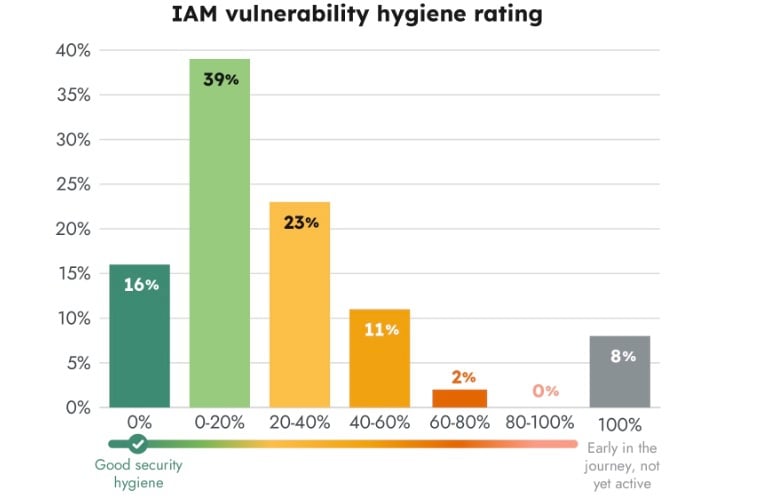
Looking at the graph above, you’ll see that while risk scores are not horrible, they could be improved. Our customers are security-conscious; what is more alarming is that companies that aren’t security-conscious are probably more lax than this! Having excessive permissions makes it more likely that if an adversary gains access to your network, they will move laterally and escalate privileges. Giving them administrator access is like handing them the keys to your kingdom.
Why are permissions given out so freely? Users are often part of many groups, and both users and groups can require many different permissions to complete their various projects. Therefore, hundreds of employee user accounts can result in thousands of permissions to manage.
If your organization doesn’t already have one, consider implementing a permissions management team. Remove unused and unnecessary granted permissions, mandate MFA, get rid of unused admin accounts and be careful when you grant permissions to third-party vendors. Managing permissions may seem tedious and time-consuming, but it sure beats dealing with a compromise!
Conclusion
It was made abundantly clear in this year’s Cloud Native Security and Usage Report that cybersecurity teams have a lot on their plates. Cloud and container vulnerabilities are bountiful, but they can be managed. Permissions are still being misused and overly granted, and they require management to reduce the risk of compromise. Check out the full report for additional details and best practices.

