

Your Security Operations Team Just Got Faster: Meet Imperva’s AI Assistant.

There is a moment every security analyst knows well. It’s 2am, an alert fires, and you’re staring at a console trying to make sense of what just happened—fast. You need context, scope, and impact: What’s being targeted? Where is it coming from? Is it getting worse? What should we do next?
That moment is exactly what we built the Imperva AI Assistant to improve, starting with Cloud WAF (cWAF) investigations, where speed and clarity matter most.
Security teams are under pressure to investigate threats faster, with fewer resources
Modern application security environments generate a constant stream of signals across events, trends, attack patterns, and security posture. But turning that data into meaningful insight still takes effort. Analysts often move between dashboards, filter logs, and stitch together context across multiple tools to understand what’s happening.
At the same time, teams are expected to do more with less. A persistent skills gap and increasing alert volume mean even routine investigations can take longer than they should, slowing response times and adding pressure to already stretched teams.
The industry’s traditional response has been more dashboards, more saved reports, and more training. We think there’s a better answer: let your team ask the question in plain English and get a structured, security-relevant answer back immediately, grounded in Imperva platform data.
Introducing the AI Assistant.
What is an AI security assistant?
An AI security assistant is a natural-language tool that lets security teams investigate threats by asking questions in plain English, instead of building queries or navigating dashboards, and returns fast, ranked, security-relevant answers grounded in their own platform data. The Imperva AI Assistant brings this capability directly into the Imperva platform, starting with Cloud WAF investigations.
Protect with AI: Making security work faster, simpler, and more accessible
To address this, we’re bringing the power of AI directly into Thales’s Imperva platform.
It builds on AI ExplAIn, the one-click, plain-language explanations we introduced for Imperva Cloud WAF, extending that same clarity from individual blocked requests to full, cross-product investigations.
Our goal is simple: help security teams get answers faster, reduce manual effort, and improve day-to-day productivity.
What the AI Assistant does?
The AI Assistant is designed around three key goals:
Increase productivity
Instead of navigating dashboards or writing complex queries, users can simply ask a question and get an answer immediately.
Make AppSec more accessible
You don’t need deep expertise in Thales or Cloud WAF. The assistant uses natural language, making it easier for more team members to investigate and understand security data.
Support a wide range of use cases
Security questions don’t follow a fixed script. Our assistant can handle a variety of queries, from investigations to trend analysis, without requiring predefined workflows.
Instead of being limited to predefined dashboards or reports, teams can explore questions as they arise, using plain language to surface insights that would be impractical to design into a traditional UI. Because the assistant can draw on signals across the Imperva AppSec platform, it doesn’t just retrieve data – it connects it.
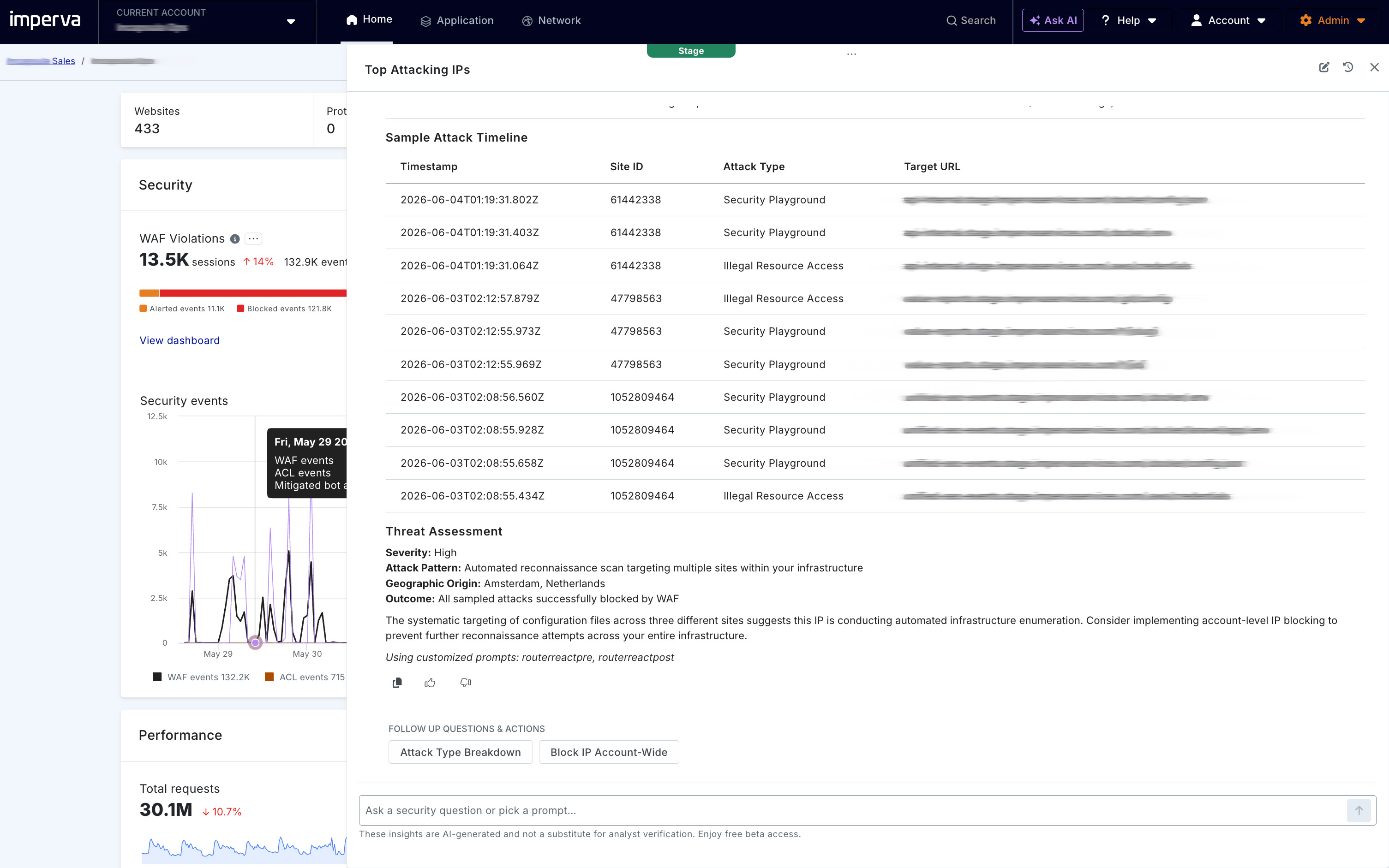
For example, an analyst might ask: “Was the IP that triggered a WAF block also behaving like automated traffic in the same session, and what changed compared to previous activity?”, and get a clear, unified answer in seconds, without having to pivot across tools or manually stitch the data together.
Security investigations, simplified with an AI security assistant
The AI Assistant is a natural-language experience built into the Imperva platform to help security teams investigate faster.
Instead of navigating dashboards or building filters, teams can simply ask:
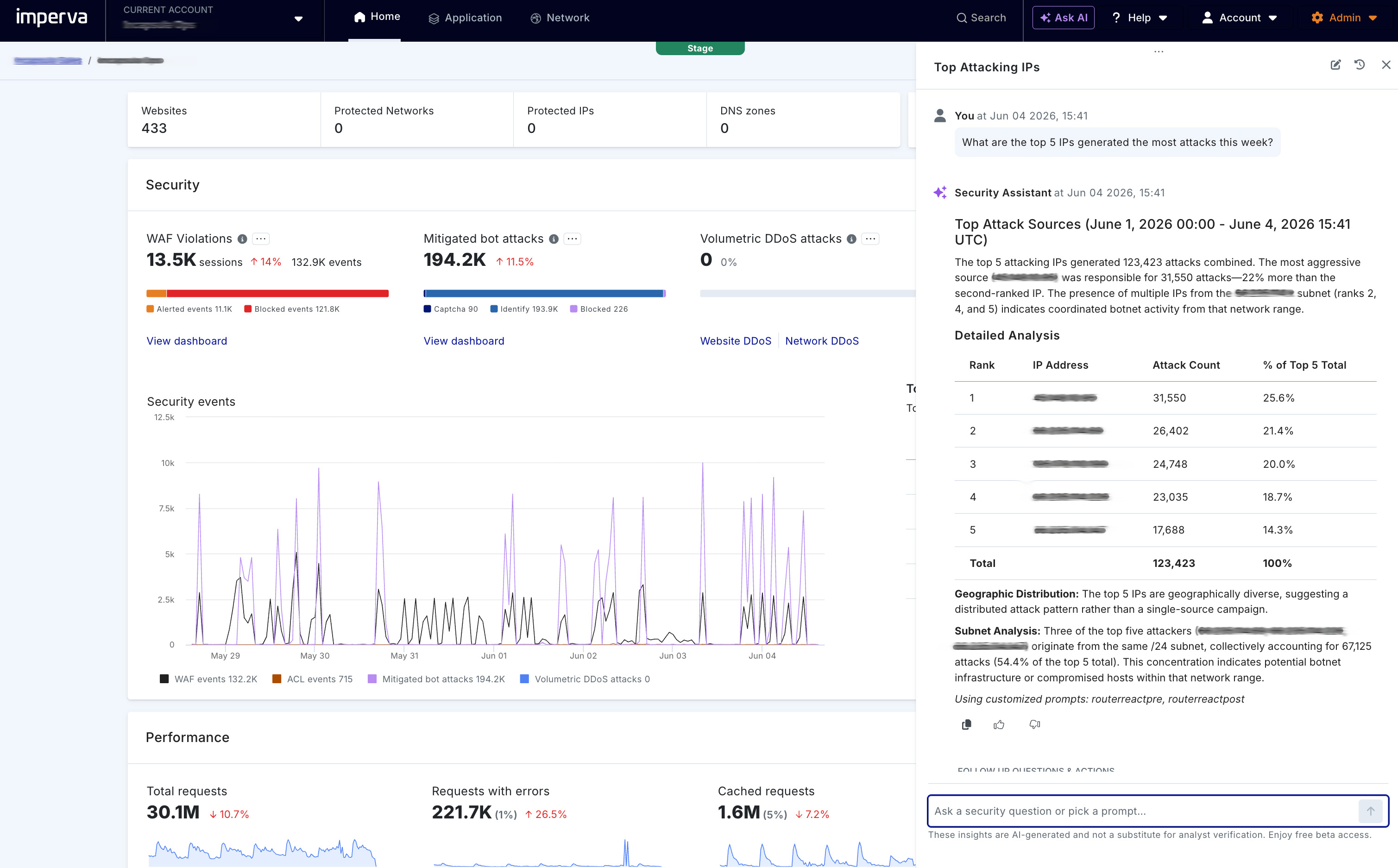
- “What are the top attack source IPs over the last 48 hours?”
- “Which URLs are most targeted right now?”
- “What types of attacks were blocked on site XYZ.com?”
- “What changed between yesterday’s baseline and today’s spike?”
- “Are these patterns concentrated in a single source or distributed across multiple locations?”
The assistant responds with a concise, ranked answer, along with a Critical Finding that highlights the security -relevant insight, not just raw data. The assistant can also access all Imperva documentation, so teams can ask “How do I configure…? Or “Where can I find…?” to easily find the information they need.
A real-world investigation, simplified.
Imagine a security analyst investigating a sudden spike in application traffic.
Today, that process often involves switching between dashboards, filtering logs, and piecing together data from multiple sources to understand what’s happening.
With the AI Assistant, the workflow is much simpler.
The analyst can ask:
- “What’s driving the spike in traffic today?”
- “Are these requests coming from the same source or multiple locations?”
- “What has changed compared to yesterday’s baseline?”
Within seconds, the assistant provides a clear, summarized answer, highlighting key trends, identifying the most relevant signals, and surfacing a Critical Finding that explains what matters. Instead of manually connecting the dots, the analyst can quickly understand the situation, prioritize next steps, and respond faster.
Why this matters for security teams
When investigating potential threats, teams need more than confirmation that “something triggered.” They need fast, clear answers that help them understand what’s happening and what to do next.
- What’s the pattern? (Is activity concentrated, distributed, or repeating?)
- What’s the scope? (Which applications, URLs, geographies, or time windows are affected?)
- What’s the severity? (How significant is the signal, and how quickly is it evolving?)
- What’s the next best action? (Where should they focus, and what should they mitigate?)
The AI Assistant is designed to answer these questions directly, reducing investigation friction and helping teams move from data to insight, faster.
In practice, this means security teams can move from alert to understanding faster—without adding complexity or changing existing workflows.
Easy to get started
The AI Assistant is built directly into the Imperva AppSec platform, there’s nothing new to install or manage.
It’s available through the Ask AI experience and works within your existing environment, using the same data, workflows, and permissions you already rely on.
Because it’s permission-aware by design, users only see the data they’re authorized to access.
AI capabilities are always optional, customers can choose whether to enable or disable them at any time, ensuring full control over how AI is used in their environment.
Available today
The AI Assistant is currently available under controlled availability for a select group of customers. This phase allows us to refine quality, guardrails, and workflows based on real-world feedback before broader rollout.
Why it matters
AI in security has been discussed for years, often focused on detection and tuning. But the real pressure point has always been the moment of investigation, when teams need to quickly understand what’s happening and decide what to do next.
That’s where the AI Assistant is different. It focuses on turning security data into clear, actionable insight – faster. It doesn’t replace expertise, but it makes effective investigation workflows easier to access across the team.
When fewer people are bottlenecks for interpreting signals, response times improve, escalations reduce, and teams spend less time on repetitive analysis.
The impact is simple: faster decisions, fewer handoffs, and more time spent on the issues that matter most.
The bottom line
Security investigations get faster when teams can turn security data into explanations they trust. The Imperva AI Assistant is designed to shorten the path from alert to decision, starting with Cloud WAF, by helping analysts quickly pull the right data, spot what’s changed, and decide what to do next.
It starts with a question, and an answer you can defend.
Frequently asked questions about the AI security assistant
What is an AI security assistant?
An AI security assistant is a natural-language interface that lets security teams ask questions in plain English and get fast, ranked, security-relevant answers drawn from their own platform data, instead of manually building queries or pivoting across dashboards. The Imperva AI Assistant delivers this inside the Imperva platform, starting with Cloud WAF investigations.
How is the Imperva AI Assistant different from AI ExplAIn?
AI ExplAIn gives one-click, plain-language explanations of individual blocked requests in Cloud WAF. The AI Assistant goes further, answering open-ended investigation and trend questions across the Imperva AppSec platform and connecting signals, such as a WAF block and automated-traffic activity, within the same session.
What questions can the AI Assistant answer?
Teams can ask investigative and trend questions such as “What are the top attack source IPs over the last 48 hours?” or “What changed between yesterday’s baseline and today’s spike?” Because it can also read the Imperva documentation, analysts can get configuration and “how do I…” answers in the same place.
Will an AI security assistant replace SOC analysts?
No. The AI Assistant is designed to speed up investigations, not replace expertise. It removes the manual work of pulling and correlating data so analysts can focus on judgment, prioritization, and response.
Is the data the AI Assistant sees kept private and under our control?
Yes. The assistant is permission-aware, so users only see data they are authorized to access, and AI capabilities are optional; customers can enable or disable them at any time.
Want to see it in action? Request a demo or ask your Thales team about the controlled availability process.
The post Your Security Operations Team Just Got Faster: Meet Imperva’s AI Assistant. appeared first on Blog.
*** This is a Security Bloggers Network syndicated blog from Blog authored by Gayle Baird. Read the original post at: https://www.imperva.com/blog/ai-security-assistant/
