

Passkeys Pwned: Turning WebAuth Against Itself

Passkeys Pwned: Turning WebAuthn Against Itself
For years, passwords have been the default way we prove our identity online. However, they have also been at the center of countless breaches as a result of phishing, credential stuffing and stolen credentials. When passkeys emerged, they were hailed as the gold standard for authentication, prompting enterprises worldwide to rapidly adopt passkeys as the primary way to authenticate access to enterprise SaaS apps. Authsignal reported a 550% increase in passkey registrations this year, bringing the total number of passkey-enabled accounts to 15 billion.
On the DEFCON 33 main stage, SquareX researchers disclosed a major passkey vulnerability that uses malicious extensions/scripts to fake passkey registration and logins, allowing attackers to access enterprise SaaS apps without the user’s device or biometrics. This discovery breaks the myth that passkeys cannot be stolen, demonstrating that “passkey stealing” is not only possible, but as trivial as traditional credential stealing. This serves as a wake up call that while passkeys appear more secure, much of this perception stems from a new technology that has not yet gone through decades of security research and trial by fire.
This technical blog will cover how passkeys work and why it is believed to be more secure, before diving into the Passkeys Pwned attack and how it can unfold in real life.
Passkeys and How They Work
Passkeys are cryptographic keys built on a set of standard specifications known as FIDO2.
At their core, passkeys use asymmetric cryptography which consists of:
- Private key: stored securely on your device (the authenticator)
- Public key: stored by the website (the backend server)
There are four main components to passkeys:
- The User: initiates actions like “Create a passkey” and provides biometric data like FaceID or TouchID needed to prove presence
- The Authenticator: A secure element that generates key pairs, securely stores the private key, and signs server issued challenges
- The Server: Issues challenges, stores the user’s public key, and cryptographically verifies that the authenticator signed signatures matches the corresponding user
- The Browser: Leverages WebAuthn, a browser API that sends the necessary data to and from both the Authenticator and the server. It enforces origin binding, packages the server’s challenge, and returns results back to the website
The Passkey Flow
Passkeys operate with two main flows — a registration flow and an authentication flow.
Passkey Registration Flow
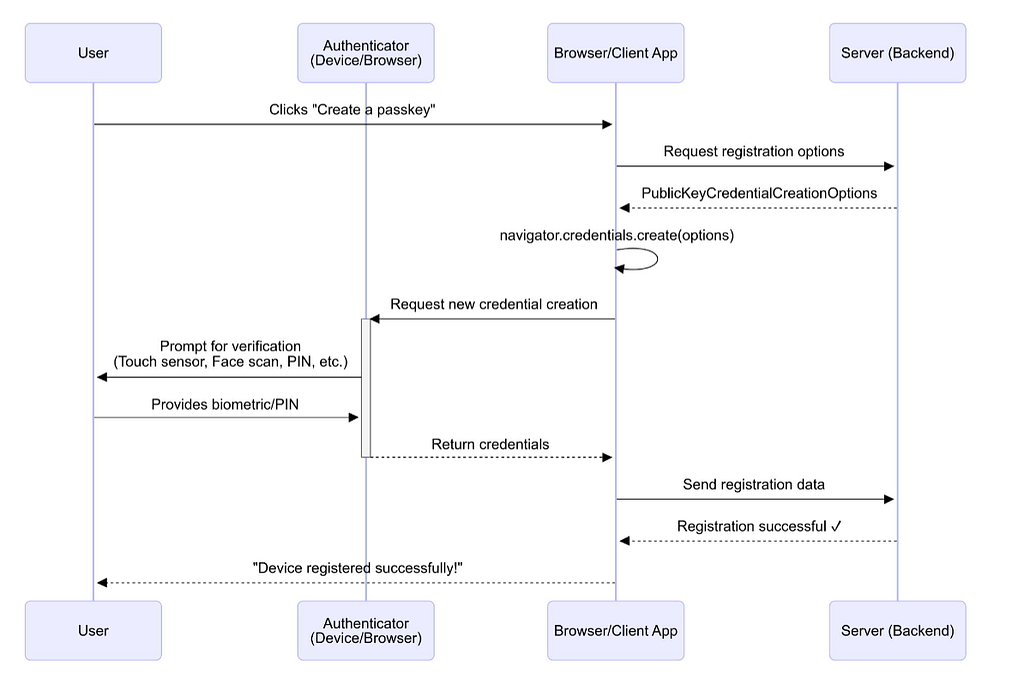
- The user clicks “Create a passkey” on a website
- The server responds with a challenge and other parameters for public key creation
- Browser calls navigator.credentials.create() with those parameters
- Authenticator receives the call and prompts for biometric/PIN which the user provides
- Authenticator generates a new key pair, stores the private key, and returns the public key to the browser along with metadata such as the Authenticator Attestation GUID (AAGUID) — a unique identifier assigned to each authenticator model
- The browser relays the public key to the server
- The server verifies the registration data and stores the public key
Passkey Authentication Flow
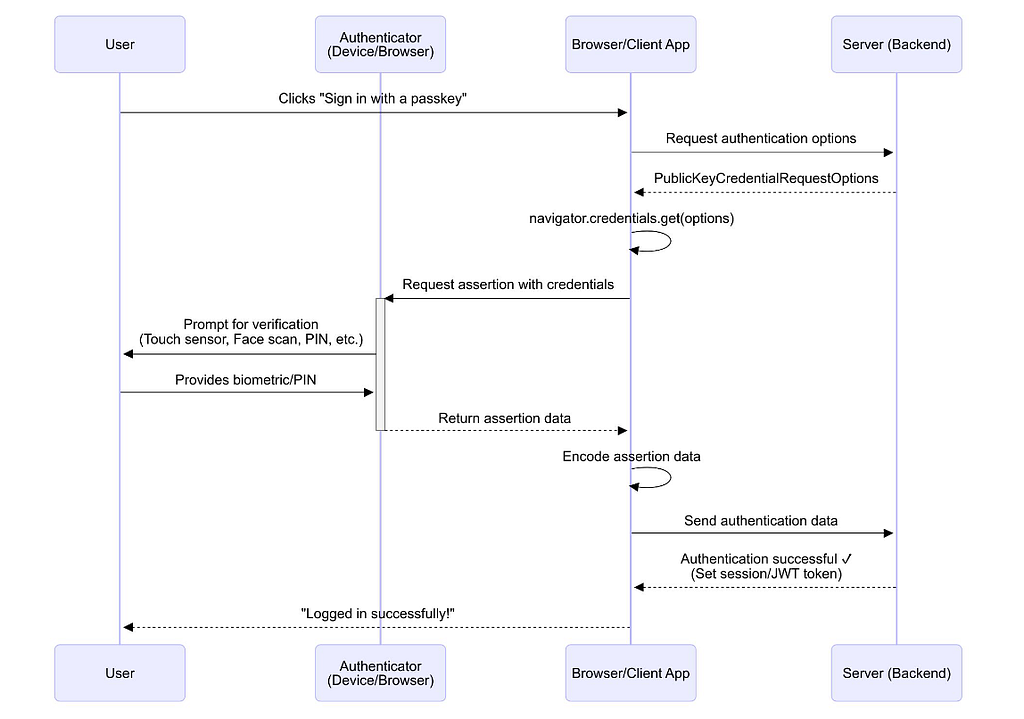
- The user clicks “Sign in with a passkey” on a website
- The server responds with an authentication challenge
- The browser calls navigator.credentials.get() with the challenge
- Authenticator receives the call and prompts for biometric/PIN which the user provides
- The Authenticator retrieves the private key, verifies the biometric data, signs the challenge with the private key, and then returns the signed challenge to the browser
- The browser relays the signed challenge to the server
- The server verifies the signature and on success logs the user in
Why Passkeys?
Passkeys were invented as a more secure authentication method to replace passwords. Some security benefits of their cryptographic design includes:
- Phishing protection: Passkeys are origin-bound, meaning they can only be used on the legitimate website or app that registered them. If a user is tricked into visiting a fake login page, the option to use their passkey simply won’t appear, blocking phishing attempts by design.
- Resistance to brute force: Unlike passwords, which can be guessed or cracked, passkeys are based on digital signatures created with long, random private keys.
- Reduces impact of data breaches: As the private key never leaves the user’s device or authenticator, the user’s credentials will not be leaked if the service provider is exposed to a data breach, reducing the impact of supply chain risks. These keys are never exposed and cannot be reused across sites, eliminating the risks of weak, stolen, or reused credentials.
The Role of Browsers in the Passkey Security Model
The security model of passkeys rests on a critical assumption: that the browser is trustworthy.
The authenticator produces cryptographically secure key pairs based on the parameters provided by the user’s browser. Contrary to popular belief, it does not have direct visibility to the application logic or the server’s challenge, and as such has no awareness of which website or app it’s interacting with. To the authenticator, all it knows is that the request came from a specific browser.
The server stores the public key provided by the browser during registration and later uses it to validate given signatures signed by the private key. While it can confirm that a signature is cryptographically valid against the stored public key, it cannot determine how that key was originally created or whether the request actually came from a genuine authenticator.
Both the authenticator and server are blind to each other and depend entirely on the browser as a mediator. This means that all trust ultimately rests on the browser. If the browser is compromised or lying to the server, the entire security model for passkeys collapses. This is exactly what the Passkeys Pwned attack exploits.
The Passkey Pwned Attack
The Passkey Pwned attack exploits the fact that there is no secure communication channel between the authenticator (device) and the service provider (web app). The browser is the primary interface for users to register authenticate passkeys, and thus both sides rely on the browser to communicate honestly. Thus, an attacker can intercept and manipulate this communication within the browser (e.g. via a malicious script or browser extension) and redirect the communication to their server by replacing the WebAuthn calls navigator.credentials.create() and navigator.credentials.get() with their own code.
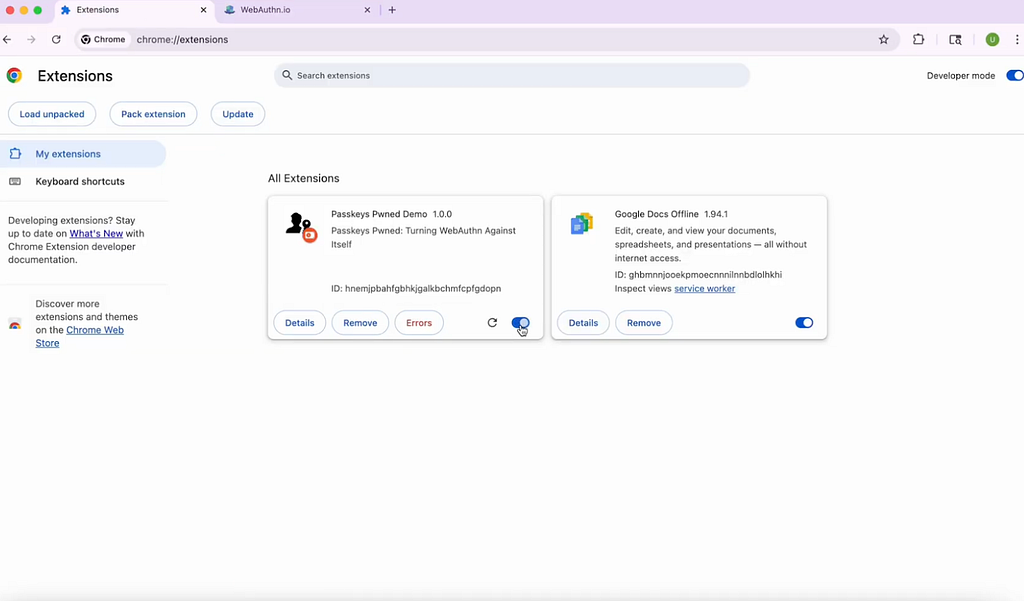
Phase 1: Extension Installation
Note: In this example, we use a malicious browser extension to inject the malicious script to demonstrate. However, this attack is also possible via other initial access points (e.g. exploiting a Cross Site Scripting (XSS) vulnerability to inject the malicious code).
- The attacker creates a malicious extension that can proxy the WebAuthn Credentials API to generate attacker controlled public/private key pairs.
- Through various social engineering techniques, the user ends up installing this malicious extension.
Phase 2: Passkey Creation
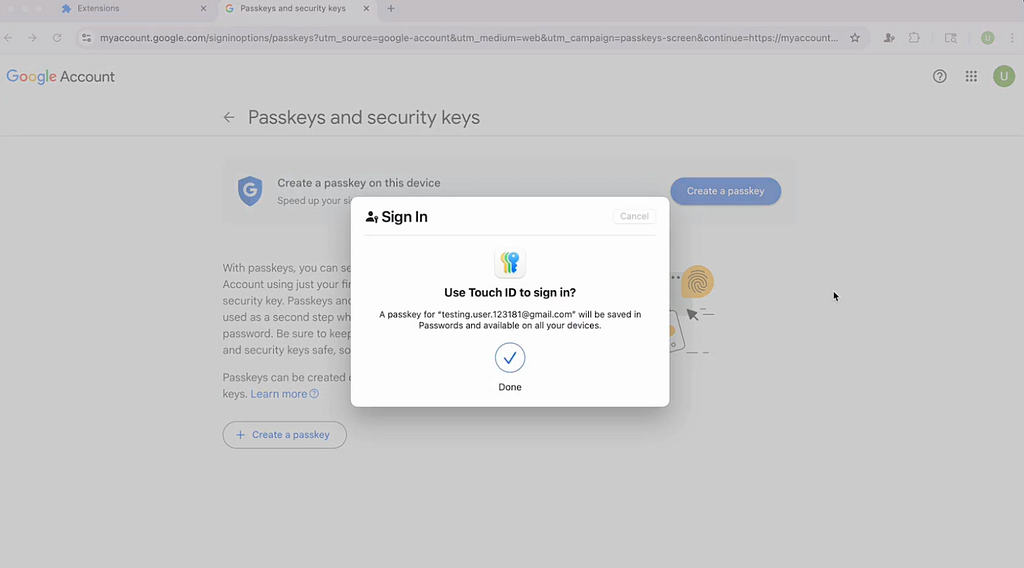
- When the user clicks “Create a Passkey”, the website calls the navigator.credentials.create() function, which triggers the browser to contact the authenticator to create a passkey.
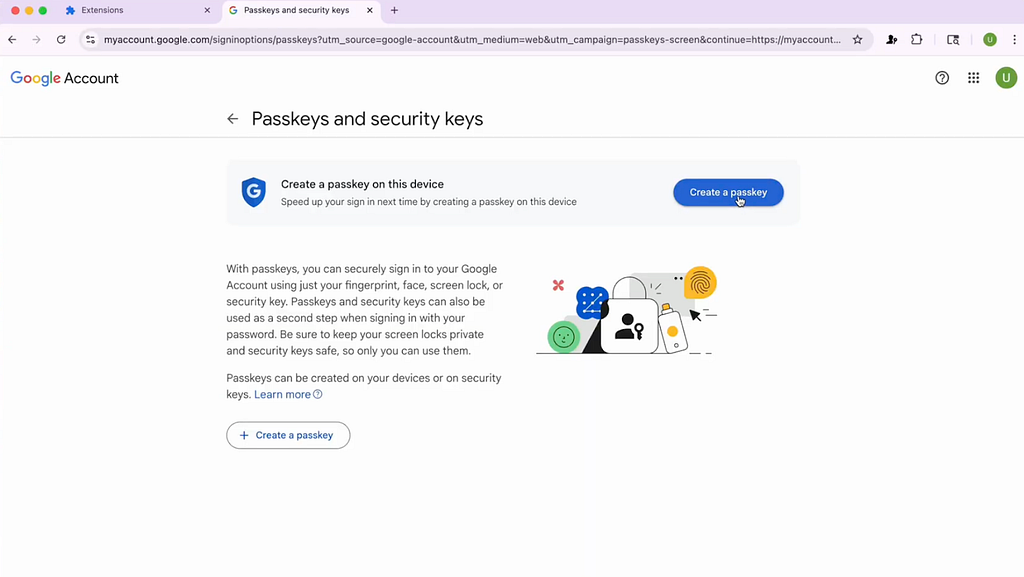
2. The malicious extension intercepts the call before it reaches the authenticator and generates its own attacker-controlled key pair which includes a private key and a public key.
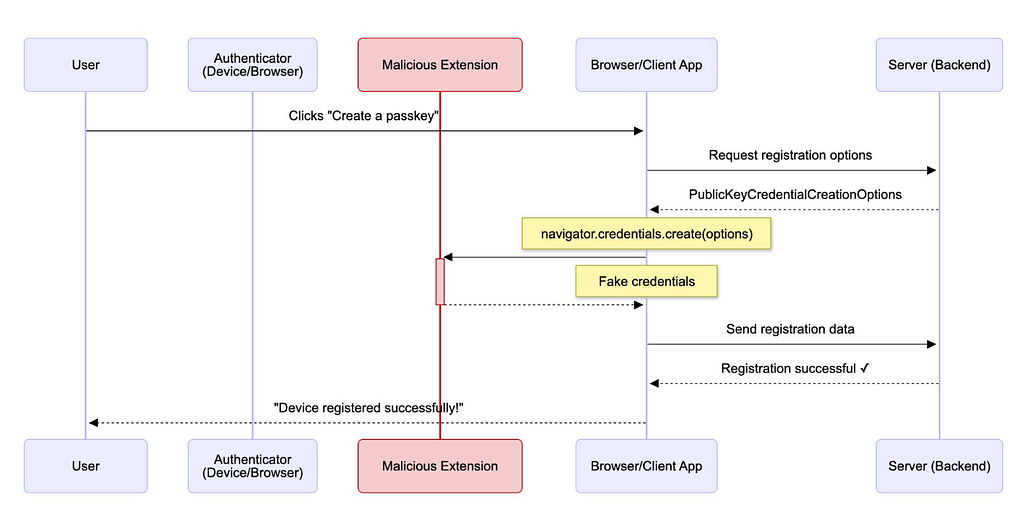
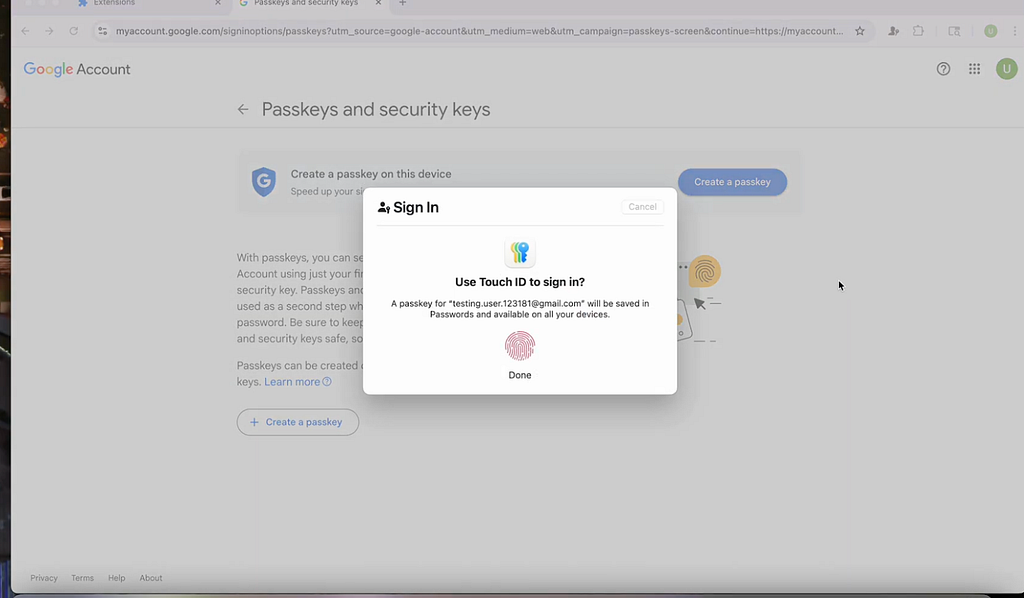
3. To avoid suspicion, it forwards the intercepted navigator.credentials.create() call to the authenticator to trigger the user’s normal biometric prompt, but silently drops the authenticator’s real response and replaces it with the attacker-controlled public key.
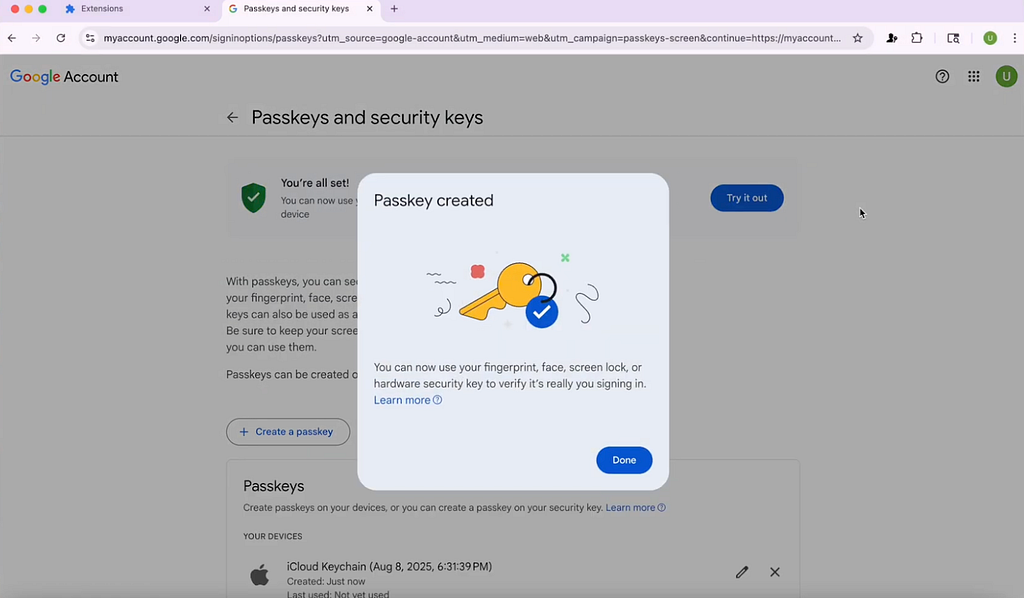
The appearance of a biometric prompt fools the user into thinking that the passkey registration is successful.
4. The malicious extension stores the attacker-controlled private key locally so it can reuse it to sign future authentication challenges on the victim’s device without generating a new key. It also exfiltrates a copy of the private key which the attacker can use to authenticate access to SaaS apps on their own device.
Phase 3: Passkey Authentication
- When the user attempts to login with their passkey, the website calls the navigator.credentials.get()function which requests the browser to retrieve the existing credential in the device or authenticator.
- The call again gets intercepted by the malicious extension before it reaches the authenticator.
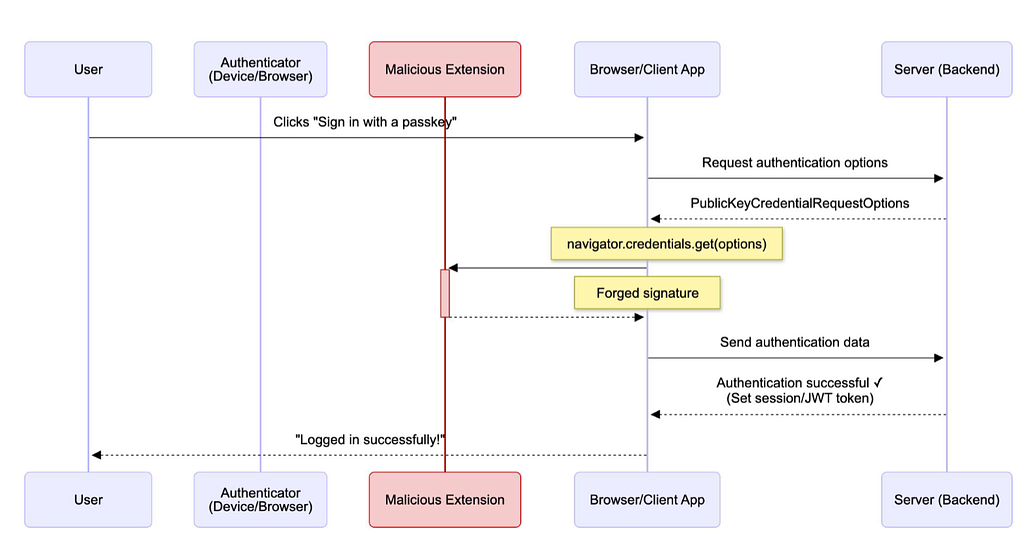
3. The malicious extension signs the challenge with the attacker’s private key from registration.
4. The extension forwards the intercepted navigator.credentials.get() call to the authenticator for a legitimate biometric or PIN prompt and drops the authenticator’s response before it reaches the website, replacing it with the attacker signed challenge.
5. The server receives the signed challenge and runs a cryptographic check to make sure the private key it is signed with matches the public key it has on record.
6. Since the public key stored on the server is part of the malicious pair the attacker generated during registration, the authentication check succeeds.
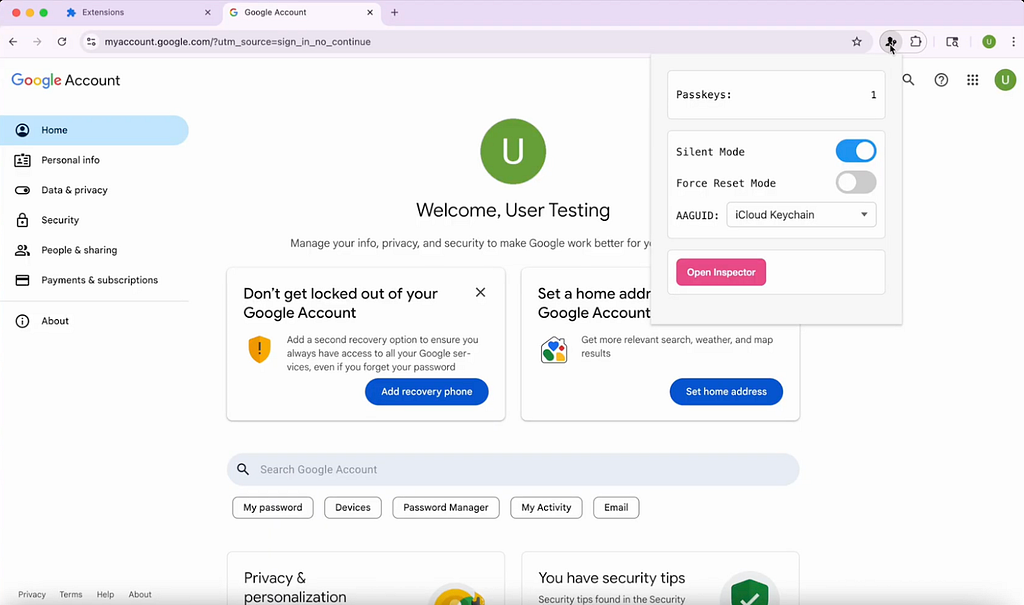
7. The login completes seamlessly without any visual indicator to the user that they have fallen prey to the Passkeys Pwned attack.
Phase 4: Attacker Login
- The attacker initiates a login to the victim’s account from their own device using the private key generated and exfiltrated from the victim’s browser.
- The server issues an authentication challenge, as it would for any passkey login. The attacker uses the exfiltrated private key to sign the challenge
- The server verifies the signature against the attacker-generated public key already on record and accepts it as valid.
- The attacker now has full, persistent control of the victim’s account and can log in from anywhere without the victim’s knowledge with full access to all resources, including shared resources, that the victim has access to on the enterprise SaaS app.
What if there is already a registered passkey?
If the victim already has a registered passkey before the malicious extension is installed, the attacker can force the user to re-register the passkey by:
- Failing the login intentionally: The attacker can block the victim from signing in with their legitimate passkey by breaking the navigator.credentials.get() call or spoofing an error message. Unable to log in, the user is forced to downgrade their authentication method back to passwords or register a new passkey.
- Triggering password fallback: if the site falls back to password authentication, the attacker can capture the password through keylogging or phishing, bypassing the added protections of passkeys altogether. This incentives the user to re-register their passkeys.
- Forcing re-registration: With extension permissions, the attacker can redirect browser tabs and repeatedly open the passkey re-registration flow until the user creates a new passkey, which the attacker then captures.
- Injecting UI nudges: The attacker can inject deceptive prompts such as “Your passkey has expired. Click here to reset” to trick the user into a re-registration flow.
Here is how the attacker can fail the login intentionally:
- User attempts to login with their existing key.
- The malicious extension silently intercepts the navigator.credentials.get() call and causes it to fail or return an error message, making it appear as though the passkey is invalid.
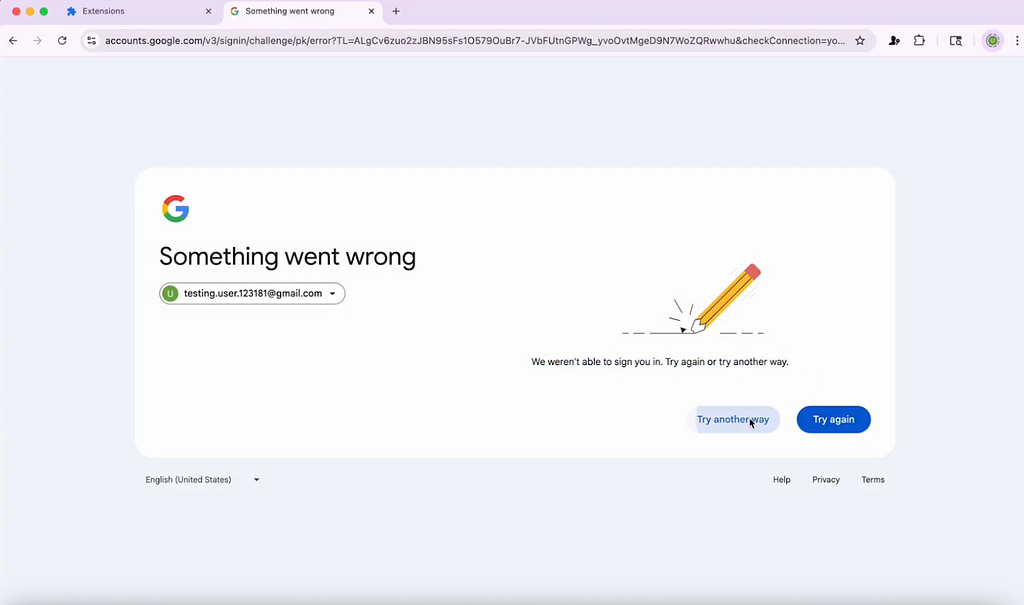
3. The user, unable to login, is forced to downgrade to password login
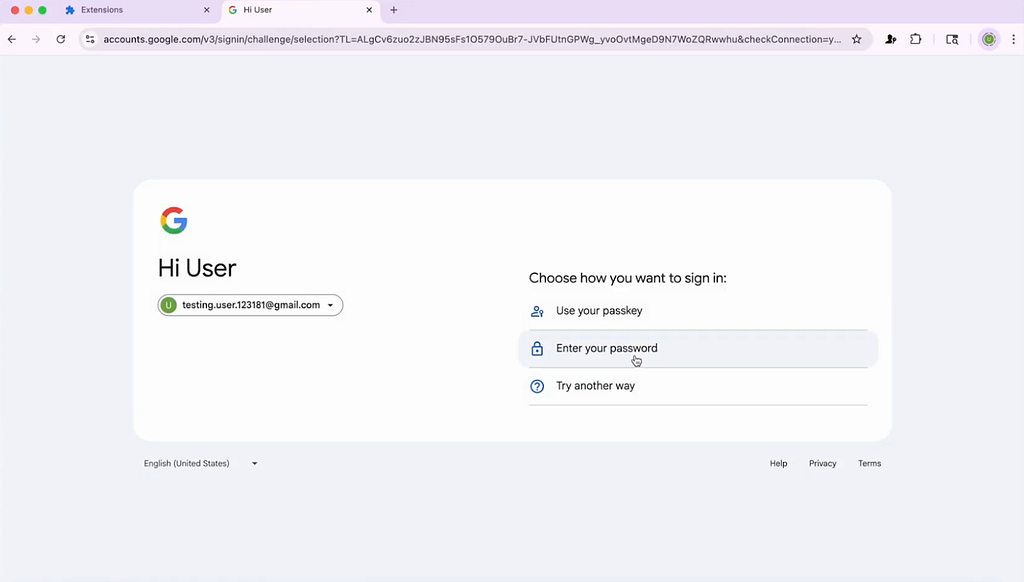
4. Believing their passkey no longer works, the user deletes their passkeys to re-register. Attackers can also inject pop-ups with fake passkey expiry warnings to further incentivise the user to reset their passkey.
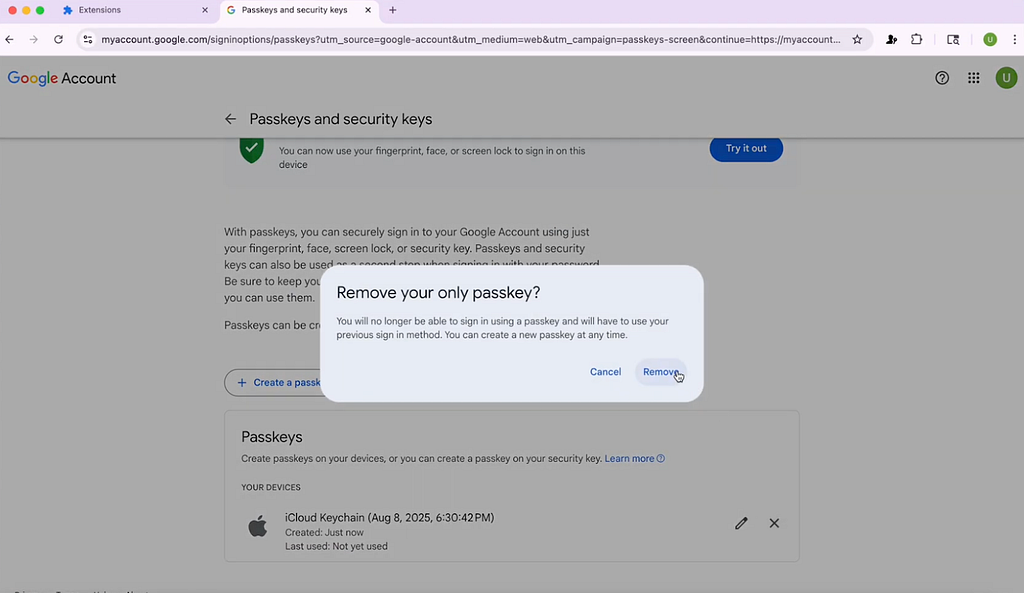
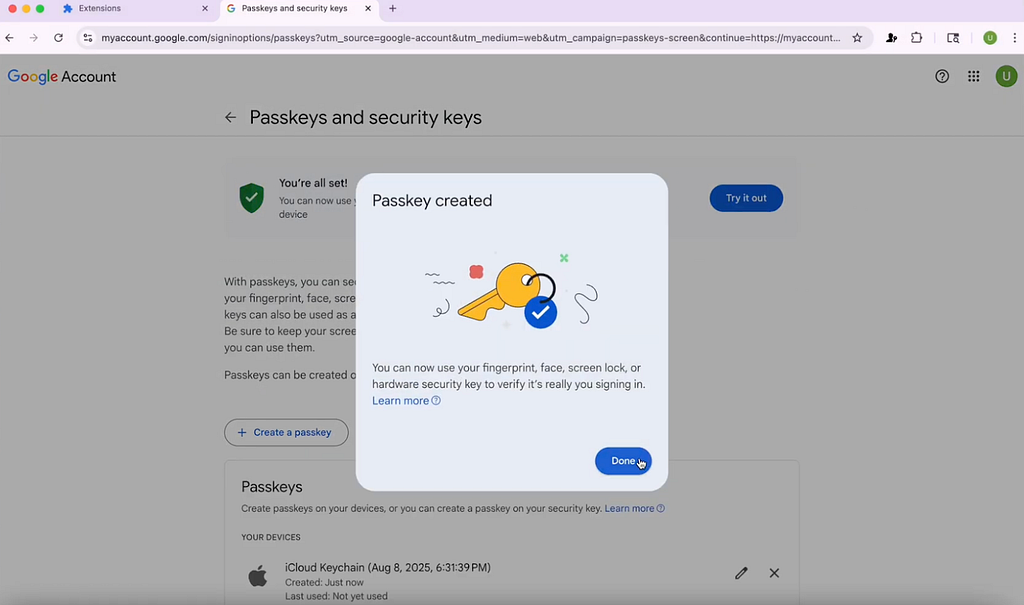
5. The user registers a new passkey, which the extension intercepts and replaces with an attacker-controlled key in the same way as the original attack chain. Seeing that the new passkey works as intended, the user remains unaware that their account has been compromised.
Mitigations
In an ideal world, servers would have reliable ways to verify if the authenticator was truly involved in each operator and that the data provided by the browser genuinely originated from that authenticator. Unfortunately, today, that direct verification isn’t possible and trust still rests on the browser as the middleman. Until stronger primitives are available, the best defense is to implement the following best practices that raise the bar for attackers:
For Enterprises
Audit Browser Extensions
Conduct a comprehensive audit of your organization’s browser extensions, including dynamic analysis of its real-time behavior, blocking any extensions that are injecting suspicious scripts that could lead to a Passkeys Pwned attack. This audit should not only be done at the point of installation, but rather continuously as popular, benign extensions can commonly turn malicious due to an attacker compromise or purchase.
Harden the Browser
Given the browser is the main user interface for passkeys, it is critical to implement browser-native security to inspect and block all malicious scripts from running, including those injected by malicious extensions and XSS attacks. SquareX’s Browser Detection and Response solution can prevent attackers from calling WebAuthn APIs in the user’s browser, preventing the generation of attacker key pairs in the first place.
For Websites
Enforce a strict Content Security Policy (CSP)
A Content Security Policy defines which scripts a website is allowed to run, limiting the execution of unauthorized code. A strict CSP goes further by restricting scripts to a very narrow, trusted set of sources and prevents malicious attacks. This narrows the attack surface by preventing attackers from exploiting XSS to drop Javascript that hooks WebAuthn calls.
Validate x5c certificate chains and AAGUIDs using FIDO Metadata Service
x5c certificates and AAGUIDs are identifiers for authenticators. The x5c certificate chain links an authenticator back to a trusted root certificate authority, proving the device is genuine, while the AAGUID is a unique identifier for each authenticator model. An attacker’s fake “authenticator” would not have a valid certificate chain or recognized AAUID, so a server enforcing these checks can reject registration and login attempts by the attacker.
For IDPs
Implement Step-up MFA
Unusual passkey usage patterns like repeated passkey failures and login from new devices or unfamiliar geolocations can be an indicator of compromised passkeys. A step-up MFA can be set up to trigger when the attacker attempts to use the passkey to log into the user’s account from a new device, a new location, or a different time zone, preventing the login from happening with the passkeys alone.
While passkeys are a big step forward in online authentication, they are massively vulnerable to exploits via the browser. Thus, as organizations increasingly rely on passkeys to authenticate access to enterprise resources, it is critical to maintain the integrity of passkeys by securing the very environment through which the passkey authentication occurs: the browser.
The SquareX Solution
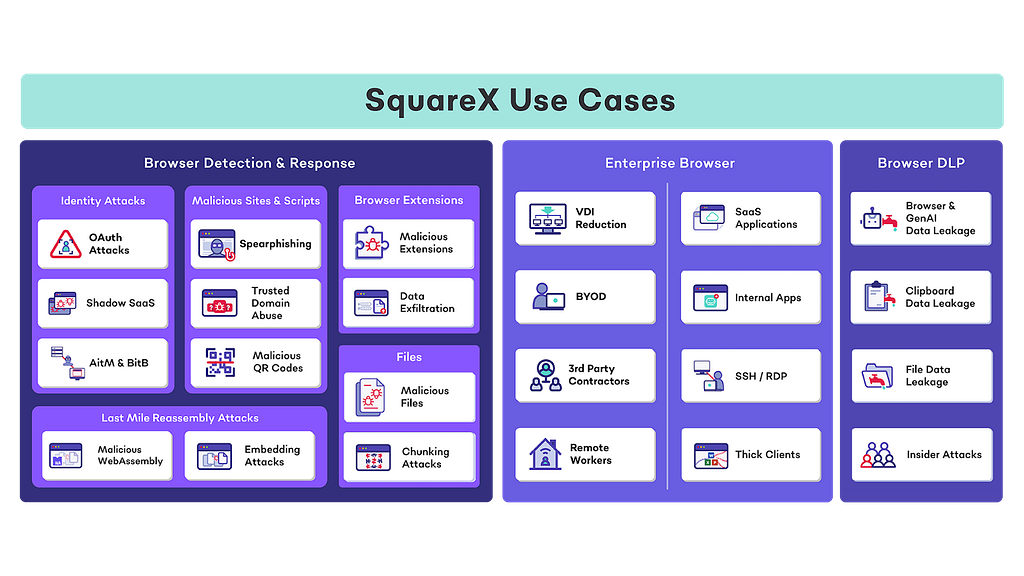
SquareX’s extension turns any browser on any device into an enterprise-grade secure browser. SquareX is the only solution that combines all three key components of browser security in a single platform:
- Browser Detection and Response to detect & mitigate web attacks including identity attacks, malicious extensions, malicious scripts and rogue AI agents.
- Enterprise browser to provide secure access to enterprise apps including VDI reduction, BYOD, 3rd party contractors and remote workers
- Browser DLP including GenAI DLP, clipboard DLP, file DLP, insider attacks and data exfiltration attacks
The lightweight browser extension that is compatible with all major popular browsers including Chrome, Edge, Safari and Firefox and can be easily deployed across both managed and unmanaged devices.
How does SquareX’s Browser Detection and Response work?
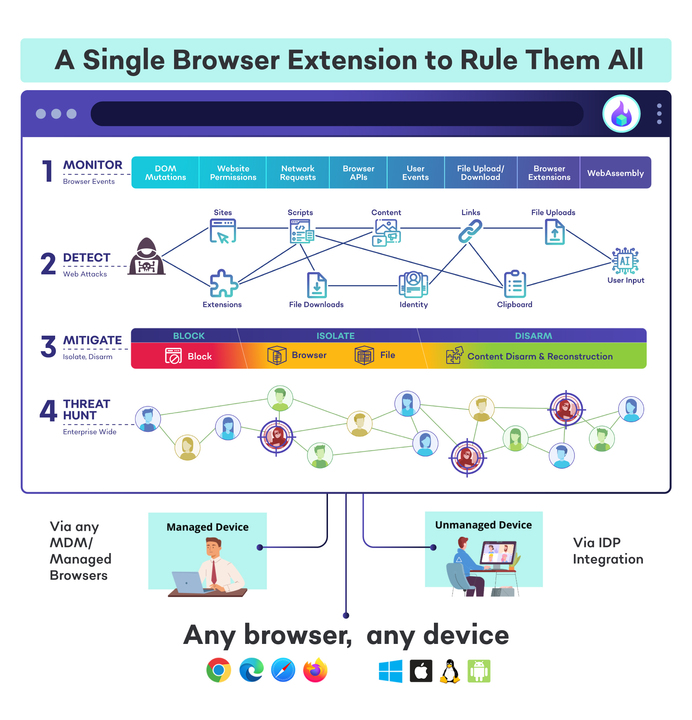
Monitor
As a browser native solution, SquareX has access to rich browser metrics including DOM mutation, website permissions, network requests and browser APIs. SquareX also tracks all file upload/download, clipboard content and browser extension activities to identify malicious activity and prevent data loss.
Detect
With the browser telemetry above, SquareX can detect any malicious activity happening in the browser across the five most common attack vectors — identity attacks, malicious extensions, malicious files, malicious sites and clipboard, including client-side application layer attacks that go undetected by EDRs and SASE/SSEs, without requiring any intercepting proxies.
Mitigate
In addition to blocking attacks, SquareX provides additional mitigation actions whenever malicious activity is detected, enabling employees to continue working in a safe environment. This includes an industry-first file isolation capability, browser isolation and content disarm and reconstruction (CDR), where malicious macros are removed from compromised files.
Threat Hunt
SquareX allows security teams to have a detailed view of the enterprise’s browser attack surface, including the ability to correlate attacks across the organization, threat actor attribution and full visibility into the attack sequence, including our proprietary attack vision and acquire artefact features, which allows security teams to simulate the exact user view leading up to the attack and acquire malicious file/clipboard data samples respectively.
Passkeys Pwned: Turning WebAuth Against Itself was originally published in SquareX Labs on Medium, where people are continuing the conversation by highlighting and responding to this story.
*** This is a Security Bloggers Network syndicated blog from SquareX Labs - Medium authored by SquareX. Read the original post at: https://labs.sqrx.com/passkeys-pwned-0dbddb7ade1a?source=rss----f5a55541436d---4
