

Thursday, June 11, 2026

Security Boulevard Logo

Security Boulevard

The Home of the Security Bloggers Network

Community Chats Webinars Library
  • Home
    • Cybersecurity News
    • Features
    • Industry Spotlight
    • News Releases
  • Security Creators Network
    • Latest Posts
    • Syndicate Your Blog
    • Write for Security Boulevard
  • Webinars
    • Upcoming Webinars
    • Calendar View
    • On-Demand Webinars
  • Events
    • Upcoming Events
    • On-Demand Events
  • Sponsored Content
  • Chat
    • Security Boulevard Chat
    • Marketing InSecurity Podcast
    • Techstrong.tv Podcast
    • TechstrongTV - Twitch
  • Library
  • Related Sites
    • Techstrong Group
    • Cloud Native Now
    • DevOps.com
    • Security Boulevard
    • Techstrong Research
    • Techstrong TV
    • Techstrong.tv Podcast
    • Techstrong.tv - Twitch
    • Devops Chat
    • DevOps Dozen
    • DevOps TV
  • Media Kit
  • About
    • Sponsor

  • Analytics
  • AppSec
  • CISO
  • Cloud
  • DevOps
  • GRC
  • Identity
  • Incident Response
  • IoT / ICS
  • Threats / Breaches
  • More
    • Blockchain / Digital Currencies
    • Careers
    • Cyberlaw
    • Mobile
    • Social Engineering
  • Humor
Security Bloggers Network 

Home » Security Bloggers Network » How to set PCAP as default save file format in Wireshark

SBN

How to set PCAP as default save file format in Wireshark

by Erik Hjelmvik on February 25, 2025

Did you know that there is a setting in Wireshark for changing the default save file format from pcapng to pcap?

In Wireshark, click Edit, Preferences. Then select Advanced and look for the capture.pcap_ng setting. Change the value to FALSE if you want Wireshark to save packets in the pcap file format. You have to double-click the “TRUE” text to change it into “FALSE”.
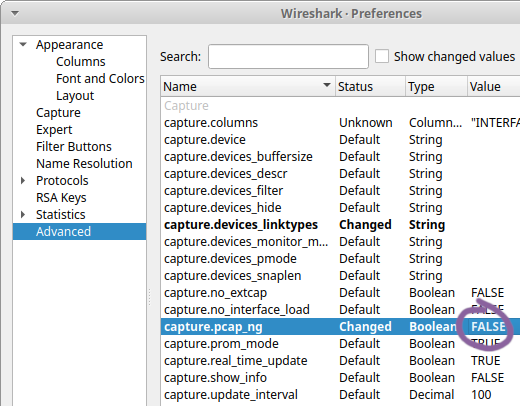
capture.pcap_ng in Wireshark Preferences

I recently learned about this setting from Sake Blok when he commented on my feature request to have Wireshark use pcap as default savefile format instead of pcapng. I have a feeling that this feature request will not be accepted though, since it has received several thumbs down 👎 reactions (it might actually be the most downvoted feature request ever on Wireshark’s gitlab repo). That’s why I’m trying to spread the word about this setting instead, so that everyone who prefers the pcap file format over pcapng can change the default behavior in their own Wireshark installation.

This setting doesn’t affect command line tools, like dumpcap, tshark, mergecap etc. So if you want to capture packets with dumpcap to a pcap file then you need to use the -P switch like this:

dumpcap -P -i eth0 -w dump.pcap

Other command line tools in the Wireshark suite, like tshark and mergecap, require that you instead specify -F pcap like this:

mergecap -F pcap -w out.pcap in1.pcap in2.pcap

What’s Wrong with PCAP-NG?

Why all this fuss about using PCAP instead of PCAP-NG? Well, it turns out that most Wireshark users are happily unaware of just how much metadata there is in the pcapng files they share online. This metadata typically contains information about the CPU of their computer, the exact version and build of their operating system as well as the name of the network interface on which the capture was performed. For Windows users the network interface details even contain a GUID that usually is a world-unique identifier.

I was once even able to identify a person, who had anonymously shared a pcapng file online, by inspecting metadata in the shared capture file github.pcapng.
Here’s the metadata in that capture file:
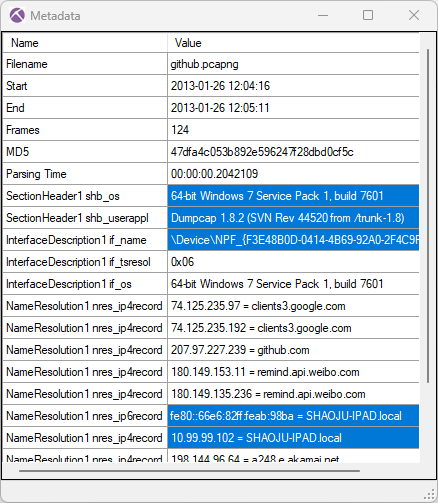
Metadata in a PcapNG file showed in NetworkMiner Professional's capture file properties

Only a subset of the metadata in this pcapng file can be viewed using Wireshark’s Capture File Properties or the command line tool capinfos. I therefore used the “Show Metadata” functionality in NetworkMiner Professional to create the screenshot above.

Mergecap

The previously mentioned command line tool mergecap, which joins multiple capture files into one, outputs pcapng files by default. In fact, if it is tasked to merge two pcap files (having no metadata), it then creates a pcapng file containing the packets from the two input pcap files enriched with metadata about the computer running mergecap. This metadata is typically information about the operating system as well as the version of mergecap that was used.
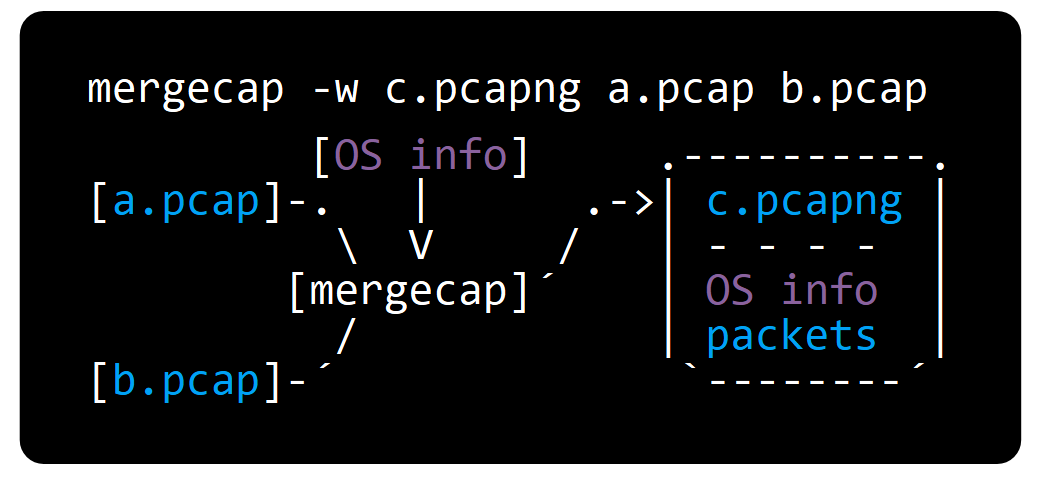
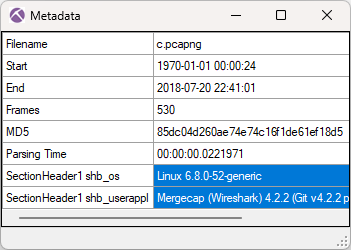
Mergecap ASCII flowchartMetadata in PcapNG file created with mergecap

Providing an output file with the “.pcap” suffix to mergecap will not help, mergecap still generates a pcapng file. You have to use the -F pcap switch to have it generate a pcap file without metadata about your operating system.

What do Wireshark Users Want?

I recently conducted two unscientific polls, where I asked which savefile format Wireshark should use as default.
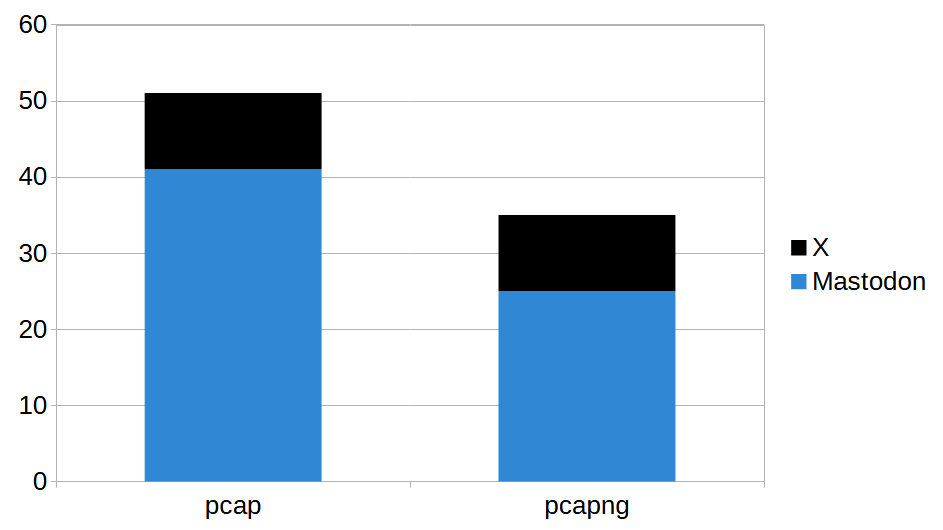
Poll results from X and Mastodon: 51 voted for pcap and 35 voted for pcapng

In total the polls got 86 votes, where 51 voted for pcap and 35 preferred pcapng.
I don’t want to draw any real conclusions from these results though, primarily due to the low number of participants but also because there might be a bias among the people who were reached by these polls.

Looking Ahead

I reach out to people I know every now and then when I notice that they are sharing pcapng files containing potentially sensitive metadata. They then have to decide if they are okay with this or if they want to go through the process of replacing the pcapng files with pcap files. In many cases they choose the latter, which can be quite tricky if that involves removing files from GitHub.

I eventually got tired of doing this, especially when I realized that even very skilled Wireshark users often don’t know that pcapng files store metadata about their computers. Reminding people to select the “pcap” format every time they save a capture file doesn’t seem to be the solution. I therefore hope that this blog post can help Wireshark users avoid accidentally sharing unnecessary metadata in the future.

For more information about the pcapng format, please visit pcapng.com.

*** This is a Security Bloggers Network syndicated blog from NETRESEC Network Security Blog authored by Erik Hjelmvik. Read the original post at: https://www.netresec.com/?page=Blog&month=2025-02&post=How-to-set-PCAP-as-default-save-file-format-in-Wireshark

February 25, 2025February 25, 2025 Erik Hjelmvik ascii-art, capture.pcap_ng setting, dumpcap, mergecap, metadata, pcap, Pcap-NG, PcapNG, Wireshark
  • ← DeepSeek vs ChatGPT: Why ChatGPT Still Leads the AI
  • INE Secures Spot in G2’s 2025 Top 50 Education Software Rankings →

Techstrong TV

Click full-screen to enable volume control
Watch latest episodes and shows

Tech Field Day Events

Upcoming Webinars

Building a Resilient Security Culture in the AI Era with AWS & Datadog
Toxic Flows: When Your Agent Skill Becomes a Supply Chain Attack
The Future of Agentic Software Delivery: Unifying Source & Binaries
35 Million Lines, Zero Build-Breakers: How Adyen Scaled DevSecOps
How to Conduct AI-Native Bug Discovery & Triage

Podcast

Listen to all of our podcasts

Secure by Design

1 week ago | Jack Poller

Senator Sanders Wants to Own AI Companies — and Hand America’s Adversaries the Keys

2 weeks ago | Jack Poller

NIST’s Nine: The PQC Signature Race Moves to Round Three

2 weeks ago | Jack Poller

The Quantum Arms Race: Why Washington Just Wrote a $2 Billion Check to Nine Companies

3 weeks ago | Jack Poller

Beyond Moore’s Law: The Hyper-Acceleration of Autonomous AI Cyber Capabilities

1 month ago | Jack Poller

The Exception Economy: When Security Teams Stop Protecting and Start Negotiating

Press Releases

GoPlus's Latest Report Highlights How Blockchain Communities Are Leveraging Critical API Security Data To Mitigate Web3 Threats

GoPlus’s Latest Report Highlights How Blockchain Communities Are Leveraging Critical API Security Data To Mitigate Web3 Threats

C2A Security’s EVSec Risk Management and Automation Platform Gains Traction in Automotive Industry as Companies Seek to Efficiently Meet Regulatory Requirements

C2A Security’s EVSec Risk Management and Automation Platform Gains Traction in Automotive Industry as Companies Seek to Efficiently Meet Regulatory Requirements

Zama Raises $73M in Series A Lead by Multicoin Capital and Protocol Labs to Commercialize Fully Homomorphic Encryption

Zama Raises $73M in Series A Lead by Multicoin Capital and Protocol Labs to Commercialize Fully Homomorphic Encryption

RSM US Deploys Stellar Cyber Open XDR Platform to Secure Clients

RSM US Deploys Stellar Cyber Open XDR Platform to Secure Clients

ThreatHunter.ai Halts Hundreds of Attacks in the past 48 hours: Combating Ransomware and Nation-State Cyber Threats Head-On

ThreatHunter.ai Halts Hundreds of Attacks in the past 48 hours: Combating Ransomware and Nation-State Cyber Threats Head-On

Subscribe to our Newsletters

Most Read on the Boulevard

Ex-IBM Exec Accuses Big Blue and AT&T of Covering Up Foreign Data Breaches
Google Patches 429 Chrome Vulnerabilities in Major Browser Update
Zscaler Launches Industry-First Zero Trust Security for Agentic AI
ShinyHunters Secret to Success: Breaking the Trust Barrier
Anthropic’s Mythos Can Serve Up N-Day Exploits in Minutes or Hours
7 Best Local LLMs You Can Run for Coding
10 Best AI Models for Coding in 2026
8 Self-Evolving Skills Hermes Agent Writes on Its Own
10 Security & QA Skills for AI Coding Agents
12 AI Coding Agents Compared in 2026: Claude Code vs Antigravity vs Codex vs Cursor vs OpenCode vs Hermes

Industry Spotlight

Anthropic Mythos AI Model Strikes Fear in Trump Administration, U.S. Banks
Cloud Security Cybersecurity Data Privacy Data Security Featured Incident Response Industry Spotlight Malware Mobile Security Network Security News Security Awareness Security Boulevard (Original) Social - Facebook Social - LinkedIn Social - X Spotlight Threats & Breaches Vulnerabilities 

Anthropic Mythos AI Model Strikes Fear in Trump Administration, U.S. Banks

April 12, 2026 Jeffrey Burt | Apr 12 Comments Off on Anthropic Mythos AI Model Strikes Fear in Trump Administration, U.S. Banks
The Day the Security Music Died
AI and Machine Learning in Security Cybersecurity Featured Industry Spotlight Security Boulevard (Original) Social - Facebook Social - LinkedIn Social - X Spotlight 

The Day the Security Music Died

April 8, 2026 Alan Shimel | Apr 08 Comments Off on The Day the Security Music Died
The Lock, Not the Alarm: How Palo Alto’s Koi Acquisition Rewrites Endpoint Security
Featured Industry Spotlight Security Boulevard (Original) Social - Facebook Social - LinkedIn Social - X Spotlight Uncategorized 

The Lock, Not the Alarm: How Palo Alto’s Koi Acquisition Rewrites Endpoint Security

February 18, 2026 Jack Poller | Feb 18 Comments Off on The Lock, Not the Alarm: How Palo Alto’s Koi Acquisition Rewrites Endpoint Security

Top Stories

ServiceNow Fixes Flaw That Could Lead to Unauthorized Access to Instances
Cloud Security Cybersecurity Data Privacy Data Security Featured Identity & Access Incident Response Mobile Security Network Security News Security Awareness Security Boulevard (Original) Social - Facebook Social - LinkedIn Social - X Spotlight Vulnerabilities 

ServiceNow Fixes Flaw That Could Lead to Unauthorized Access to Instances

June 11, 2026 Jeffrey Burt | 6 hours ago 0
Zscaler Launches Industry-First Zero Trust Security for Agentic AI
AI and ML in Security Cybersecurity Featured News Security Boulevard (Original) Social - Facebook Social - LinkedIn Social - X Spotlight Zero-Trust 

Zscaler Launches Industry-First Zero Trust Security for Agentic AI

June 10, 2026 Jon Swartz | Yesterday 0
Anthropic’s Mythos Can Serve Up N-Day Exploits in Minutes or Hours
Cloud Security Cybersecurity Data Privacy Data Security Featured Incident Response Malware Mobile Security Network Security News Security Awareness Security Boulevard (Original) Social - Facebook Social - LinkedIn Social - X Spotlight Threat Intelligence Vulnerabilities 

Anthropic’s Mythos Can Serve Up N-Day Exploits in Minutes or Hours

June 9, 2026 Jeffrey Burt | 2 days ago 0

Security Humor

Randall Munroe’s XKCD 'Husband and Wife'

Randall Munroe’s XKCD ‘Husband and Wife’

Download Free eBook

[su_panel border="0px solid #ddd" radius="0" text_align="center" padding-top="0px" padding-bottom="0px"]
Managing the AppSec Toolstack
[/su_panel]

Security Boulevard Logo White

DMCA

Join the Community

  • Add your blog to Security Creators Network
  • Write for Security Boulevard
  • Bloggers Meetup and Awards
  • Ask a Question
  • Email: [email protected]

Useful Links

  • About
  • Media Kit
  • Sponsor Info
  • Copyright
  • TOS
  • DMCA Compliance Statement
  • Privacy Policy

Related Sites

  • Techstrong Group
  • Cloud Native Now
  • DevOps.com
  • Digital CxO
  • Techstrong Research
  • Techstrong TV
  • Techstrong.tv Podcast
  • DevOps Chat
  • DevOps Dozen
  • DevOps TV
Powered by Techstrong Group
Copyright © 2026 Techstrong Group Inc. All rights reserved.
×

Insert/edit link

Enter the destination URL

Or link to existing content

    No search term specified. Showing recent items. Search or use up and down arrow keys to select an item.