

Hunting Impacket — Part 3

Hunting Impacket — Part 3

Overview — Enumeration/System Tools
Welcome back. This is part three of our blog series covering the Impacket example tools. Impacket is a collection of Python classes focused on providing tools to understand and manipulate low-level network protocols. This capability enables you to craft or decode packets of a wide variety of protocols such as IP, TCP, UDP, ICMP, and even higher-level protocols like SMB, MSRPC, NetBIOS, and others.
One of the key strengths of Impacket is its ability to facilitate the development of scripts and tools for network exploration, penetration testing, and exploit development. It is widely used by security researchers and penetration testers to create or extend their own tools when working on assessments or research projects. Impacket includes modules to perform operations like network authentication cracking, relay attacks, and execution of code on target machines through protocols like SMB.
Moreover, Impacket provides several command-line tools as practical examples of what can be achieved using its classes. These example tools include scripts for executing commands on remote systems, transferring files, port scanning, and gathering system information, etc. Tools such as smbexec, wmiexec, and psexec are particularly notable for their widespread use to perform remote command execution on Windows systems, demonstrating the power and flexibility of Impacket in real-world scenarios. Register for a FREE community account to access the tons of content included in this blog post, as well as thousands of other community detections.
In the previous post we’ve covered how Impacket can be used to execute commands on a target host, but it also can be used to enumerate a target as well. Sometimes you need to know more about a system before following up with a full fledged attack. Some of these examples can also be used to make small modifications to a system to weaken it.
addcomputer.py:
Designed to interact with Active Directory (AD) and Domain Services.
It allows for the addition of a computer account to the AD. The script
operates by leveraging network protocols to communicate with AD
services, automating the process of computer account creation without
needing to use the Windows. graphical user interface or PowerShell
cmdlets.
exchanger.py:
A tool for connecting to MS Exchange via RPC over HTTP v2. Can be used
to enumerate mailboxes, public folders, and contact lists.
GetADUsers.py:
This script will query Active Directory for user account information.
It can retrieve a wide range of details about user accounts,
getArch.py:
Determines the architecture of a remote Windows machine over the
network. This is achieved by utilizing SMB (Server Message Block) or
RPC (Remote Procedure Call) protocol.
lookupsid.py:
A Windows SID brute forcer through MSRPC Interface, aiming at finding
remote users/groups.
netview.py:
Monitors and records the sessions that are open on remote hosts.
Continuously scans the identified hosts to monitor login and logout
activities on remote systems.
ping.py:
This implementation of ping uses the ICMP echo and echo-reply packets
to check the status of a host. If the remote host is up, it should
reply to the echo probe with an echo-reply packet.
ping6.py:
IPv6 version of ping.py.
rdp_check.py:
This script tests whether an account is valid on the target host by
attempting to reach CredSSP auth.
reg.py:
Used for interacting with Windows Registry through the network. It
allows users to connect to a remote Windows machine, and perform
various registry operations such as querying, creating, and deleting
keys or values without needing physical access to the system. This
script leverages the Windows Remote Registry service and SMB/RPC
protocol to execute these operations
rpcdump.py:
Script designed to enumerate and dump information from Microsoft’s
Remote Procedure Call (RPC) services over the network. It can identify
RPC services available on a remote Windows host by sending RPC queries
and analyzing the responses.
rpcmap.py:
It scans and reports on the various RPC services that are exposed by
the target. This will then bind to the MGMT interface and get the
interface UUIDs. Otherwise, it takes a list of known interface UUIDs
and tries to bind to each one.
samrdump.py:
Specifically designed to gather and dump user and group membership
information from Windows systems using the Security Account Manager
(SAM) Remote Protocol (MS-SAMR). The MS-SAMR protocol is used by
Windows to perform administrative tasks related to security accounts,
such as creating, modifying, and deleting user accounts or querying
for group membership. samrdump.py exploits this protocol to remotely
query a target system for information about its users and groups
without needing to authenticate as a user with administrative
privileges.
services.py:
This script interacts with Windows services through the SMB protocol.
This script can be used to query, start, stop, create, or delete
Windows services remotely.
smbclient.py:
A simple SMB client that will list shares and files, rename, upload,
and download files and create and delete directories.
sniff.py:
Simple packet sniffer that listens for packets on a specified
interface.
sniffer.py:
Simple packet sniffer that uses a raw socket to listen for packets in
transit corresponding to the specified protocols.
tstool.py:
Designed to interact with Microsoft’s Terminal Services (now known as
Remote Desktop Services) and Remote Desktop Protocol (RDP). These can
be used for various purposes, such as enumerating session information,
attaching to sessions, listing, or terminating processes, or executing
shutdown commands remotely on a target Windows system.
wmiquery.py:
[MS-WMI] example. It’s used for executing WMI queries against
Windows systems.
Since there are so many we will take a closer look at a few of the more interesting ones.
Reg.py
This is one of the more powerful example scripts that doesn’t involve direct code execution. The ability to query and modify the registry remotely can have far-reaching consequences. Here is an example of using the tool to weaken a system by modifying DisableRestrictedAdmin. Similarly, the tool can be used to delete instead of creating a registry key/value.

The tool can also be used for querying the registry.
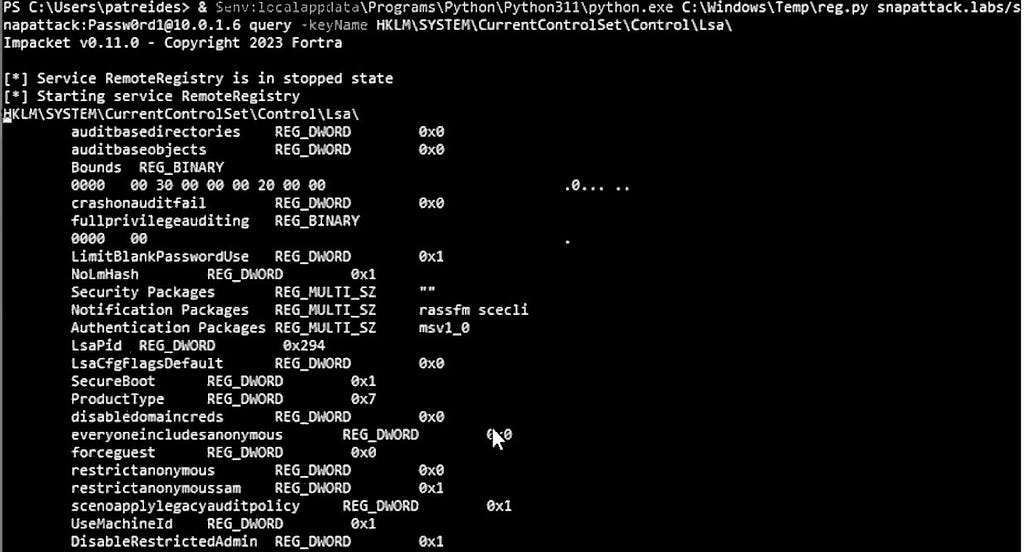
Fortunately for defenders, this activity is quite noisy and gives lots of detection opportunities. Since this is using the remote registry you will see a few tidbits related to starting and accessing that. First will be a request to the service control manager named pipe.
EventCode: 5145
AccessList: %%4416 %%4417
ObjectType: File
ProcessId: 4
RelativeTargetName: svcctl
ShareLocalPath:
ShareName: \\*\IPC$
Additionally, you will see the svchost.exe process launching the RemoteRegistry service. We can see the activity in the process graph spawning under the services.exe process.
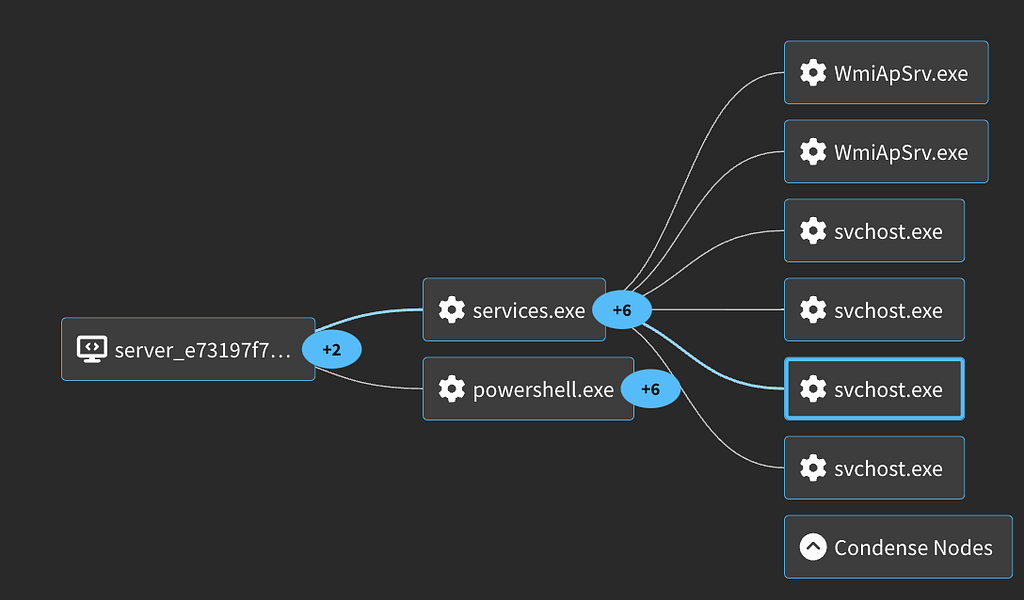
Looking at the process creation event we can see the RemoteRegistry service launch command.
EventCode: 1
CommandLine: C:\Windows\system32\svchost.exe -k localService -p -s RemoteRegistry
ParentCommandLine: C:\Windows\system32\services.exe
User: NT AUTHORITY\LOCAL SERVICE
The usage of the remote registry also causes a unique Named Pipe connection to the winreg pipe.
EventCode: 18
EventType: ConnectPipe
PipeName: \winreg
User: NT AUTHORITY\SYSTEM
For more logs and details, we have captured this activity in our platform: Impacket Remote Registry
For Detections check out this Collection: Hunting Impacket REG
MITRE
T1112: Modify Registry
Adversaries may interact with the Windows Registry to hide configuration information within Registry keys, remove information as part of cleaning up, or as part of other techniques to aid in persistence and execution.
T1012: Query Registry
Adversaries may interact with the Windows Registry to gather information about the system, configuration, and installed software.
T1059.006: Command and Scripting Interpreter: Python
Adversaries may abuse Python commands and scripts for execution.
T1078.002: Valid Accounts
Adversaries may obtain and abuse credentials of existing accounts as a means of gaining Initial Access, Persistence, Privilege Escalation, or Defense Evasion.
Samrdump.py
Samrdump.py attempts to enumerate a ton of user and group information using the Security Account Manager (SAM) Remote Protocol (MS-SAMR). It first identifies accounts:
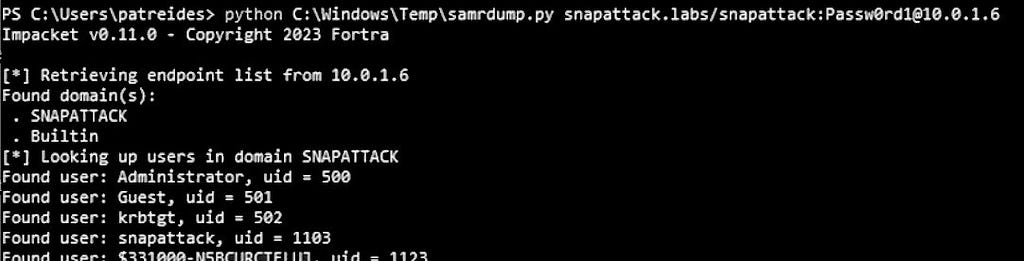
Next it will output various useful pieces of information about each of the accounts.
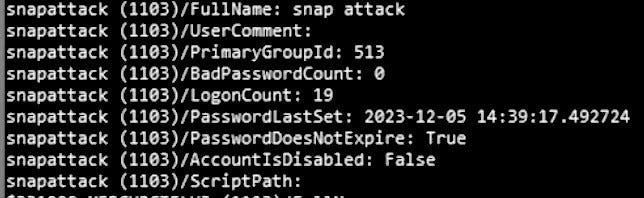
The first place to look for detections with this activity, like a lot of the Impacket tools, is with Windows event 5145, specifically trying to access SAMR.
EventCode: 5145
AccessList: %%4416 %%4417
ObjectType: File
ProcessId: 4
RelativeTargetName: samr
ShareLocalPath:
ShareName: \\*\IPC$
Another interesting log to look at for this activity is Windows Event 4661. This event indicates that a handle was requested for either an Active Directory object or a Security Account Manager (SAM) object. There will be rapid fire requests for the Domain and Account objects. This is how
the tool retrieves all that useful information it spits out. The ObjectTypes of interest here are going to be SAM_DOMAIN, SAM_GROUP, and SAM_USER.
SystemTime: '2024-03-04T17:35:27.910991Z'
EventCode: 4661
ObjectName: DC=snapattack,DC=labs
ObjectType: SAM_DOMAIN
ObjectServer: Security Account Manager

SystemTime: '2024-03-04T17:35:27.928578Z'
EventCode: 4661
ObjectName: S-1-5-21-421648065-3458498710-3574272164-500
ObjectType: SAM_USER
ObjectServer: Security Account Manager

SystemTime: '2024-03-04T17:35:27.999146Z'
EventCode: 4661
ObjectName: S-1-5-21-421648065-3458498710-3574272164-502
ObjectType: SAM_USER
ObjectServer: Security Account Manager

SystemTime: '2024-03-04T17:35:28.031308Z'
EventCode: 4661
ObjectName: S-1-5-21-421648065-3458498710-3574272164-1103
ObjectType: SAM_USER
ObjectServer: Security Account Manager
For more logs and details, we have captured this activity in our platform: Impacket SamrDump)
For Detections check out this Collection: Hunting Impacket REG
MITRE
T1021.002: Remote Services: SMB/Windows Admin Shares
Adversaries may use Valid Accounts to interact with a remote network share using Server Message Block (SMB). The adversary may then perform actions as the logged-on user.
T1087: Account Discovery
Adversaries may attempt to get a listing of valid accounts, usernames, or email addresses on a system or within a compromised environment.
T1087.002: Account Discovery: Domain Accounts
Adversaries may attempt to get a listing of domain accounts.
T1201: Password Policy Discovery
Adversaries may attempt to access detailed information about the password policy used within an enterprise network or cloud environment.
T1059.006: Command and Scripting Interpreter: Python
Adversaries may abuse Python commands and scripts for execution.
T1078.002: Valid Accounts
Adversaries may obtain and abuse credentials of existing accounts as a means of gaining Initial Access, Persistence, Privilege Escalation, or Defense Evasion.
Services.py
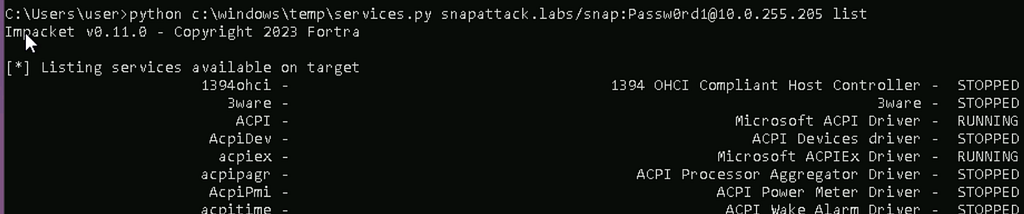
The services script allows an attacker to interact with Windows services on a remote host. This allows for listing, creating, modifying, starting, stopping, etc. Here are some examples of using this script.
Listing Services
Creating a new service

Viewing the config of a service
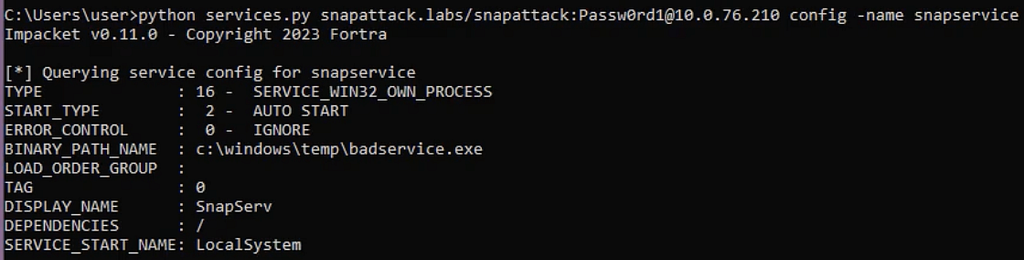
When creating a service with this technique, there will be many typical artifacts of a normal service creation, especially in the registry. Taking a look at these events you can see the binary that is going to be executed in the ImagePath key.
EventCode: 13
EventType: SetValue
Image: C:\Windows\system32\services.exe
TargetObject: HKLM\System\CurrentControlSet\Services\snapservice\ImagePath
Details: c:\windows\temp\badservice.exe
These registry keys are especially interesting when the service is set to auto start on boot, DWORD (0x00000002), as seen here.**
EventCode: 13
EventType: SetValue
Image: C:\Windows\system32\services.exe
TargetObject: HKLM\System\CurrentControlSet\Services\snapservice\Start
Details: DWORD (0x00000002)
User: NT AUTHORITY\SYSTEM
Looking at when the service is started you will see a process creation event under the services.exe process and the NT AUTHORITY/SYSTEM user. This is going to be the malicious executable that was configured earlier. Often these services masquerade as legitimate binaries but not always. Looking at the location of the executable can be useful in
identifying strange behavior.
EventCode: 1
ParentCommandLine: C:\Windows\system32\services.exe
CommandLine: c:\windows\temp\badservice.exe
CurrentDirectory: C:\Windows\system32\
User: NT AUTHORITY\SYSTEM
For more logs and details, we have captured this activity in our platform: Impacket Services Alternative)
For Detections check out this Collection: Hunting Impacket SERVICES
MITRE
T1021.002: Remote Services: SMB/Windows Admin Shares
Adversaries may use Valid Accounts to interact with a remote network share using Server Message Block (SMB). The adversary may then perform actions as the logged-on user.
T1569.002: System Services: Service Execution
Adversaries may abuse the Windows service control manager to execute malicious commands or payloads.
T1569: System Services
Adversaries may abuse system services or daemons to execute commands or programs. Adversaries can execute malicious content by interacting with or creating services either locally or remotely.
T1059.006: Command and Scripting Interpreter: Python
Adversaries may abuse Python commands and scripts for execution.
T1078.002: Valid Accounts
Adversaries may obtain and abuse credentials of existing accounts as a means of gaining Initial Access, Persistence, Privilege Escalation, or Defense Evasion.
Tstool.py
This script is built around manipulating terminal services on a Windows target. It has a bunch of various methods including the following:
- qwinsta: Display information about Remote Desktop Services sessions.
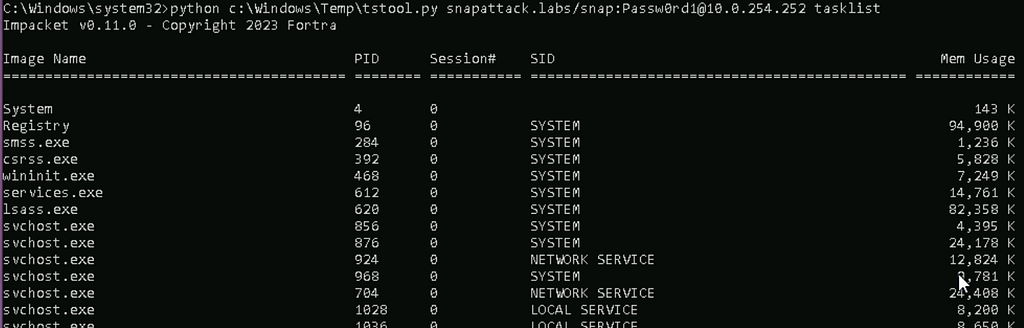
- tasklist: Display a list of currently running processes on the system.
- taskkill: Terminate tasks by process id (PID) or image name
- tscon: Attaches a user session to a remote desktop session
- tsdiscon: Disconnects a Remote Desktop Services session
- tslogoff: Signs-out a Remote Desktop Services session
- shutdown: Remote shutdown
- msg: Send a message to Remote Desktop Services session (MSGBOX)
For now, we are going to focus on the task related functions (tasklist/taskkill). Here is the basic usage of both.
Tasklist
Taskkill

Once again with Impacket, Windows Event 5145 comes in handy. This time it accesses a fairly unique object (Ctx_WinStation_API_service) which is associated with terminal services.
EventCode: 5145
AccessList: %%4416 %%4417
ObjectType: File
ProcessId: 4
RelativeTargetName: Ctx_WinStation_API_service
ShareLocalPath:
ShareName: \\*\IPC$
With the taskkill functionality there isn’t much to go on. Really the only pertinent log is going to be either Sysmon EventCode 5 or Windows Event 4689. Monitoring these events for specific processes such as security related applications can be useful.
For more logs and details, we have captured this activity in our platform: Impacket Tstool
For Detections check out this Collection: Hunting Impacket TSTOOL
MITRE
T1562.001: Impair Defenses: Disable or Modify Tools
Adversaries may modify and/or disable security tools to avoid possible detection of their malware/tools and activities.
T1021.002: Remote Services: SMB/Windows Admin Shares
Adversaries may use Valid Accounts to interact with a remote network share using Server Message Block (SMB). The adversary may then perform actions as the logged-on user.
T1059.006: Command and Scripting Interpreter: Python
Adversaries may abuse Python commands and scripts for execution.
T1078.002: Valid Accounts
Adversaries may obtain and abuse credentials of existing accounts as a means of gaining Initial Access, Persistence, Privilege Escalation, or Defense Evasion.
Wmiquery.py
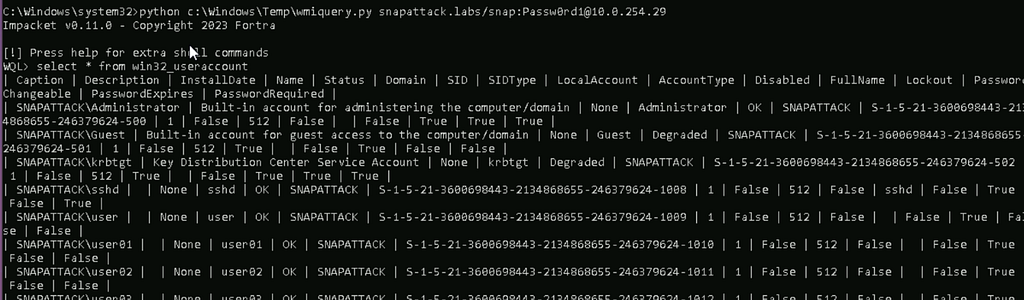
This particular script is going to be a bit different to detect depending on what the user performs with the wmi commands. There will be a few things that are consistent, however. Here is the basic usage of the tool to perform some simple enumeration.
If you have network data and something such as Zeek you can see the dce_rpc request similar to wmiexec/dcomexec.
sourcetype: bro:dce_rpc:json
operation: RemoteCreateInstance
endpoint: IRemoteSCMActivator
id.resp_p: 135
You will also see a process creation event for wmiprvse.exe under svchost. Notice that its under the DcomLaunch group.
EventCode: 1
ParentCommandLine: C:\Windows\system32\svchost.exe -k DcomLaunch -p
CommandLine: C:\Windows\system32\wbem\wmiprvse.exe -Embedding
CurrentDirectory: C:\Windows\system32\
User: NT AUTHORITY\SYSTEM
In this particular use case, there is also some user enumeration detection opportunities with Windows Event 4661 similar to some of the other user enumeration scripts.
EventCode: 4661
ObjectName: S-1-5-21-3600698443-2134868655-246379624-500
ObjectType: SAM_USER
ObjectServer: Security Account Manager
For more logs and details, we have captured this activity in our platform: Impacket WMIQuery
For Detections check out this Collection: Hunting Impacket WMIQUERY
MITRE
T1047: Windows Management Instrumentation
Adversaries may abuse Windows Management Instrumentation (WMI) to execute malicious commands and payloads.
T1059.006: Command and Scripting Interpreter: Python
Adversaries may abuse Python commands and scripts for execution.
T1078.002: Valid Accounts
Adversaries may obtain and abuse credentials of existing accounts as a means of gaining Initial Access, Persistence, Privilege Escalation, or Defense Evasion.
Conclusion
This concludes part three of our blog series on Impacket. In summary, Impacket is a widely utilized tool used by a range of malicious actors. It offers various capabilities for interacting with a target system. Many of these require legitimate credentials or hashes to work so it isn’t usually an initial infection but rather a method of lateral movement or enumeration. We covered many detection opportunities for a few of these attacks, and you can dig deeper into them, and the ones we didn’t cover here.
SnapAttack is the threat hunting, detection engineering, and detection validation platform for proactive threat-informed defense. Register for a FREE community account to access the tons of content included in this blog post, as well as thousands of other community detections. Subscribers also get advanced features like a no-code detection builder, one-click deployments to leading SIEMs and EDRs like Chronicle, Sentinel, Splunk, CrowdStrike and SentinelOne,
advanced threat profiles to prioritize relevant threats, and customized reports that track MITRE ATT&CK coverage and more!
Resources
- GitHub – fortra/impacket: Impacket is a collection of Python classes for working with network protocols.
- Impacket
- Impacket
- Impacket – Red Canary Threat Detection Report
Hunting Impacket — Part 3 was originally published in SnapAttack on Medium, where people are continuing the conversation by highlighting and responding to this story.
*** This is a Security Bloggers Network syndicated blog from SnapAttack - Medium authored by Trenton Tait. Read the original post at: https://blog.snapattack.com/hunting-impacket-part-3-9c2680fd9265?source=rss----3bac186d1947---4
