

How to Use Git Secrets for Better Code Security

You know that sinking feeling after you hit “commit”? That moment when you suddenly wonder, “Wait, did I just accidentally expose an API key or hardcode a password?” We’ve all been there, and the risks are no joke. But here’s the good news—there’s a way to ditch that anxiety for good.
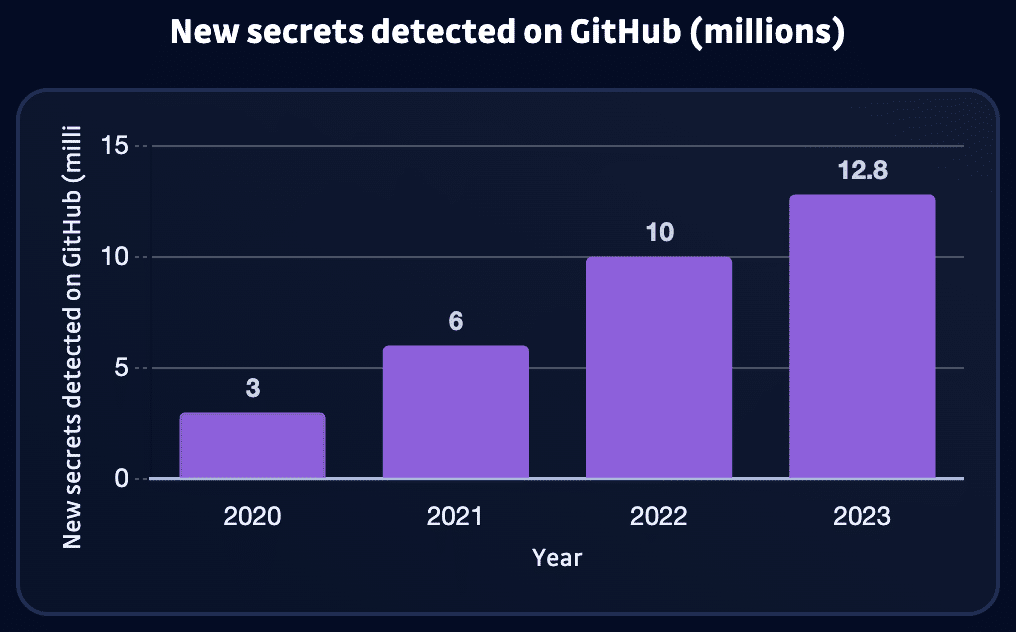
In 2023, GitHub’s automated scanning blocked over 12.8 million leaked secrets.
Code leaks are every developer’s worst nightmare. A single exposed API key or password can lead to a security breach that seriously impacts you and your company. But wouldn’t it be awesome if you could eliminate that fear and focus on what you do best – coding?
What is Git Secrets and How Can It Help?
We’re not just talking about a little unauthorized access. With exposed secrets, attackers can steal or change your most critical data, crash your services, or even take control of your whole infrastructure. That kind of disaster costs are massive – lawsuits, fines, and the time and money to fix the mess. Worst of all, a breach can destroy your company’s reputation, and that kind of damage can last for years. Preventing leaks is a vital first step, but maintaining data security requires proactive monitoring and vulnerability detection beyond your codebase.
Git Secrets is a tool for preventing sensitive information from leaking into your code repositories. It focuses primarily on pre-commit scanning and pattern matching to achieve this.
Here’s how it works:
- Pre-Commit Scanning: Git Secrets proactively prevents accidental leaks by blocking commits with potential secrets and sending immediate alerts.
- Pattern Matching: It compares your code against patterns resembling secrets (API keys, passwords, etc.).
- Alerts and Prevention: Git Secrets prevents accidental leaks by halting commits containing potential secrets and alerting you immediately.
Customization is critical with Git Secrets. While it includes generic patterns to detect shared secrets, you can significantly enhance its effectiveness by defining custom patterns that align with the specific secret formats you use within your organization.
A Step-by-Step Guide to Git Secrets Setup and Configuration
Getting started with Git Secrets is remarkably straightforward, ensuring you can quickly protect your codebase. In this guide, we’ll walk you through the installation and configuration process, empowering you to customize Git Secrets for maximum security within your organization.
Step 1 – Installing Git Secrets
The installation method for Git Secrets varies depending on your operating system. Here’s a breakdown of common environments:
// Linux
apt-get install git-secrets

// Windows
git secrets --install -f // Use Git Bash

// MacOS
brew install git-secrets
Step 2 – Configuration
Clone or initialize a new git project
git init
Generate an RSA key pair.
gpg --gen-key
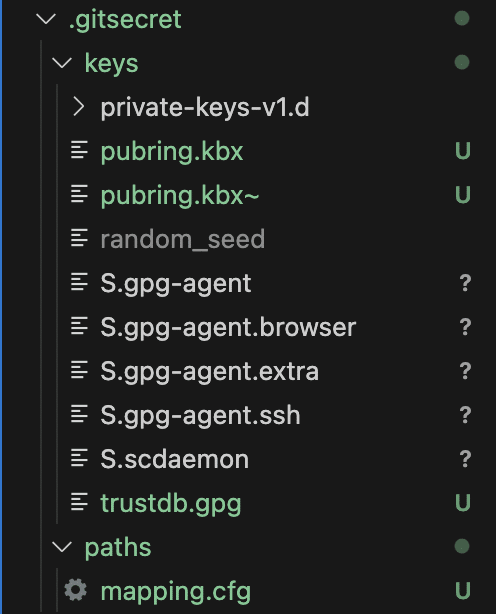
Navigate into the project and initialize the git secret inside the project. It will generate a .gitsecret folder like the one below.
cd [project folder]
git secret init
Add the users who should have permission to encrypt and decrypt. The command below adds users to a list managed by git-secret.
git secret tell [email address]
Encrypt files to automatically add them to your .gitignore.
git secret add apiKey.js
Now you can hide and reveal the secret file using the below commands:
// Hide
git secret hide
// Reveal
git secret reveal
Step 3 – Defining Secret Patterns in Git Secrets
By default, Git Secrets can automatically detect standard secret formats like API keys, access tokens, and database credentials. However, to maximize effectiveness, you must customize these patterns to match the specific secret formats used within your organization.
Using the Git Secrets configuration file (.git-secrets.yml) allows you to define custom patterns using regular expressions. Here is an example of a pattern for identifying the AWS basic auth value:
pattern: ^(\"|')?Basic [A-Za-z0-9\\+=]{60}(\"|')?$
Resources like the OWASP Cheat Sheet for Secure Coding provide valuable guidance on identifying common secret patterns.
Configuration Best Practices
Git Secrets is a powerful tool, but following configuration best practices to unleash its full potential is crucial. Here are three essential techniques to maximize its effectiveness:
- Zero Tolerance for Unencrypted Secrets. Treat unencrypted secrets in your repositories as an immediate security emergency. Even private repositories are vulnerable to access breaches. Use your .gitignore file diligently to ensure files containing sensitive data are never accidentally committed and pushed.
- Automation is Key. Integrate Git Secrets directly into your CI/CD pipelines to automatically screen every developer’s code change before it enters your main codebase. Think of it as setting up security checkpoints throughout the development process.
- Embrace Environment Variables. Hardcoding secrets is a recipe for disaster. Instead, leverage environment variables to store and dynamically load your secrets at runtime.
Here is an example:
const apiKey = process.env.API_KEY;
Integrate Git Secrets into Your Workflow to Increase Security
To harness Git Secrets’ protective power, you must integrate it strategically throughout your development workflow. Let’s explore key integration points for increased code security.
Pre-commit automation
Pre-commit hooks are the first line of defense, catching and preventing potential secret leaks as soon as possible.
Git Secrets catches mistakes when a developer attempts a commit, preventing them from spreading to your shared codebase. This immediate feedback promotes rapid fixes and strengthens secure coding habits across your team.
Git Secrets as part of your CI/CD security
Git Secrets adds robust scrutiny to your CI/CD pipelines, scanning every pull request and merge for potential secret leaks.
This integration allows you to enforce consistent security standards across your entire codebase, minimizing the risk of a costly breach due to an undetected secret. CI/CD integration is easily achievable with popular tools like Jenkins, CircleCI, and Travis CI.
Regular Scanning of Existing Repositories
Pre-commit hooks and CI/CD integration are crucial for ongoing security, but to address secrets already in your codebase, you’ll need additional tools like Git Secrets.
Regularly scan your code history with Git Secrets to expose potential secrets you may have missed initially. This proactive approach lets you quickly identify and neutralize vulnerabilities, preventing exploitation. Schedule full scans of your repositories during off-peak hours for maximum coverage and minimal resource impact.
Git Secrets and a layered workflow approach to security
Maintaining the security of sensitive data like API keys, tokens, and credentials is a crucial challenge within modern development environments. Accidentally committing these secrets to a code repository, especially a publicly accessible one, can have severe consequences.
Git Secrets focuses on direct secret detection, while platforms like Spectral broaden your protection. Code security is essential, but secure data access management is equally critical. Regularly conducting user access reviews helps prevent unauthorized access, even if some secrets are compromised. To further minimize risk, consider the benefits of Just-in-Time (JIT) access management for privileged accounts.
A robust security strategy involves not just tools, but continuous improvement of your development practices. The DevSecOps Maturity Model (DSOMM) can guide this evolution. Beyond code analysis, solutions like Data Security Posture Management (DSPM) continuously assess your overall data infrastructure.
Git Secrets Security Best Practices
While Git Secrets is a valuable tool, security is an ongoing process. Here’s how to optimize it through secure secrets management and code hygiene.
Secure Secrets Management
To manage secrets securely, avoid hardcoding them in your source code. Instead, use environment variables or a secrets management tool.
- Environment Variables – Use .env files to store your secrets locally and load them into your application at runtime. For Node.js, you might use the dotenv package:
require('dotenv').config();
const apiKey = process.env.API_KEY;
Note: Ensure .env files are listed in your .gitignore to prevent accidental commits.
- Secrets Management Tools – Use AWS Secrets Manager or HashiCorp Vault to store and manage secrets. Configure your application to retrieve secrets at runtime:
import boto3
client = boto3.client('secretsmanager', region_name='us-west-2')
  get_secret_value_response = client.get_secret_value(SecretId='mySecretId')
Code Hygiene for Secret Reduction
Maintain clean code practices to minimize the risk of secrets exposure by doing the following.
1. Regular Expressions for Detection
Customize Git Secrets to detect proprietary secret patterns by adding custom patterns to your .git-secrets configuration. Example of an AWS secret key:
git secrets --add 'AKIA[0-9A-Z]{16}'
2. Pre-commit Hook Setup
Equip every developer’s repository with Git Secrets by automating its setup in your project’s README or a setup script.
#!/bin/bash
# Setup Git Secrets for new clones
git secrets --install
git secrets --register-aws
git secrets --add 'custom-pattern-here'
3. Refactor for environment variables
To reduce secret exposure, refactor your code to retrieve frequently-used secrets from environment variables.
4. Principle of least privilege
Follow the principle of least privilege – grant your code only the necessary permissions to function. This proactive approach reduces the impact of potential secret leaks.
Safeguard Your Code with Git Secrets
Code leaks aren’t just a technical headache—they directly threaten your business. Exposed secrets can lead to costly breaches, damage your hard-earned reputation, and even result in legal repercussions. Git Secrets offers a proactive solution, but its effectiveness is maximized when combined with broader DevSecOps best practices.
While Git Secrets is a powerful tool, a comprehensive security strategy goes beyond preventing accidental leaks. SpectralOps can uncover hidden vulnerabilities, misconfigurations, and compliance risks, offering a broader safety net.
Ready to protect your code and prevent leaks? Start with a free Spectral account today.
The post How to Use Git Secrets for Better Code Security appeared first on Spectral.
*** This is a Security Bloggers Network syndicated blog from Security boulevard - Spectral authored by Eyal Katz. Read the original post at: https://spectralops.io/blog/how-to-use-git-secrets-for-better-code-security/
