

What is SMTP TLS Reporting?

Reading Time: 8 min
As organizations increasingly rely on email as a primary means of communication, the importance of fortifying these channels against potential threats cannot be overstated. Transport Layer Security (TLS) stands as a cornerstone in ensuring the confidentiality and integrity of data transmitted across networks.
SMPT TLS Reporting is a reverse feedback mechanism that helps domain owners find email delivery issues with pinpoint accuracy. TLS-RPT works together with the MTA-STS protocol. It provides tracking data on bounced emails that fail delivery. This can be due to reasons like unsuccessful TLS encryptions.
Let’s understand how these protocols work together to bolster email security.
What is TLS-RPT?
TLS-RPT stands for Transport Layer Security Reporting. TLS Reporting (TLS-RPT) is a standard for reporting email delivery issues that occur when an email isn’t encrypted with TLS. It supports the MTA-STS protocol which is used to guarantee that any email sent to your domain gets TLS encrypted.
- TLS encryption ensures that every email sent to you gets delivered securely. An attacker might attempt an SMTP downgrade. It is a type of attack where the email gets sent to you without being encrypted, allowing attackers to read or tamper with the contents. MTA-STS combats this by making it necessary for all emails to be encrypted before being sent to you. If an attacker tries to perform an SMTP downgrade, the email will not be sent at all.
- TLS-RPT makes it possible for you, the domain owner, to receive reports on every email that doesn’t get encrypted and fails to be sent to you. You can then identify the source of the problem and fix your delivery issues.
How Does TLS Reporting Work?

TLS reporting (TLS-RPT) is used to support the MTA-STS protocol. The MTA-STS protocol ensures emails are encrypted before being delivered. Your email server or Mail Transfer Agent (MTA) negotiates with the receiving server to see if it supports the STARTTLS command. If it does, the email gets encrypted with TLS and gets delivered to the receiving MTA.
An attacker might attempt an SMTP downgrade attack at this point. This involves blocking the negotiation between the sending and receiving MTAs. The sending server thinks the receiver doesn’t support the STARTTLS command. It then proceeds to send the email without TLS encryption. Hence allowing the attacker to view or tamper with the email’s contents.
When you enable MTA-STS in your domain, it makes it mandatory for your sending server to encrypt messages before sending them. If an attacker attempts an SMTP downgrade attack, the email will not be sent. This ensures TLS encryption on all your emails without fail.
TLS reporting (TLS-RPT) is a protocol that will notify you, the domain owner when emails sent through your domain face issues with delivery. If an email fails to be sent due to an SMTP downgrade or some other issue, you will receive a report in a JSON file format. TLS Reports contain the details of the email that failed. These reports do not contain the contents of the email.
Why Do You Need SMTP TLS Reporting?
Domain owners need to stay informed about email delivery issues due to failures in TLS encryption for emails sent from an MTA-STS-enabled domain. TLS reporting makes it possible by providing this information.
To Receive Feedback Reports
If a message fails to be sent, TLS reporting helps you get notified about it. This is especially beneficial when you have MTA-STS enabled. As MTA-STS enforces TLS encryption, sometimes messages fail to get delivered due to encryption failures. SMTP TLS reports provide valuable insights into such failures.
To Gain Total visibility on Email Channels
TLS-RPT helps you gain granular insights into your email flow. Through TLS reporting you can better understand how emails flow through your system. This helps you track your TLS encryption status, delivery failures, and other vulnerabilities.
To Fix Delivery Issues
TLS reporting helps you Identify the source of the problem and fix it with zero delay. When you leverage the data in your reports, you can track your email delivery success rate. This helps you take corrective actions faster to resolve delivery failures.
As described in RFC 8460, SMTP security is opportunistic. This makes it very easy for an attacker to manipulate it and eavesdrop on email conversations. MTA-STS stops this from happening by making encryption mandatory. However, if it fails – messages are not sent. TLS-RPT is a real hero in these situations to provide a reverse feedback mechanism about delivery failures.

Steps to Set Up TLS-RPT
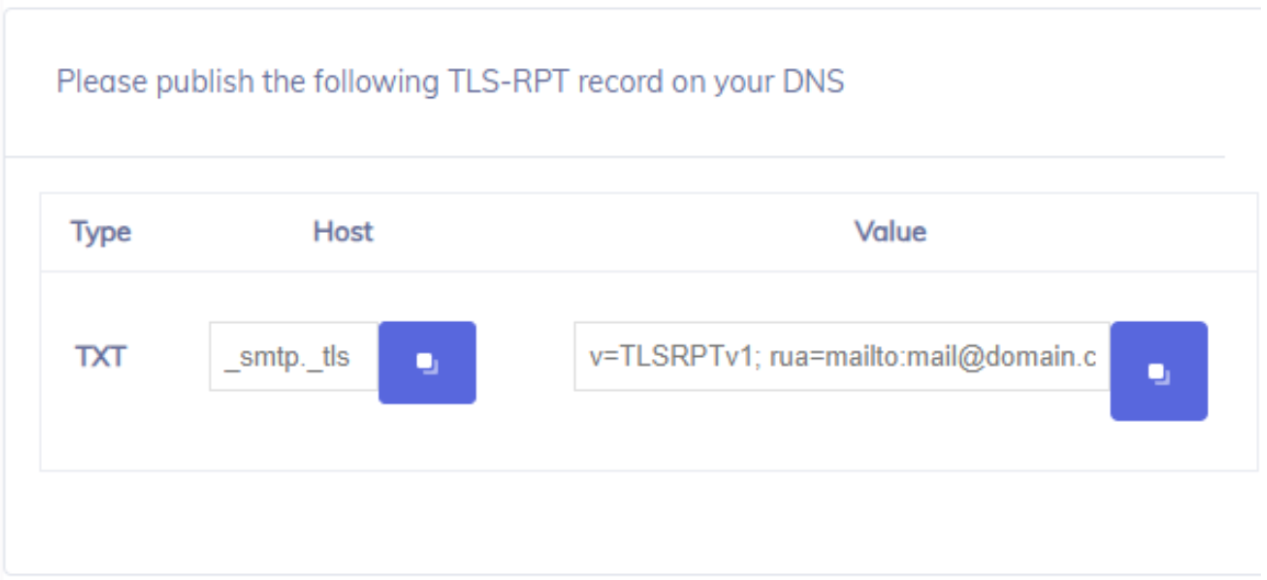
You can enable TLS reporting for your domain by creating a TXT record for TLS-RPT and publishing it on your DNS. This record must be published at the subdomain smtp.tls.yourdomain.com
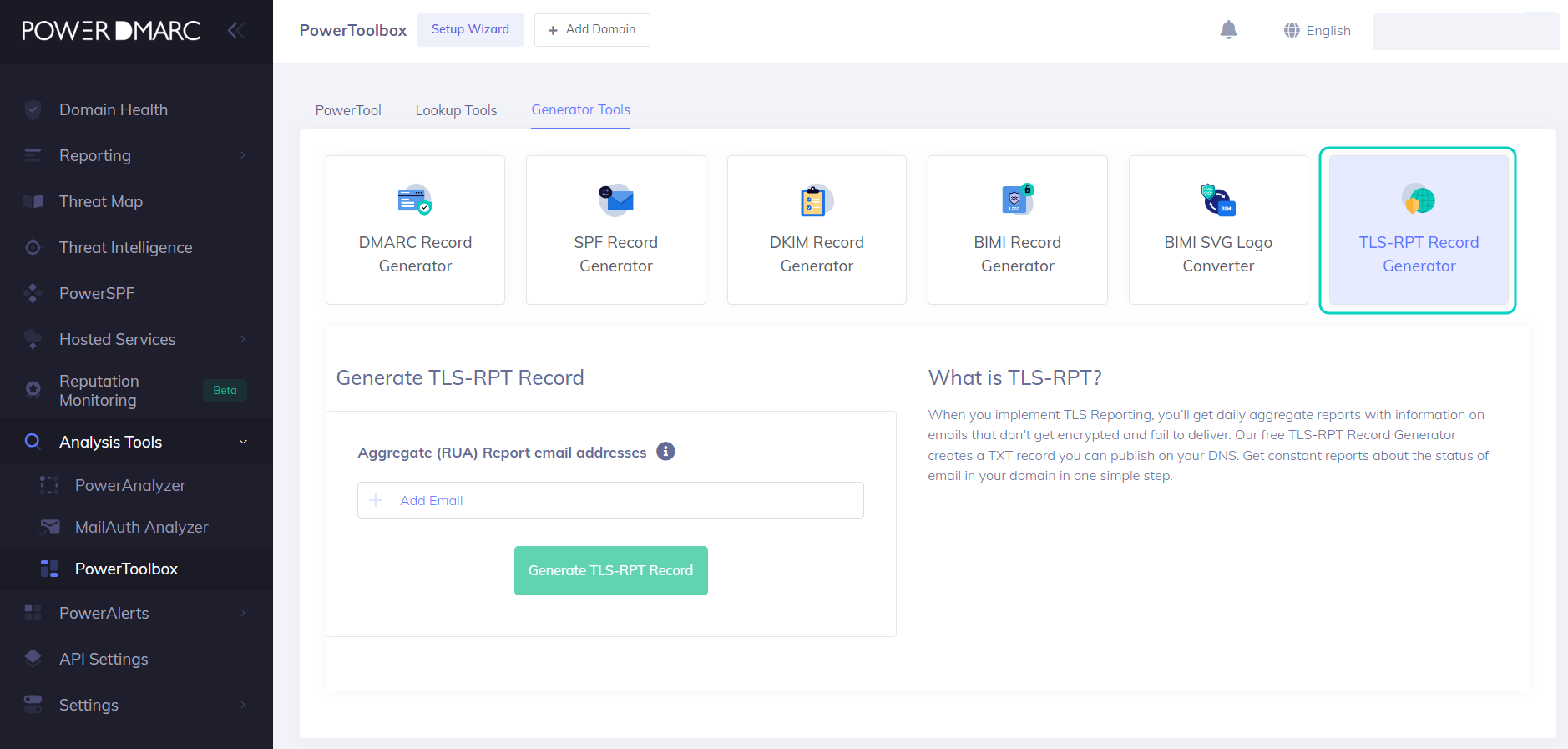
Step 1: Select a TLS-RPT Record Generator Tool
You can sign up on PowerDMARC for free and use our TLS-RPT record generator to create your record.
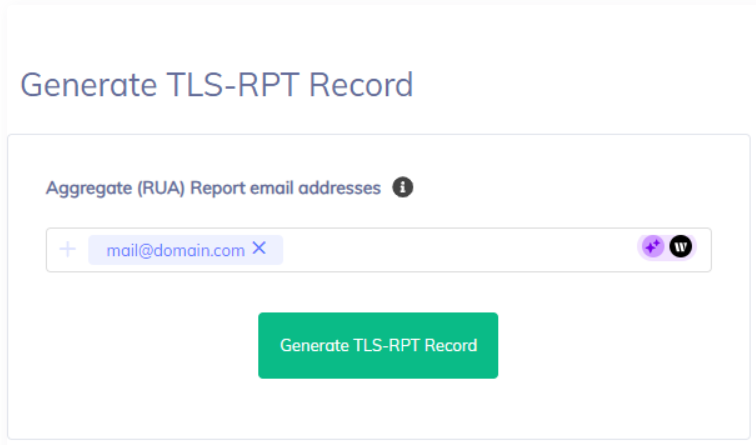
Step 2: Enter Your Reporting Email Address
Enter an email address on which you wish to receive your SMTP TLS Reports.
Step 3: Publish the TLS Record on Your DNS
You can contact your domain registrar to create a new TXT record for TLS-RPT. If you manage your own DNS, edit your DNS settings to include the record.
TLS-RPT Record Example
v=TLSRPTv1; rua=mailto:[email protected];
Let’s break down the components of the provided TLS reporting record:
v=TLSRPTv1:
This tag specifies the version of the TLS-RPT protocol being used. In this case, “TLSRPTv1” indicates the first version of the TLS-RPT protocol.
rua=mailto:[email protected]:
This tag indicates the reporting URI for the aggregated reports (RUAs). It specifies where the recipient’s mail server should send aggregated reports about TLS failures. rua stands for “Reporting URI(s) for Aggregate Data.”
The value “mailto:[email protected]” is a URI that specifies an email address ([email protected]) to which the aggregated reports should be sent via email.
In practice, you would replace “yourdomain.com” with the actual domain name where you want to receive these reports.
The significance of each component:
v=TLSRPTv1:
This indicates the version of the TLS-RPT protocol being used. It helps ensure compatibility between the sender and receiver of the reports.
rua=mailto:[email protected]:
This specifies the destination of aggregated reports for TLS delivery issues. By providing a reporting email address, domain owners can receive information about failed or problematic TLS connections. The reports are valuable for diagnosing potential security or configuration issues related to email communication.
TLS Reporting Format and Report Example
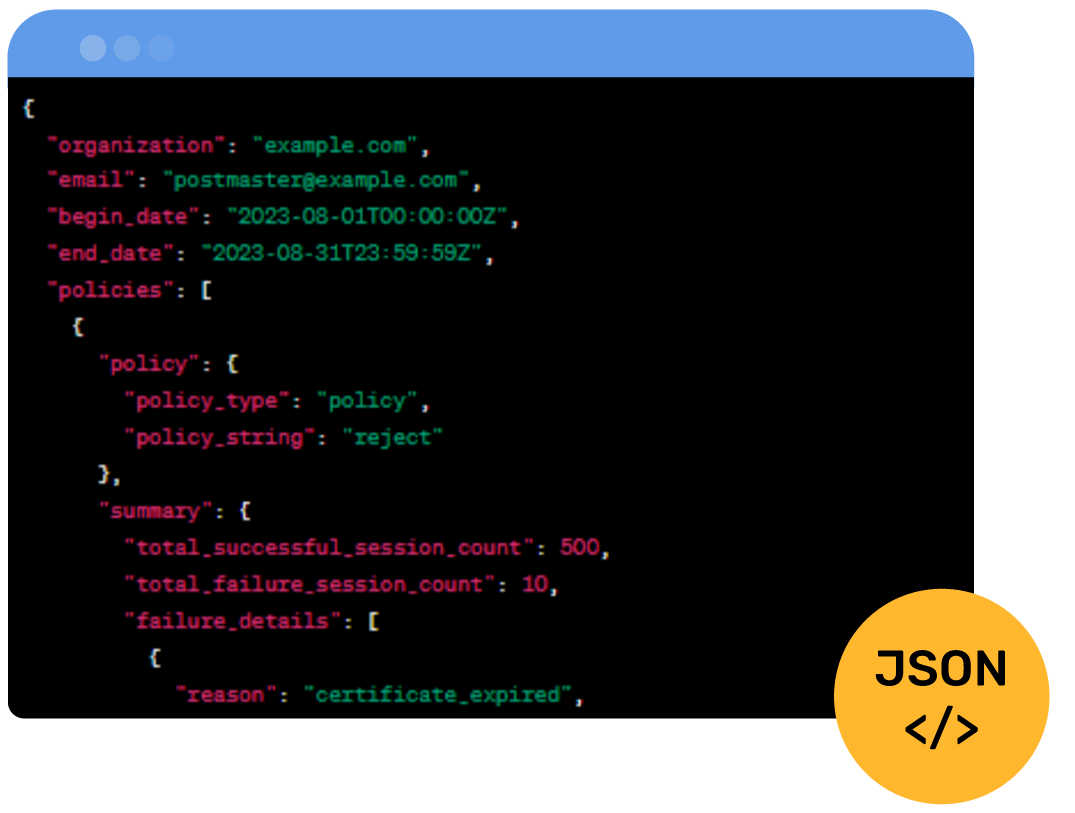
JSON TLS reports follow a specific format. Below is an example of what a JSON TLS report might look like:
Here’s the breakdown of the main fields within this JSON TLS report:
organization: The domain organization that owns the TLS-RPT record.
email: The email address where aggregated reports are sent.
begin_date: The start date of the reporting period.
end_date: The end date of the reporting period.
policies: An array of policy objects that describe the policies applied during the reporting period.
policy: Contains information about the applied policy.
policy_type: Specifies the type of policy (e.g., “policy” for a TLS policy).
policy_string: Specifies the policy string associated with the policy (e.g., “reject” for a strict TLS policy).
summary: Contains summary information about the sessions that were attempted.
total_successful_session_count: The total count of successfully established TLS sessions.
total_failure_session_count: The total count of TLS session failures.
failure_details: An array of objects that provide details about specific failures.
reason: A string indicating the reason for the failure (e.g., “certificate_expired”).
count: The count of sessions that failed for a specific reason.
TLS Encryption Failure Reasons and Types
Certificate Issues:
- certificate_expired: The certificate presented by the remote server has passed its expiry date. This makes it untrustworthy for encryption.
- certificate_not_valid_yet: The certificate presented by the remote server is not yet valid. This may be due to incorrect server time or premature certificate usage.
- certificate_revoked: The certificate presented by the remote server has been revoked by the certificate authority due to security concerns.
- untrusted_certificate: The certificate chain presented by the remote server is not trusted by the sender’s mail server or client, indicating a potential security risk.
- no_valid_signature: The certificate presented by the remote server is not properly signed by a trusted certificate authority, raising concerns about its authenticity.
- unsupported_certificate: The certificate presented by the remote server uses encryption algorithms or key lengths that are not supported by the sender’s mail server, preventing a secure connection.
Hostname and Identity Mismatch
- hostname_mismatch: The hostname specified in the server’s certificate does not match the hostname of the server the sender’s mail server is trying to connect to. It indicates a possible man-in-the-middle attack or configuration issue.
Cipher Suite and Encryption Configuration
- insecure_cipher_suite: The cipher suite negotiated between the sender’s and recipient’s mail servers is considered weak or insecure, compromising the confidentiality and integrity of the communication.
- protocol_version_mismatch: There is a mismatch in the supported TLS protocol versions between the sender’s and recipient’s mail servers, preventing them from establishing a compatible encrypted connection.
- no_shared_cipher_suite: There is no common cipher suite available for both the sender’s and recipient’s mail servers. Thus resulting in a failed connection.
Handshake and Protocol Issues
- handshake_failure: An issue occurred during the initial TLS handshake process between the sender’s mail server and the recipient’s mail server, preventing the secure channel from being established.
- unexpected_message: The sender’s mail server received an unexpected or unsupported message during the TLS handshake process, indicating a potential protocol or implementation mismatch.
MTA-STS Policy Issues
- mta_sts_policy_not_found: This failure occurs when the sender’s mail server is unable to find an MTA-STS policy for the recipient’s domain.
- mta_sts_policy_invalid: This failure occurs when the MTA-STS policy found in DNS for the recipient’s domain is invalid, contains errors, or doesn’t adhere to the MTA-STS specification.
- mta_sts_policy_fetch_error: This failure occurs when the sender’s mail server encounters an error while trying to retrieve the MTA-STS policy from the recipient’s domain’s DNS records.
- mta_sts_connection_failure: This failure occurs when the sender’s mail server attempts to establish a secure connection using MTA-STS but fails due to reasons such as untrusted certificates, unsupported cipher suites, or other TLS issues.
- mta_sts_invalid_hostname: This failure occurs when the hostname of the recipient’s mail server, as specified in the MTA-STS policy, does not match the actual hostname of the server.
- mta_sts_policy_upgrade: This failure occurs when the sender’s mail server attempts to upgrade the connection to a secure one using MTA-STS, but the recipient’s server doesn’t support the upgrade.
Simplified SMTP TLS Reporting with PowerDMARC
PowerDMARC’s SMTP TLS reporting experience is all about improving your security while making your life easier with a hosted service.
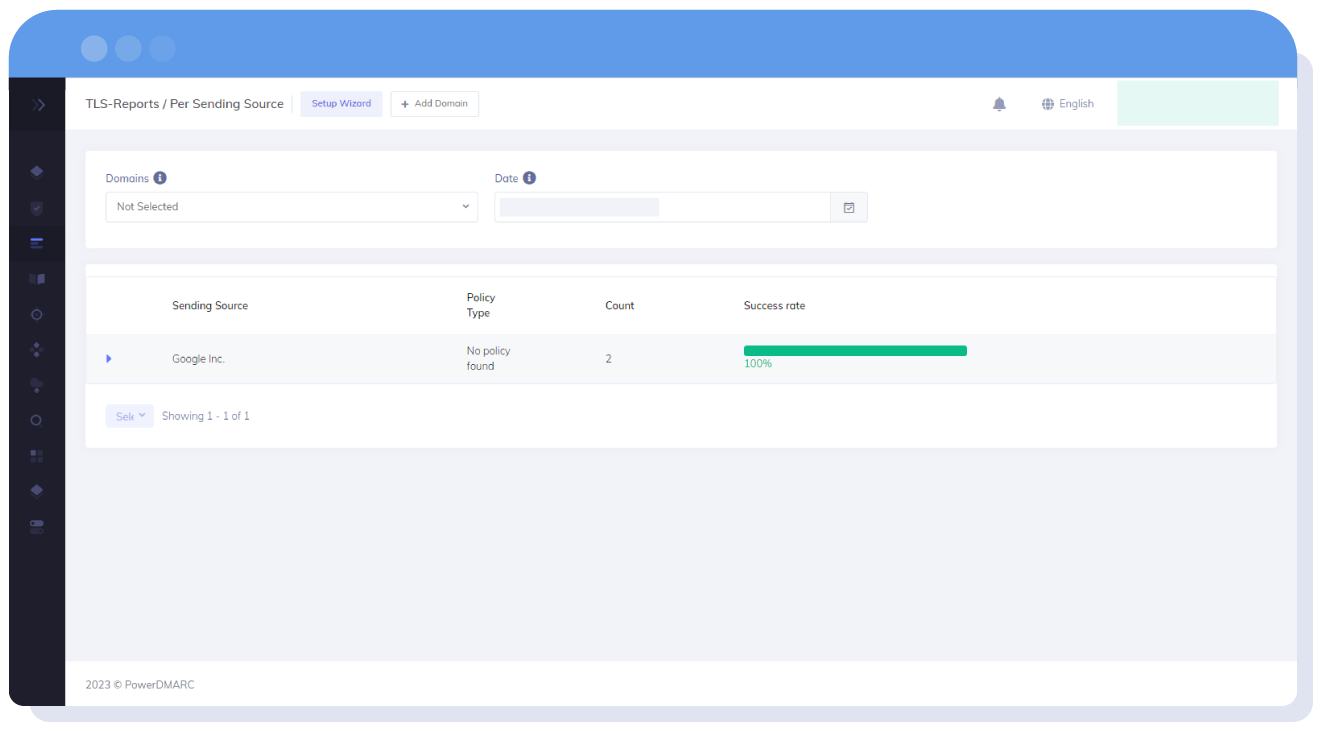
Translated TLS Reports
Your complex JSON reports for TLS reporting are converted to simplified information you can skim through in seconds or read in detail.
Auto-detect issues
The PowerDMARC platform pinpoints and highlights the issue you’re facing so you can resolve it without wasting time.

There’s not one thing I like about the PowerDMARC platform, they have an easy to use and understand layout with what I’d call full features allowing for hosted DMARC control, SPF flattening, being able to easily expand the SPF includes to inspect the specifics of the record and even full support for MTA-STS and TLS-RPT!

Dylan B (Business Owner)
Frequently Asked Questions on Transport Layer Security
1. What does TLS stand for?
TLS stands for Transport Layer Security.
2. Who issues TLS certificates?
Certificate Authorities (CAs) can issue TLS certificates. The process for issuing the certificate includes verification of the certificate holder’s identity. On successful identification, the CA issues the TLS certificate.
3. Why do I need a TLS certificate?
TLS certificates play a pivotal role in securing communications over the internet. They help encrypt sensitive information exchanged between communicating web servers. Some of its most common usages include securing email communications, and HTTPS.
4. What is the current TLS standard?
TLS 1.3 is the latest version of Transport Layer Security. TLS-RPT can be implemented using any version of TLS. This can include older versions of the protocol or future versions. The version is usually determined by criteria like the capabilities of the communicating servers.

*** This is a Security Bloggers Network syndicated blog from PowerDMARC authored by Yunes Tarada. Read the original post at: https://powerdmarc.com/what-is-tls-rpt/
