

Sqlitespy for Sqlite Database analysis

Sqlite is the ubiquitous database for mobile applications on iPad, iPhone and Android. It is also used by certain internet browsers, web application frameworks and software products for their local storage needs. While doing penetration tests, we often see sensitive information like usernames, passwords, account numbers, SSN etc… insecurely stored in these databases. Thus, every penetration test requires comprehensive analysis of the local databases being used.
While analyzing databases, a penetration tester repeatedly does the following:
- Opens the database in sqlite reader (sqlite3 or other readers)
- Views various tables and columns to understand database layout and schema.
- Analyzes the storage for sensitive information.
As the number and size of database increases, the analysis time increases exponentially. To escape the recurring pain, I wrote a ruby script to automate this process. The script achieves the following:
- Analyzes multiple databases in a single run.
- Queries and displays database schema.
- Provides an option to run search on Table and Column Names for quick analysis.
- Performs case-insensitive regular expression search (default). This can be controlled with command line options to one’s requirements.
- Displays Database, Tables and Row Number reference for every successful match.
- Dumps database rows on a successful match.
- Looks for search strings in the following:
- Table Name
- Column Names
- Actual Data
Sqlitespy dependencies are listed below:
 |
|
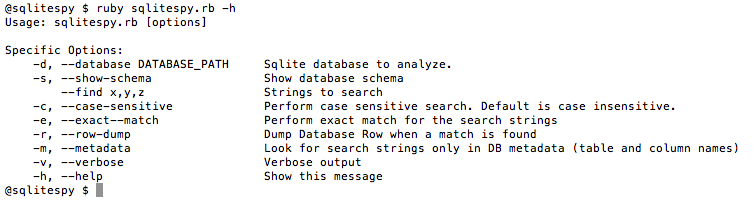
Figure 1: Image shows sqlitespy help
|
 |
|
Figure 2: Image shows sqlite sample run with multiple search strings and row information dump for a successful match
|
 |
|
Figure 3: Image shows sqlitespy sample run with minimal information
|
 |
|
Figure 4: Image shows sqlite database schema dump
|
Sqlitespy Code Follows:
 #Author: Gursev Singh Kalra
 require 'rubygems'
 require 'optparse'
 require 'ostruct'
 require 'sequel'


 class CmdLineOptions

  def self.parse(args)
   options = OpenStruct.new
   options.dbs = []
   options.sstrings = []
   options.show_schema = false
   options.case_sensitive = false
   options.exact = false
   options.verbose = false
   options.rowdump = false
   options.metadata = false

   opts = OptionParser.new do |opts|
   opts.banner = "Usage: sqlitespy.rb [options]\n\nSpecific Options:"

   opts.on("-d", "--database DATABASE_PATH",
    "Sqlite database to analyze.") do |db|
    options.dbs << db
   end

   opts.on("-s", "--show-schema", "Show database schema") do |show|
    options.show_schema = show;
   end

   opts.on("--find x,y,z", Array, "Strings to search") do |list|
    options.sstrings = list
   end

   opts.on("-c", "--case-sensitive", "Perform case sensitive search. Default is case insensitive.") do |case_sensitive|
    options.case_sensitive = case_sensitive;
   end

   opts.on("-e", "--exact--match", "Perform exact match for the search strings") do |v|
    options.exact = v;
   end

   opts.on("-r", "--row-dump", "Dump Database Row when a match is found") do |v|
    options.rowdump = v;
   end

   opts.on("-m", "--metadata", "Look for search strings only in DB metadata (table and column names)") do |v|
    options.metadata = v;
   end

   opts.on("-v", "--verbose", "Verbose output") do |v|
    options.verbose = v;
   end

   opts.on_tail("-h", "--help", "Show this message") do
    puts opts
    exit
   end

   end

   opts.parse!(args)
    options
   end# parse()

 end# class CmdLineOptions

 options = nil

 begin
  options = CmdLineOptions.parse(ARGV)
 rescue (OptionParser::InvalidOption)
  $stderr.puts "[-] Invalid option "
  options = CmdLineOptions.parse(ARGV+["-h"])
 end

 if(options.dbs.length == 0)
  $stderr.puts "[-] No Database available. Exiting !!"
  exit
 end

 dbs = []
 options.dbs.uniq!

 dbs = options.dbs.collect do |db|
  begin
   throw Errno::ENOENT unless(File.file?(db))
   Sequel.sqlite(db).tables
   db
  rescue
   $stderr.puts "[-] \"#{db}\" is not a sqlite database"
   nil
  end
 end

 options.dbs = dbs.compact

 if(options.dbs.length == 0)
  $stderr.puts "[-] No Database available. Exiting."
  exit
 end

 options.sstrings.uniq!

 if(options.show_schema)

  puts
  puts "+"*80
  puts "Database Schemas"
  puts "+"*80

  options.dbs.each do |db|
   puts
   puts "[DATABASE] #{db}"
   Sequel.sqlite(db) do |dbhandle|
    dbhandle.tables.each do |table|
     puts "\t[TABLE] #{table}"
     puts "\t\t[COLUMNS] #{dbhandle[table.to_sym].columns.join(', ')}"
    end
   end
  end

  puts "-"*80

 end

 regex_strings = []
 regex_strings = options.sstrings.collect do |search|

  regexstr = ""
  regex = nil
  if(options.exact)
   regexstr = "^#{search}$"
  else
   regexstr = "#{search}"
  end

  if(options.case_sensitive)
   regex = Regexp.new("#{regexstr}")
  else
   regex = Regexp.new("#{regexstr}", Regexp::IGNORECASE)
  end
  regex

 end

 options.sstrings = regex_strings

 options.dbs.each do |database|

  if(options.verbose)
   puts
   puts "+"*80
   puts "Analyzing Database '#{database}'"
   puts "+"*80
  end

  Sequel.sqlite(database) do |databasehandle|
   databasehandle.tables.each do |table|
    if(options.verbose)
     puts
     puts "-"*80
     puts "Analyzing Table '#{table}'"
     puts "-"*80
    end

    options.sstrings.each do |regex|
     if(regex.match(table.to_s))
      puts "[+] Table Name Match Found -> Database '#{database}' -> TABLE '#{table}'"
     end
    end

    #Column Name Search
    databasehandle[table.to_sym].columns.each do |column_name|
     options.sstrings.each do |regex|
      if(regex.match(column_name.to_s))
       puts "[+] Column Name Match Found -> Database '#{database}' -> TABLE '#{table}' -> COLUMN '#{column_name}'"
      end
     end
    end

    #Data Search
    if(options.sstrings.length > 0 && !options.metadata)
     row = 0
     databasehandle[table].each do |rowHash|
      row = row + 1
      rowHash.each do |key, value|
       options.sstrings.each do |regex|
        if(regex.match(value.to_s))
         puts "[+] Data Match Found -> Database '#{database}' -> TABLE '#{table}', COLUMN '#{key}' -> ROW '#{row}'"
         puts "\t[*] Row Dump\t=>\t#{rowHash.values.join('|')}" if(options.rowdump)
        end
       end
      end
     end
    end
   end
  end
 end
*** This is a Security Bloggers Network syndicated blog from Random Security authored by Gursev Singh Kalra. Read the original post at: http://gursevkalra.blogspot.com/2012/02/sqlitespy-for-sqlite-database-analysis.html
