

Hunting Operation FlightNight TTPs


Overview
Operation FlightNight is one of the latest large attacks utilizing ISOs to trick users into executing malware. This form of phishing has become common over the last few years and is showing no signs of going away. It has been used by actors such as APT29, UNC2633, UNC3922, and more. The attackers in this case used a phishing scheme disguised as an invitation from the Indian Air Force, which then exfiltrated data via Slack channels. This campaign involved modified open-source tools like HackBrowserData to steal sensitive information. This blog will discuss the malware’s behavior, attack methodology, and detection opportunities for these types of attacks. Register for a FREE community account to access the tons content included in this blog post, as well as thousands of other community detections.
Timeline of activity
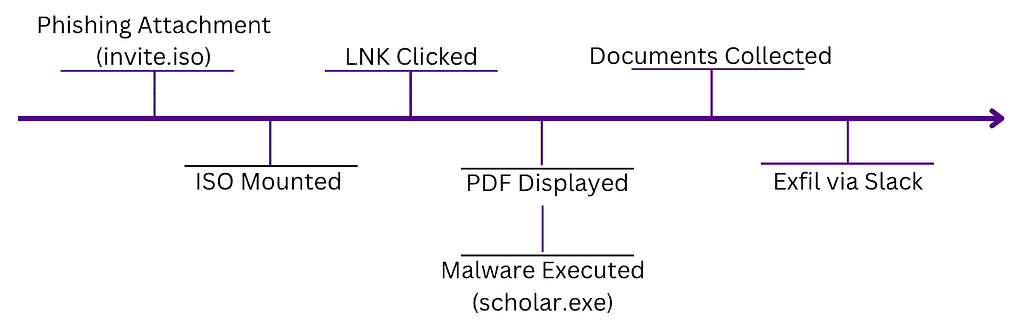
ISO and Decoy Document
The actor in this case used a decoy PDF document pretending to be an invitation letter from the Indian Air Force. This document was delivered inside an ISO file to try and avoid some attachment focused protections. The only thing visible in the ISO was in fact a shortcut file (LNK) that would execute the malware in the background while simultaneously opening the decoy PDF. The shortcut file even had its icon modified to appear to be a PDF.
When mounted the ISO is pretty innocuous looking.
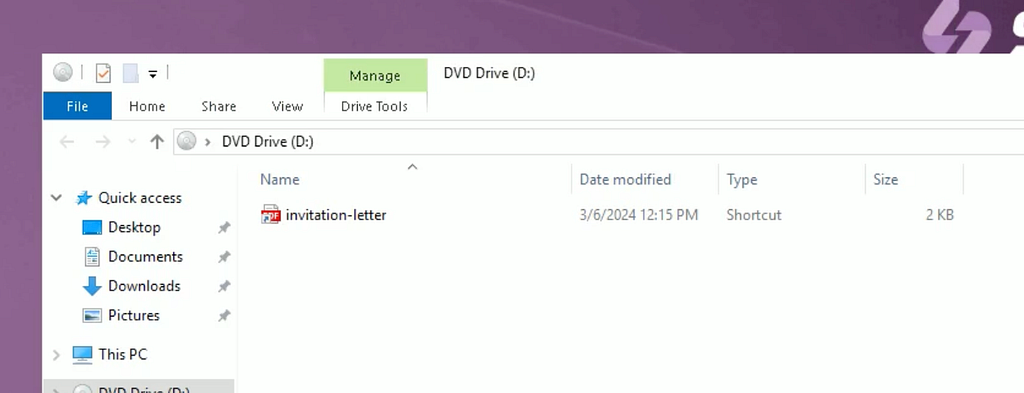
There is a few detection opportunities already at this point. Mounting an ISO generates a few indicators including file and registry activity. First looking at the files that are created when an ISO is mounted we can see activity in the Recent directory.
EventCode: 11
Image: C:\Windows\Explorer.EXE
TargetFilename: C:\Users\user\AppData\Roaming\Microsoft\Windows\Recent\69c3a92757f79a0020cf1711cda4a724633d535f75bbef2bd74e07a902831d59.iso.lnk
Investigate any unanticipated .lnk file creations whether from an ISO or not. They are usually suspicious.
In addition to that file being created there is a similar detection opportunity using registry activity.
EventCode: 13
EventType: SetValue
Image: C:\Windows\explorer.exe
TargetObject: HKU\S-1-5-21-454062999-803709901-3569341773-1001\Software\Microsoft\Windows\CurrentVersion\Explorer\RecentDocs\.iso\0
Details: Binary Data
When the LNK file is clicked it kicks off a few commands which we can see in the process graph below.
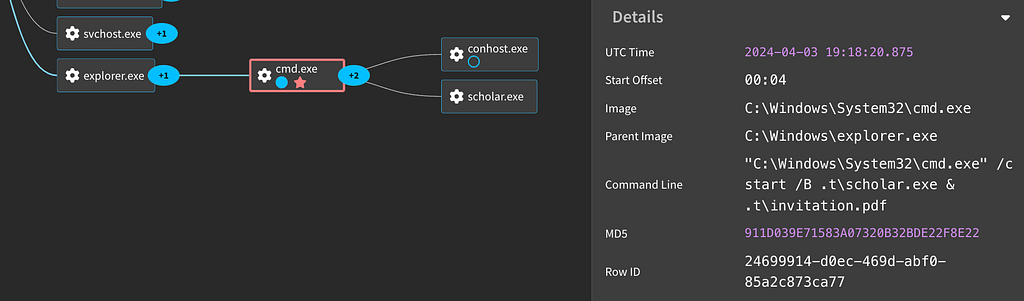
The decoy pdf is launched as well as the malware. Looking closer at the commands we can see that it’s using the /B flag to launch the malware in the background by starting a new process and not creating a command window.
EventCode: 1
ParentProcessName: explorer.exe
ProcessName: cmd.exe
CommandLine: "C:\Windows\System32\cmd.exe" /c start /B .t\scholar.exe & .t\invitation.pdf
CurrentDirectory: D:\
Another interesting detection opportunity here lies in the fact that we see a ParentProcessName of explorer.exe , an execution of cmd.exe and a CurrentDirectory of D:\ . This indicates this process chain was kicked off from either a removable media or a mounted ISO. In addition any CommandLine containing the combination of .exe, &, and .pdf is going to be suspect.
MITRE
T1566.001 Phishing: Spearphishing Attachment
Adversaries may send spearphishing emails with a malicious attachment in an attempt to gain access to victim systems.
T1204 User Execution
An adversary may rely upon specific actions by a user in order to gain execution.
T1036 Masquerading
Adversaries may attempt to manipulate features of their artifacts to make them appear legitimate or benign to users and/or security tools.
Data Collection
Once launched the malware creates a text file in the %Temp% directory and uses this as a mutex so that multiple instances aren't executed. Again we can detect on the fact that the Image is executing not in the C:\ drive but writing to it (Note this changes if utilizing multiple drives and should be adjusted according to your environment).
EventCode: 11
Image: D:\.t\scholar.exe
TargetFilename: C:\Users\user\AppData\Local\Temp\2\Bkdqqxb.txt
In addition to the mutex, the malware creates a host of .temp and .log files in the %TEMP% directory as well.
The malware itself is a modified version of https://github.com/moonD4rk/HackBrowserData. It’s focus is on gathering browser data such as passwords as well as specific file types (Office, SQL, and PDFs). In our lab we used a Chromium browser but this activity will be similar for others such as Firefox. For Chrome and Opera we can see the tool attempt to dump information via Windows Event 4695. This event generates if DPAPI CryptUnprotectData function was used to unprotect “auditable” data that was encrypted using CryptProtectData function with CRYPTPROTECT_AUDIT flag (dwFlags) enabled. This activity is common across many of the Browser dumping tools such as this.
EventCode: 4695
MasterKeyId: Google Chrome
ProtectedDataFlags: 0x0
CryptoAlgorithms: AES-256, SHA2-512
FailureReason: 0x0

EventCode: 4695
MasterKeyId: Opera
ProtectedDataFlags: 0x0
CryptoAlgorithms: AES-256, SHA2-512
FailureReason: 0x0
We can look for the file artifacts generated by the tool to identify this activity as well (Note that since this is open source these filenames could be changed).
...
EventCode: 11
Image: D:\.t\scholar.exe
TargetFilename: C:\Users\Public\results\chrome_default_localstorage.csv

EventCode: 11
Image: D:\.t\scholar.exe
TargetFilename: C:\Users\Public\results\chrome_default_history.csv

EventCode: 11
Image: D:\.t\scholar.exe
TargetFilename: C:\Users\Public\results\chrome_default_extension.csv

EventCode: 11
Image: D:\.t\scholar.exe
TargetFilename: C:\Users\Public\results\chrome_default_cookie.csv

EventCode: 11
Image: D:\.t\scholar.exe
TargetFilename: C:\Users\Public\results\chrome_default_sessionstorage.csv

EventCode: 11
Image: D:\.t\scholar.exe
TargetFilename: C:\Users\Public\results\chrome_default_download.csv
...
The data it extracts with this tool is stored in a zip file with the name results.zip in the C:\Users\Public folder. This naming scheme is also the same as the base HackBrowserData tool.
EventCode: 11
Image: D:\.t\scholar.exe
TargetFilename: C:\Users\Public\results.zip
Detecting on compressed file creation events from unusual locations, or to temp directories such as this, can catch automated collection actions such as the example above.
MITRE
T1059.003 Command and Scripting Interpreter: Windows Command Shell
Adversaries may abuse the Windows command shell for execution.
T1119 Automated Collection
Once established within a system or network, an adversary may use automated techniques for collecting internal data.
T1555.003 Credentials from Password Stores: Credentials from Web Browsers
Adversaries may acquire credentials from web browsers by reading files specific to the target browser.
Slack Exfiltration
Once the tool has collected all the browser files that it set out to harvest it uses Slack’s api to siphon it off. In addition, it identifies the various other files it is programmed to collect and uploads them as well. If using Sysmon, you can detect this activity by looking for DNS requests to the slack.com domain from processes that are not slack. In the case of this attack it is also coming from a non C:\ drive as well.
EventCode: 22
Image: D:\.t\scholar.exe
QueryName: slack.com
If you have greater insight into network traffic there is a bit more you can focus on for this. Specifically calls to the slack endpoint. This malware uses a specific format for their filenames (VictimID~FilePath). Monitoring the following url for unusual filenames can be a useful hunt for this sort of activity.
https://slack.com/api/files.upload?channels=C06MJFV5V8U&filename=awhoivhao~C%3A~Users~user~Important.pdf&title=awhoivhao~C%3A~Users~user~Important.pdf...
MITRE
T1048 Exfiltration Over Alternative Protocol
Adversaries may steal data by exfiltrating it over a different protocol than that of the existing command and control channel.
T1102 Web Service
Adversaries may use an existing, legitimate external Web service as a means for relaying data to/from a compromised system.
Conclusion
In summary, ISO attachments pretending to be legitimate files are a common way for attackers to trick users into executing malware. They commonly utilize .lnk files and icon masquerading to aid in the attack. Browser data and file exfiltration are common targets for actors looking to expand intelligence or accesses for future attacks. This type of data can contain many types of sensitive information. Finally using common services such as Slack can allow the attacker to blend into normal traffic patterns and avoid easy detection.
For more logs and details, we have captured this activity in our platform:
HackBrowserData
Operation FlightNight ISO
Stage Popular Credential Files for Exfiltration
For Detections check out these Collections:
Operation FlightNight
HACKBROWSERDATA
SnapAttack is the threat hunting, detection engineering, and detection validation platform for proactive threat-informed defense. Register for a FREE community account to access the tons of content included in this blog post, as well as thousands of other community detections. Subscribers also get advanced features like a no-code detection builder, one-click deployments to leading SIEMs and EDRs like Chronicle, Sentinel, Splunk, CrowdStrike and SentinelOne, advanced threat profiles to prioritize relevant threats, and customized reports that track MITRE ATT&CK coverage and more! Keep an eye out for future content for even more insights.
Resources
- Operation FlightNight: Indian Government Entities and Energy Sector Targeted by Cyber Espionage Campaign
- GitHub – moonD4rk/HackBrowserData: Extract and decrypt browser data, supporting multiple data types, runnable on various operating systems (macOS, Windows, Linux).
Hunting Operation FlightNight TTPs was originally published in SnapAttack on Medium, where people are continuing the conversation by highlighting and responding to this story.
*** This is a Security Bloggers Network syndicated blog from SnapAttack - Medium authored by Trenton Tait. Read the original post at: https://blog.snapattack.com/hunting-operation-flightnight-ttps-0baf6775bdcc?source=rss----3bac186d1947---4
