

How to Simplify and Automate ISO 27001 Access Controls


The goal of ISO 27001 is to offer a standardized practice that helps companies secure their IT environment.
However, most companies end up being less secure.
That’s because for those companies, following the ISO 27001 standard is a real hassle and burdensome for IT administrators, especially when companies are understaffed. As a result, certain protocols get neglected, therefore increasing the likelihood of security breaches.
There is a better way to follow ISO 27001, which we will present in this article. This better way not only simplifies the whole process, but also automates the entire process so organizations can follow the security protocols with ease.
In this article, we will first expose the problems that most companies face when adopting ISO 27001. Then, we’ll show you how Mamori.io simplifies and automates ISO 27001 access control processes.
To be clear, we’re only focusing on ISO 27001 A.9 access control in this article.
TABLE OF CONTENTS
ISO 27001 A.9 Access Control in a Nutshell
3 Major Problems with Common Practices in ISO 27001 Access Controls
Automate and Simplify ISO 27001 Access Controls Using Mamori.io
No Cost, Big Protection.
Download Mamori Freemium and begin securing your jump servers with Mamori.io’s free, easy-to-use solution.
ISO 27001 A.9 Access Control in a Nutshell
The goal of ISO 27001 A.9 is to ensure that employees, information processing facilities and third parties can only access information needed to perform their job duties. The information access restrictions should be limited to the role. This concept is similar to the common practice of least-privileged access set forth by Privileged Access Management (PAM) Solutions. (Small businesses can get our PAM solution for free.)
Organizations that hold sensitive data will greatly benefit from this. Industries include government agencies and public sector organizations, healthcare (HIPAA), financial institutions (PCI DSS), tech companies (intellectual property), and companies that work with external vendors.
3 Major Problems with Common Practices in ISO 27001 Access Controls
As stated earlier, the goal of ISO 27001 is for organizations to avoid costly security breaches, internal and external. Other goals are to ensure compliance, data integrity, and reputation among clients and customers.
However, when companies put these practices into reality, security and privacy gaps are inadvertently created, posing increased security threats and data privacy violations. But why?
For most, the root of this problem is that too much burden falls onto the IT administrators.
Here’s a look into the process and its associated problems when implementing ISO 27001 access controls:
-
Providing excess access during account creation: When an IT admin creates an account for a new employee or for 3rd party access, they tend to over-provision access because they implement what the manager asks. The manager usually request excess access because they don’t want to make too many requests once the project starts, and they typically have the impression that IT folks take a long time to deliver. The mentality is – “get it all in the initial ask” and prevent future workflow disruptions instead of “get just what you need, when you need it.” This over-provisioning does NOT comply with ISO 27001 because users have more access than what’s needed for their job.
-
Validating and managing access via email exchanges and reports: If access was not over-provisioned, the admin and managers are spending considerable time validating whether users have the right amount of access. This process is usually done via extensive back-and-forth email communication with the users or through access reports.
-
Failure to terminate unused accounts: After an account is created, chances are the account is forgotten until there is a manual review of all the accounts. These “zombie accounts” poses a significant security threat, both internally and externally. For instance, an employee who has joined a competing firm may still have access if his account wasn’t terminated. Worse, that account has already been compromised by a ransomware hacker.
As you can see, the creation, validation, and termination of accounts mostly fall on the shoulders of IT admins. They are the bottleneck for controlling access to sensitive data, which is why most companies that follow ISO 27001 end up being less secure.
But what if we can lessen the burden of the IT admins by using automation that simplifies the entire access control process?
Automate and Simplify ISO 27001 Access Controls Using Mamori.io
At Mamori.io, we are able to automate and simplify ISO 27001 because we use the zero-trust security approach. We’re shifting security closer to the user.
To achieve automation, we shifted the burden to Active Directory (AD) policies and the users. In summary, instead of having IT admins do everything, the user will request access for the IT admin and/or the manager for approval, and the account access will automatically expire based on policy.
Here’s what the process looks like in a nutshell:
-
Users request access to resources: Instead of having IT admins over-provisioning access, the role is reversed – a user has to request access to resources. The user can request a single resource or a collection of resources based on the role the user is grouped in. Each request is then approved by the admin or business manager.
-
Access to resources expire based on policy: Rules can be applied so that access to resources is only valid within a certain time frame – day of the week, time of the day, or on-demand. After-hours access will require special authorization. Admins and managers no longer have to spend time validating and managing access via email communications and reports.
-
AD account terminated based on contract expiration: Instead of manually reviewing inactive accounts, access termination expires automatically based on policy, and AD accounts are terminated automatically based on the contract expiration date that was set when the AD login was created.
As you can see, most of the work of granting, approving, and securing access is no longer on the shoulders of the IT admin. Instead, all they need to do is to review the user’s role and decide whether to grant or deny a user’s access permission request.
Below is an illustration of the automated workflow when using Mamori.io:
Above: When new employees or 3rd parties join your organization, a role is assigned to them. When they access via the Web Access Portal, their identity is confirmed and role-based access controls (RBAC) are applied. The user then requests for a single resource or a collection of resources that the role has authorized access to. When the request is approved by the manager, the user starts the access. Finally, the user’s access is terminated based on policy. 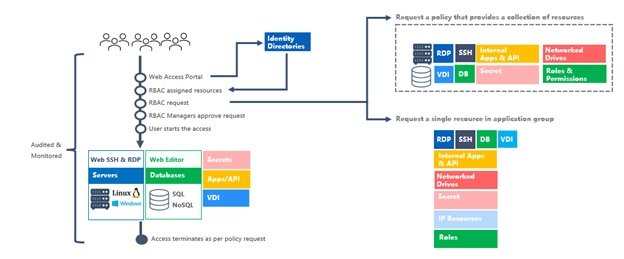
This process translates to increased productivity and enhanced security, which is what ISO 27001 is all about.
Closing Security Gaps
Without automation, managers ask IT admins to over-provision access to increase work productivity and avoid future workflow disruptions because of insufficient access. However, excessive access permissions also come with security risks. Employees who left the company may still have access to data that they can one-day use with malicious intentions. Forgotten, unused accounts (“zombie” accounts) that still have access can be quietly used by a cyber-criminal. Further, having multiple zombie accounts increases the attack surface and chances of cyberattack.
With an automated access control process, security gaps from over-provisioned access can be closed because access is now based on role and approval. Also, forgotten and unused accounts are automatically removed based on policy, thereby reducing the attack surface of cybercriminals.
Increasing IT Productivity
With automation, not only do you speed up the entire process of account creation to account termination, but you’re also saving valuable time for IT admins to perform their other essential duties.
Below is a table that shows how productivity can be increased when you can automate the process:
|
Process |
No |
Automated |
|
Account |
> 4 4 steps 1 role 4 systems |
< 1 1 step 1 role 1 system |
|
Provisioning |
> 4 3 steps 3 roles 4 systems |
Immediate 1 step 2 roles 1 system |
|
Validity |
Days 4 steps 2 roles 4 systems |
Automatic 0 step 0 role 1 system |
|
Access |
> 4 4 steps 1 role 4 systems |
< 30 1 step 1 role 1 system |
|
Time |
Days |
< 90 minutes |
Above: When provisioning access, multiple steps are required in multiple systems, such as granting access to network, servers, and databases. With Mamori.io, most of those steps are shortened to 1 step or completely automated.
The chart above illustrates an immense difference in time involved when you can automate the ISO 27001 access control process with Mamori.io. The number of steps is greatly reduced, and the number of people involved is minimized as well.
What is ISO 27001 A.9 access control and which businesses need it?
ISO 27001 A.9 is the access control section of the ISO 27001 security standard. It requires that employees, third parties, and systems can only access the information they need to perform their specific job duties, following the principle of least-privilege access. Industries most affected include healthcare (HIPAA), financial institutions (PCI DSS), government agencies, tech companies handling intellectual property, and any organization that works with external vendors or partners.
Why do most companies following ISO 27001 end up less secure than intended?
The root cause is that too much of the process falls on IT administrators. When accounts are created, managers typically request excess access upfront to avoid future workflow disruptions, which violates the least-privilege principle. Validating whether users have the right access then requires lengthy email back-and-forth, and when employees leave or change roles, their accounts are often forgotten rather than terminated. These over-provisioned permissions and abandoned accounts create exactly the security gaps ISO 27001 is designed to prevent.
What are zombie accounts and why are they a serious security risk?
Zombie accounts are unused or forgotten user accounts that still have active access to company systems, typically because offboarding was never completed when an employee left or changed roles. A cybercriminal who discovers a zombie account can use it to access sensitive data quietly, with no one noticing because the account was assumed inactive. Each zombie account also expands the attack surface, giving attackers an additional entry point into your network.
How much time does automating ISO 27001 access controls actually save?
Without automation, the full cycle of account creation, provisioning, access validation, and termination can take multiple days across four systems and several people. With an automated approach, the same cycle takes under 90 minutes: account creation drops from over 4 hours to under 1 hour, provisioning becomes immediate, access validity checks become fully automatic with zero manual steps, and access termination is reduced from over 4 hours to under 30 minutes.
How does Mamori.io automate ISO 27001 access controls?
Mamori.io reverses the traditional process: instead of IT admins over-provisioning access upfront, users request the specific resources they need and the admin or manager approves the request. Access automatically expires based on pre-set policies (time of day, day of week, or on-demand), and Active Directory accounts are terminated automatically when the contract expiration date is reached. This reduces the full access control cycle from days to under 90 minutes, with no email-based validation required.
Beyond Automating ISO 27001
Mamori.io is able to automate ISO 27001 because we are an all-in-one solution that integrates ZTNA, 2FA, DAM, PAM, SQL Firewall, and data privacy solutions into a simple, comprehensive, and easy-to-deploy solution. Automating and simplifying ISO 27001 access controls is just the tip of the iceberg of what Mamori.io can do.
With an all-in-one solution, Mamori.io can prevent ransomware by offering multiple layers of security – from the network, servers, and all the way down to the database. The same system can also help organizations comply with privacy regulations and reduce cyber insurance premiums.
For small businesses, Mamori.io has all the features to completely secure their data. For large businesses, Mamori.io covers security gaps, secures external vendor access, and provides access controls to the database.
Schedule a demo with Mamori.io or request your free trial. If you’re a small business with $10 million USD in gross revenue or less, you can use 20 free Mamori.io licenses.
The post How to Simplify and Automate ISO 27001 Access Controls appeared first on Zero Trust Data Security Blog – mamori.io.
*** This is a Security Bloggers Network syndicated blog from Zero Trust Data Security Blog - mamori.io authored by Victor Cheung. Read the original post at: https://www.mamori.io/blog/how-to-simplify-and-automate-iso-27001-access-controls
